3. MADYMO model setup
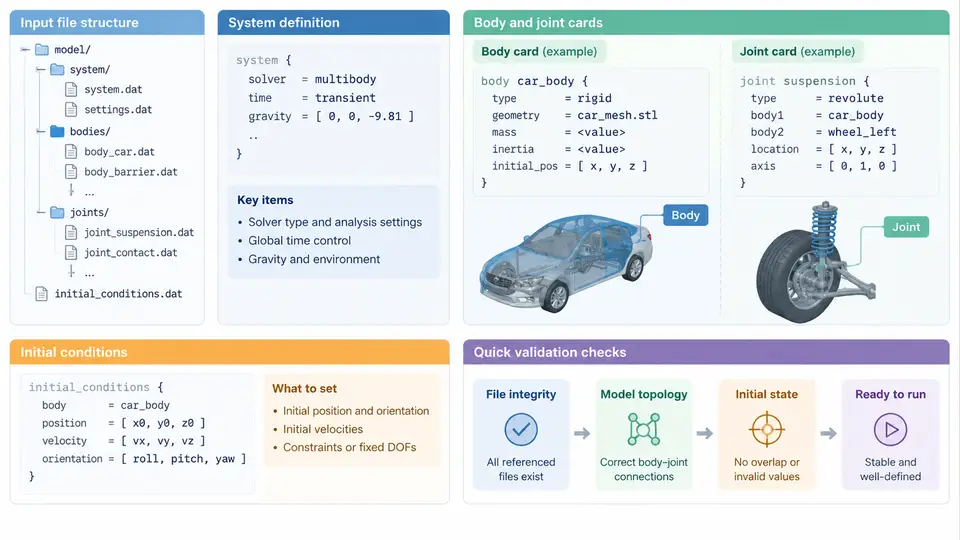
A MADYMO multibody model is not assembled through a graphical wizard; it is described by a structured text input deck that the solver parses sequentially. Understanding that deck is the prerequisite for every later activity in this course — debugging contact definitions, tuning restraint characteristics, or correlating a sled test. This section walks through the anatomy of a MADYMO input file, the way a system is declared, how rigid bodies and joints are connected into a kinematic tree, and how initial conditions are imposed before the first time step.
3.1 Anatomy of the Input File
A MADYMO input file is organized as a sequence of data blocks, each opened by a keyword and terminated by the next keyword. The parser is order-sensitive in one important respect: a body, joint, or restraint can only reference entities that have already been declared. The canonical ordering is therefore:
GENERAL— units, gravity, time step, simulation end time, output frequency.SYSTEMblocks — one per system; each system contains its own bodies, joints, and initial conditions.- Within a system:
BODY.RIGID/BODY.FEdeclarations, thenJOINTdeclarations, thenINITIAL.CONDITIONentries. - Optional
CONTACT,RESTRAINT,LOAD, andOUTPUTblocks.
A minimal but complete skeleton looks like this:
GENERAL
  GRAVITY    = 9.81
  TEND       = 0.150
  TIMESTEP   = 1.0E-5
  PENALTY    = 1.0E4
END

SYSTEM
  BODY.RIGID
    ID       = 1
    NAME     = "torso"
    MASS     = 32.0
    INERTIA  = 1.2, 1.4, 0.9
    POS      = 0.0, 0.0, 0.0
  END

  JOINT
    ID       = 1
    TYPE     = "FREE"
    BODY1    = 1
    BODY2    = 0
  END

  INITIAL.CONDITION
    BODY     = 1
    VEL      = 12.0, 0.0, 0.0
  END
END
Two conventions matter from the outset. First, MADYMO uses a right-handed Cartesian coordinate system; unless the model declares otherwise, x is forward, y is lateral (left positive), and z is vertical (up positive). Second, all translational quantities are expressed in metres and all rotational quantities in radians, so a velocity of 12.0 means 12 m/s, not 12 km/h. Mixing units is the single most common cause of a model that runs but produces nonsense.
3.2 System Definition
A SYSTEM is the top-level container for a kinematic tree. Every model has at least one system; a vehicle–occupant study typically has two or three (vehicle, occupant, and sometimes a separate restraint system). Systems are independent in the sense that each maintains its own tree, but they interact through contacts and prescribed motions.
Each system declares its own reference frame. If a system is attached to a moving base — for example, an occupant system mounted on a sled — the attachment is expressed through a SYSTEM.MOTION or a bracket joint rather than by rewriting every body position. Keeping the occupant in its own system and driving that system with the sled acceleration history is far easier to maintain than embedding the occupant directly in the vehicle tree.
3.3 Rigid Bodies
A BODY.RIGID card defines mass, inertia tensor, and geometry. The inertia tensor is given in the body-fixed principal frame; if the body is not symmetric, the off-diagonal products of inertia must be supplied as well. The POS field gives the initial position of the body's local origin in the parent frame, and ORI gives its initial orientation as a 3×3 direction-cosine matrix or as a sequence of Euler angles, depending on the ORI.TYPE setting.
Geometry is attached through ELLIPSOID, PLANE, or MULTIBODY sub-cards. Ellipsoids are the workhorse for occupant bodies because contact between two ellipsoids is cheap to evaluate and reasonably accurate for blunt body segments. A typical torso ellipsoid might be declared as:
ELLIPSOID
  ID       = 101
  RADIUS   = 0.18, 0.14, 0.22
  POS      = 0.0, 0.0, 0.0
END
The three radii correspond to the semi-axes along the body's local x, y, and z. Note that the ellipsoid centre is offset from the body origin by POS; getting this offset wrong shifts the contact surface without changing the mass properties, producing a model that looks correct in the pre-processor but contacts too early or too late.
3.4 Joints and the Kinematic Tree
Joints define how bodies move relative to one another. MADYMO supports FREE (six degrees of freedom), REVOLUTE, TRANSLATIONAL, SPHERICAL, UNIVERSAL, CYLINDRICAL, and FIXED joint types. Each joint card names a BODY1 (the child) and a BODY2 (the parent). A BODY2 of 0 denotes the ground or the system reference frame.
The collection of joints forms a tree, not a graph: every body except the root has exactly one parent. This constraint is what makes the multibody formulation efficient, and violating it — for example, closing a loop between two branches — requires an explicit constraint card rather than a second joint. When building an occupant model, the usual tree is pelvis → torso → neck → head, with the limbs branching from the torso. Each revolute joint carries a LOCATION (the hinge point in the parent frame) and an AXIS (the rotation axis in the parent frame).
JOINT
  ID       = 2
  TYPE     = "REVOLUTE"
  BODY1    = 2
  BODY2    = 1
  LOCATION = 0.0, 0.0, 0.25
  AXIS     = 0.0, 1.0, 0.0
END
This declares a hinge between the torso (body 1) and the neck (body 2) located 0.25 m above the torso origin, rotating about the lateral axis — that is, flexion and extension. The sign convention follows the right-hand rule about the stated axis, so a positive rotation about +y tilts the neck forward when x is forward and z is up.
3.5 Initial Conditions
Initial conditions are declared per body inside the system. The INITIAL.CONDITION card accepts POS, ORI, VEL, and ANG.VEL. These values override whatever was set on the body card, which is convenient but also a frequent source of confusion: if a body's position is declared twice, the initial-condition value wins, and the body card value is silently ignored.
For a frontal impact simulation, the occupant system is typically given an initial forward velocity equal to the vehicle's pre-impact speed, while the vehicle system is decelerated by a prescribed pulse. If the occupant is belted, the belt must be routed and pre-tensioned before the pulse begins; otherwise the occupant will "float" for the first few milliseconds and the belt will engage late. A practical check is to run the model for 5 ms with the pulse disabled and confirm that the occupant velocity remains constant and the belt forces are near zero.
TEND = 0.005 job with gravity enabled and no external load. The occupant should settle by a few millimetres, not metres. If it drops further, check that the joint locations and ellipsoid offsets are consistent with the intended geometry.
3.6 A Worked Setup Sequence
Consider a simplified 50th-percentile male occupant in a frontal sled test at 50 km/h (13.9 m/s). The setup proceeds as follows. First, declare GENERAL with GRAVITY = 9.81, TEND = 0.150, and TIMESTEP = 1.0E-5. Second, create the occupant system and declare the pelvis, torso, neck, and head as rigid bodies with masses of 32 kg, 28 kg, 1.2 kg, and 4.5 kg respectively. Third, connect them with a free joint at the pelvis and revolute joints at the torso–pelvis and neck–torso interfaces. Fourth, attach ellipsoids to each body with radii chosen to match the occupant's anthropometry. Fifth, set the initial velocity of every body to 13.9 m/s in the forward direction. Sixth, define the contact between the occupant and the vehicle interior. Seventh, apply the sled deceleration pulse to the vehicle system.
After the first run, inspect the output at t = 0. The pelvis should be at its declared position, the torso should be upright, and all velocities should equal 13.9 m/s. If the head shows a non-zero angular velocity at t = 0, a joint axis or location is misaligned. If the total kinetic energy does not match the sum of the individual body contributions, a mass or inertia value has been entered in the wrong units.
LOCATION lies inside the parent body's geometry. A hinge placed outside the torso will still function, but the resulting motion will be physically meaningless. Always cross-check joint locations against the body's ellipsoid extents.
3.7 Summary
The input file is the model. Its block structure enforces a declaration order that mirrors the kinematic tree: general settings, then systems, then bodies, then joints, then initial conditions. Rigid bodies carry mass, inertia, and geometry; joints define the degrees of freedom and the parent–child relationships; initial conditions set the state at t = 0. Getting these three layers consistent — units, coordinate conventions, and reference frames — is what separates a model that runs from a model that predicts. The next section builds on this foundation by introducing contact definitions and restraint systems, which are the mechanisms through which the occupant interacts with the vehicle environment.