3. MADYMO model setup for CRS simulation
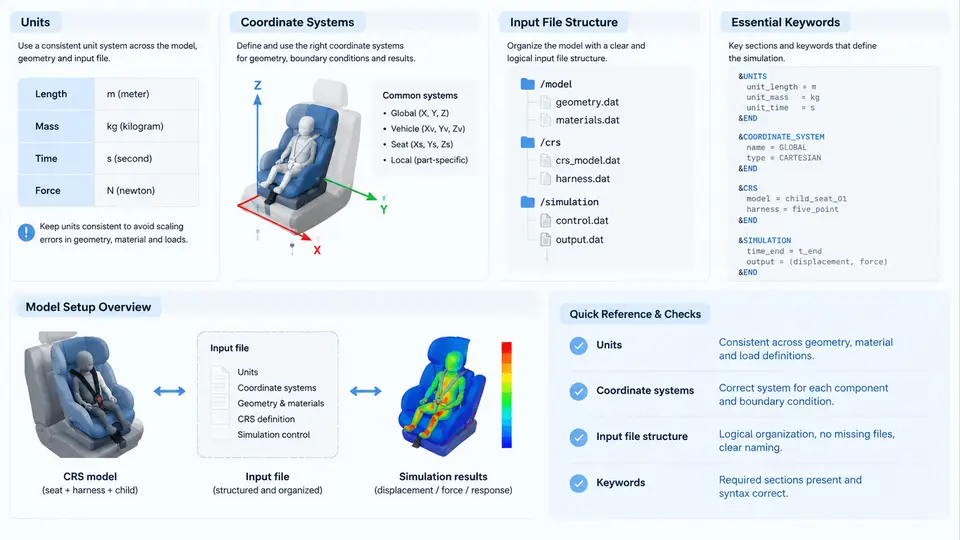
Before a single acceleration pulse is applied, a MADYMO child restraint system (CRS) model must be assembled from a consistent set of physical conventions and a correctly structured input deck. Most beginner errors in CRS simulation are not solver failures — they are setup failures: a millimetre-based geometry paired with a metre-based stiffness, a belt routed through the wrong side of the shell, or a keyword placed in the wrong data block. This section establishes the three foundations that prevent those errors: the unit system, the coordinate conventions, and the input file architecture with its essential keywords.
3.1 Unit Consistency: Choose Once, Convert Everything
MADYMO is unit-agnostic in the sense that it does not enforce a unit system, but it is strictly unit-consistent: every quantity must belong to the same coherent system. The two systems used in CRS practice are the SI system (m, kg, s, N, Pa) and the millimetre-tonne-second system (mm, t, s, N, MPa). The second is popular in occupant safety because shell thicknesses, belt widths, and foam dimensions are naturally expressed in millimetres.
The critical trap is derived units. In the mm–t–s system, density is not kg/m³ but t/mm³, and Young's modulus is in MPa, not Pa. A polypropylene shell with a density of 905 kg/m³ becomes 9.05 × 10⁻¹⁰ t/mm³. If you enter 905 directly, the shell will be roughly 10¹² times too heavy and the simulation will either diverge immediately or produce a rigid, non-deforming structure. Similarly, gravity must be entered as 9810 mm/s², not 9.81.
| Quantity | SI | mm–t–s | Typical CRS value |
|---|---|---|---|
| Length | m | mm | Shell thickness 3.0 mm |
| Mass | kg | t | CRS mass 4.5 kg = 4.5 × 10⁻³ t |
| Force | N | N | Belt peak force ~4000 N |
| Stress / modulus | Pa | MPa | PP modulus 1400 MPa |
| Density | kg/m³ | t/mm³ | PP 9.05 × 10⁻¹⁰ t/mm³ |
| Acceleration | m/s² | mm/s² | Gravity 9810 mm/s² |
| Time | s | s | Pulse duration 0.12 s |
3.2 Coordinate Systems and Sign Conventions
MADYMO uses a right-handed Cartesian system. For vehicle occupant simulation, the conventional orientation is: X forward along the vehicle longitudinal axis, Y to the left, and Z upward. Rotations follow the right-hand rule about each axis: roll about X, pitch about Y, yaw about Z.
Two coordinate frames matter in a CRS model. The global (inertial) frame is fixed to the vehicle body and carries the crash pulse. The local frame of each rigid body is attached to that body and moves with it. Every body's initial position and orientation is defined relative to its parent in the kinematic tree, so a small error in a parent's orientation propagates to all children.
Sign conventions must be fixed explicitly and held throughout. A forward-facing CRS is normally installed with its back against the vehicle seat back, so the child's chest faces +X. A rear-facing CRS is rotated 180° about Z, so the child's chest faces −X. The crash pulse is applied as a deceleration of the vehicle, which in the global frame is a negative X acceleration. If you instead apply a positive X pulse, the occupant will be thrown forward relative to the vehicle — the opposite of the physical event.
Belt routing depends on these conventions. A three-point belt approaches the CRS from the outboard side, passes through the belt routing guide, and crosses the child's chest from shoulder to opposite hip. In the local frame of a forward-facing CRS, the shoulder belt typically enters at +Y (left) and exits at −Y (right) for a left-hand-drive vehicle. Reversing this produces a belt that crosses the neck instead of the chest, which changes both the kinematics and the injury metrics.
3.3 Input File Structure
A MADYMO input deck is a sequence of data blocks, each introduced by a keyword and terminated by the next keyword. The order is not arbitrary: bodies must exist before they are referenced, and systems must be defined before they are coupled. The canonical order for a CRS model is:
GRAVITY— define the gravity vector and magnitude.MATERIAL/CHARACTERISTIC— define material models and their parameters.SYSTEMblocks — one per subsystem (vehicle, CRS, child, belt).BODYdefinitions inside each system — rigid bodies, their mass, inertia, and initial position.JOINTdefinitions — kinematic constraints between bodies.FE_MODEL— finite element meshes for deformable parts (shell, foam).BELT— belt segments, routing, and sliprings.CONTACT— contact definitions between bodies and FE models.ACCELERATION— the crash pulse applied to the vehicle system.TIME/CONTROL— simulation duration, time step, and output settings.
The SYSTEM block is the structural backbone. Each system contains its own bodies, joints, and FE models, and systems are connected through SYSTEM.MODEL references or through contacts. A typical CRS model has four systems: the vehicle (seat and floor), the CRS shell, the child dummy, and the belt. Keeping them separate makes it possible to swap the dummy model without touching the CRS geometry.
3.4 Essential Keywords in Practice
The following keywords appear in essentially every CRS deck and deserve explicit attention.
GRAVITY
  DIRECTION = 0.0, 0.0, -1.0
  MAGNITUDE = 9810.0        ! mm/s^2

MATERIAL
  ID = 1
  TYPE = ELASTIC_PLASTIC
  E = 1400.0                ! MPa
  NU = 0.35
  YIELD = 25.0              ! MPa

SYSTEM
  ID = 2
  NAME = 'CRS_SHELL'
  BODY
    ID = 1
    MASS = 4.5e-3           ! t
    INERTIA = 1.2e-5, 1.5e-5, 1.1e-5
    POSITION = 0.0, 0.0, 0.0
    ORIENTATION = 0.0, 0.0, 0.0
  END BODY
END SYSTEM

ACCELERATION
  SYSTEM = 1
  FUNC = 1
  DIRECTION = 1.0, 0.0, 0.0
  SCALE = -1.0              ! deceleration

TIME
  T_END = 0.12
  DT = 1.0e-6
  DT_OUT = 1.0e-4
Three details in this snippet are worth highlighting. First, SCALE = -1.0 on the acceleration keyword converts a positive-magnitude pulse function into a deceleration along +X, which is the physically correct direction for a frontal impact. Second, DT = 1.0e-6 is a starting time step; MADYMO will reduce it automatically if contact stiffness demands it, but starting too large causes an immediate divergence. Third, DT_OUT controls output frequency — 1.0e-4 s gives 1200 output frames over 0.12 s, which is sufficient for belt force and head excursion traces.
3.5 A Minimal Verification Before the Full Run
Before running the full crash pulse, run a 5 ms gravity-only simulation with the pulse disabled. The CRS should settle onto the seat with small, decaying oscillations, and the belt should tension to a steady value. If the shell sinks through the seat, the contact definition is missing or the contact stiffness is too low. If the belt goes slack, the initial belt routing or pretension is wrong. This short check isolates setup errors from solver errors and saves hours of debugging on the full model.
The diagram above ties the three foundations together: the global frame defines the pulse direction, the CRS local frame defines the child's orientation and belt routing, and the input deck order ensures that every referenced entity exists before it is used. Get these right, and the remaining modelling work — mesh quality, contact parameters, belt stiffness — becomes a matter of refinement rather than repair.