1. Introduction to MADYMO for child restrai
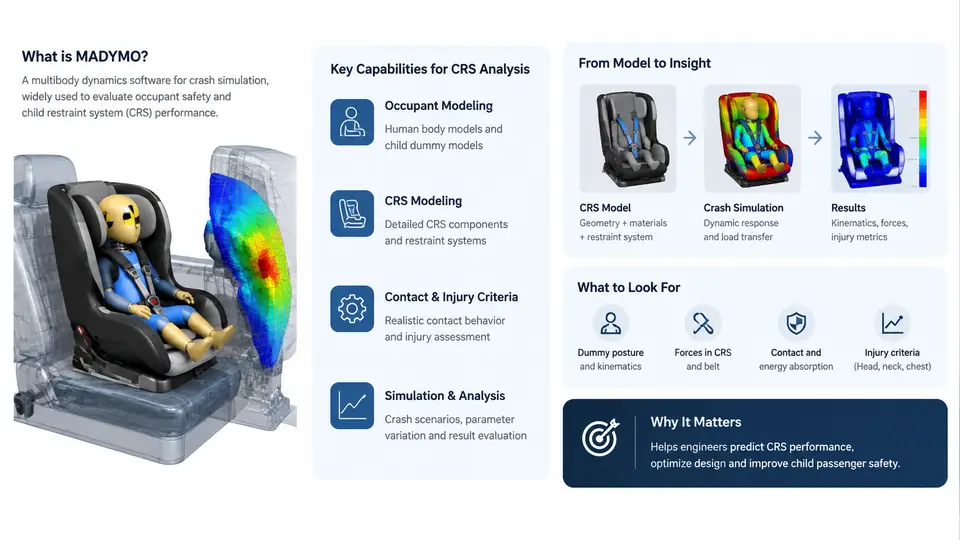
MADYMO (Mathematical Dynamic Model) is a multi-body and finite element (FE) solver developed by TASS International (now part of Siemens Digital Industries Software) for occupant safety simulation. In the context of child restraint systems (CRS), MADYMO is widely used to predict how an infant or child occupant interacts with a CRS, a vehicle seat, a seat belt, and the surrounding interior during frontal, side, and rear impact events. Its core strength lies in combining rigid multi-body dynamics for the occupant and restraint hardware with FE models for deformable components such as the CRS shell, padding, and vehicle trim. This hybrid approach allows engineers to capture both the gross kinematics of the child and the local deformation of energy-absorbing materials within a single simulation.
From a regulatory and consumer-testing perspective, MADYMO supports workflows aligned with UN ECE R44, UN ECE R129 (i-Size), FMVSS 213, and consumer programs such as Euro NCAP and C-NCAP. The software provides validated dummy models — including the Q-series (Q0, Q1, Q1.5, Q3, Q6, Q10) and the Hybrid III family — that are essential for assessing injury criteria such as HIC, chest deflection, and neck loads. For CRS analysis specifically, MADYMO enables the engineer to evaluate belt routing, ISOFIX/LATCH anchor loads, top-tether forces, head excursion, and the effectiveness of side-impact energy management.
Why MADYMO Is Suited to CRS Analysis
Child restraint simulation differs from adult occupant simulation in several important ways. The child is smaller and lighter, the CRS introduces an additional compliant interface between the child and the vehicle, and the restraint geometry (harness, buckle, adjuster) changes significantly with CRS type. MADYMO addresses these challenges through:
- Multi-body occupant models that represent the child dummy as a chain of rigid bodies connected by joints and contact interactions, allowing fast evaluation of kinematics.
- FE capability for the CRS shell, foam, and vehicle seat, capturing buckling, crushing, and energy absorption that rigid bodies cannot represent.
- Belt and harness modeling using belt segments, sliprings, and retractor elements to simulate webbing routing, friction, and pretensioner/load-limiter behavior.
- Contact algorithms that handle the many interacting surfaces in a CRS: child-to-harness, harness-to-shell, shell-to-vehicle seat, and CRS-to-vehicle interior.
- Prescribed and adaptive loading for sled pulse input, allowing the same model to be run against different crash pulses without rebuilding the model.
A typical MADYMO CRS model is organized into several subsystems: the vehicle environment (seat, floor, belt anchors, interior surfaces), the CRS (shell, base, harness, buckle, adjuster, ISOFIX connectors), and the occupant (dummy model with defined joints and contact ellipsoids). The simulation is driven by a prescribed acceleration pulse applied to the vehicle reference frame, and the solver computes the dynamic response of the occupant and restraint over the crash duration, typically 100–150 ms.
Key Capabilities Relevant to CRS Engineering
When setting up a CRS crash simulation, the engineer should understand which MADYMO capabilities map to which engineering questions. The table below summarizes the main capability areas and their typical use in CRS development.
| Capability | CRS Engineering Application |
|---|---|
| Multi-body dynamics | Child dummy kinematics, head excursion, harness routing |
| FE shell and solid elements | CRS shell deformation, foam crushing, side-wing energy absorption |
| Belt/harness elements | Webbing tension, slip at buckle, pretensioner and load limiter effects |
| Contact and friction | Child-to-harness, CRS-to-seat, CRS-to-door interaction |
| Prescribed motion | Sled pulse input for frontal, side, and rear impact |
| Output and injury criteria | HIC, chest deflection, neck force/moment, belt loads |
It is important to note that MADYMO is not a single monolithic model but a modeling environment. The engineer builds the model using XML-based input files (the .xml format in MADYMO 7.x and later, or the older .dat format), defines the system in a hierarchical structure, and runs the solver via the command line or the MADYMO Graphical User Interface (GUI). A minimal run command might look like:
madymo -i crs_frontal.xml -o crs_frontal_output.xmlAfter the run, results are inspected in the MADYMO post-processor (MADPost) or exported to a format compatible with third-party tools. The engineer checks time-history curves for head acceleration, chest deflection, and belt forces, and visualizes the animation to identify unrealistic penetrations, belt slip, or contact issues.
Modeling Workflow and Practical Considerations
A practical CRS simulation workflow in MADYMO typically follows these stages: define the vehicle environment and crash pulse, import or build the CRS geometry, position the dummy according to the test setup, define the harness and belt routing, set contact interactions and friction coefficients, run the simulation, and validate against sled test data. Validation is critical: a model that has not been correlated with physical test results should be treated as a trend tool rather than a predictive one.
Common pitfalls in CRS modeling include incorrect initial dummy positioning (which changes head excursion significantly), missing or overly stiff contact definitions, and belt segments that do not slide realistically through the buckle. These issues often manifest as non-physical spikes in acceleration curves or visible interpenetration in the animation. Troubleshooting usually involves checking the contact definitions, reviewing the belt routing, and comparing the model's initial state against the physical test setup.
The diagram above shows the three main subsystems — vehicle environment, CRS, and occupant — feeding into the MADYMO solver, which produces injury criteria and kinematic outputs. The dashed validation loop emphasizes that simulation results should be checked against physical sled tests before being used for design decisions.
What to Expect in the Following Chapters
This course builds from the fundamentals of MADYMO modeling to advanced CRS-specific techniques. You will learn how to construct a multi-body dummy model, define FE components for the CRS shell, set up belt and harness routing, apply crash pulses, and interpret injury criteria. Later chapters cover side-impact modeling, ISOFIX load transfer, parameter studies, and correlation with test data. The goal is to equip you with a working knowledge of MADYMO that can be applied directly to child restraint system development and optimization.