3. 发布-订阅基本通信
任务说明
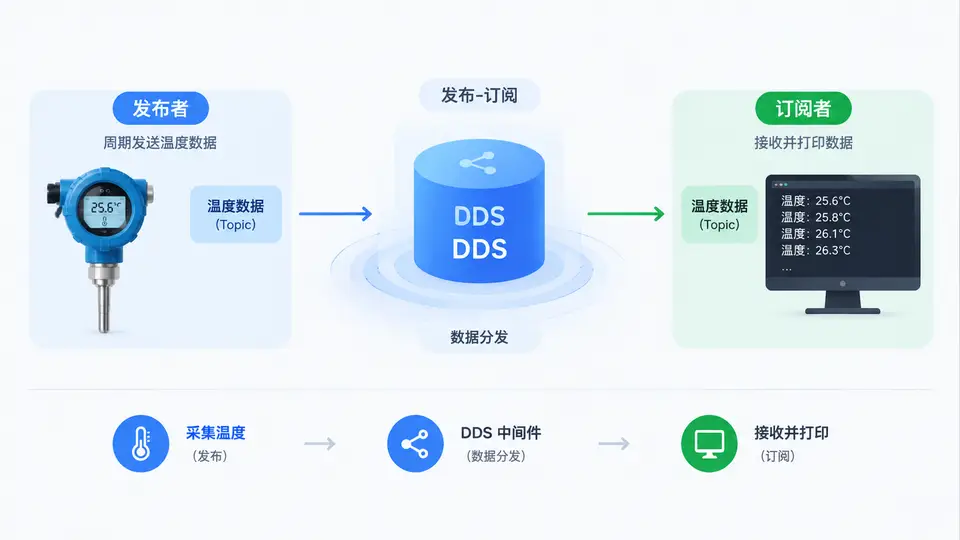
本案例实现DDS最基本的发布-订阅通信模式:一个发布者节点周期发送温度数据(float32),一个订阅者节点接收并打印收到的温度值。通过该案例验证DDS中间件的核心机制——数据以Topic为通道,在参与者之间自动路由分发。
环境依赖
使用Eclipse Cyclone DDS(C语言实现),需安装以下依赖:
- Cyclone DDS库(
libcyclonedds-dev) - C编译器(gcc)
- CMake(可选,用于构建)
IDL定义
定义温度数据类型和Topic。将以下内容保存为Temperature.idl:
module tutorial {
    struct Temperature {
        float value;  // 温度值(摄氏度)
    };
    #pragma keylist Temperature
};
发布者代码
保存为publisher.c。发布者每500ms发送一次温度数据,温度值从20.0开始递增0.5:
#include <stdio.h>
#include <stdlib.h>
#include <unistd.h>
#include "dds/dds.h"
#include "Temperature.h"

int main(void)
{
    dds_entity_t participant, topic, writer;
    tutorial_Temperature sample;
    uint32_t status = 0;
    int rc;

    /* 创建参与者(域ID=0) */
    participant = dds_create_participant(0, NULL, NULL);
    if (participant < 0) {
        printf("创建参与者失败: %s\n", dds_strerrno(participant));
        return 1;
    }

    /* 创建Topic */
    topic = dds_create_topic(participant, &tutorial_Temperature_desc,
                            "TempSensor", NULL, NULL);
    if (topic < 0) {
        printf("创建Topic失败: %s\n", dds_strerrno(topic));
        return 1;
    }

    /* 创建DataWriter */
    writer = dds_create_writer(participant, topic, NULL, NULL);
    if (writer < 0) {
        printf("创建Writer失败: %s\n", dds_strerrno(writer));
        return 1;
    }

    printf("发布者启动,开始发送温度数据...\n");
    float temp = 20.0f;
    for (int i = 0; i < 20; i++) {  /* 发送20次后自动退出 */
        sample.value = temp;
        rc = dds_write(writer, &sample);
        if (rc != DDS_RETCODE_OK) {
            printf("写入失败: %s\n", dds_strerrno(rc));
            break;
        }
        printf("已发送: %.1f°C\n", temp);
        temp += 0.5f;
        usleep(500000);  /* 500ms */
    }

    /* 清理资源 */
    dds_delete(participant);
    return 0;
}
订阅者代码
保存为subscriber.c。订阅者持续监听Topic,收到数据后打印温度值,收到20个样本后退出:
#include <stdio.h>
#include <stdlib.h>
#include "dds/dds.h"
#include "Temperature.h"

int main(void)
{
    dds_entity_t participant, topic, reader;
    tutorial_Temperature sample;
    void *samples[1];
    dds_sample_info_t infos[1];
    int count = 0;

    /* 创建参与者 */
    participant = dds_create_participant(0, NULL, NULL);
    if (participant < 0) {
        printf("创建参与者失败: %s\n", dds_strerrno(participant));
        return 1;
    }

    /* 创建Topic(名称必须与发布者一致) */
    topic = dds_create_topic(participant, &tutorial_Temperature_desc,
                            "TempSensor", NULL, NULL);
    if (topic < 0) {
        printf("创建Topic失败: %s\n", dds_strerrno(topic));
        return 1;
    }

    /* 创建DataReader */
    reader = dds_create_reader(participant, topic, NULL, NULL);
    if (reader < 0) {
        printf("创建Reader失败: %s\n", dds_strerrno(reader));
        return 1;
    }

    printf("订阅者启动,等待温度数据...\n");
    while (count < 20) {
        /* 阻塞等待数据,超时5秒 */
        dds_entity_t status = dds_read(reader, samples, infos, 1, 1, 5000);
        if (status > 0) {
            for (int i = 0; i < status; i++) {
                if (infos[i].valid_data) {
                    tutorial_Temperature *temp = (tutorial_Temperature *)samples[i];
                    printf("收到温度: %.1f°C\n", temp->value);
                    count++;
                }
            }
            dds_return_loan(reader, samples, status);
        } else if (status == DDS_RETCODE_TIMEOUT) {
            printf("等待超时,未收到数据\n");
            break;
        }
    }

    dds_delete(participant);
    return 0;
}
编译与运行
使用IDL编译器生成类型支持代码,然后编译两个程序:
# 生成类型支持代码(生成Temperature.h/.c等文件)
ddsc Temperature.idl

# 编译发布者
gcc -o publisher publisher.c Temperature.c -lddsc

# 编译订阅者
gcc -o subscriber subscriber.c Temperature.c -lddsc
运行(需先启动订阅者再启动发布者,或同时启动):
./subscriber &   # 终端1
./publisher      # 终端2
验证方法
满足以下条件即判定案例通过:
- 订阅者终端按约500ms间隔持续打印温度值,数值从20.0开始每次递增0.5,共收到20条数据
- 发布者终端打印的发送顺序与订阅者接收顺序一致
- 两个进程退出码均为0,无错误输出
预期输出(订阅者终端):
收到温度: 20.0°C
收到温度: 20.5°C
收到温度: 21.0°C
...
通信流程示意
发布者通过DataWriter将温度样本写入Topic,DDS中间件自动将数据路由到同一域内订阅该Topic的DataReader,无需双方直接建立连接。