1. 搭建第一个DDS域
任务目标
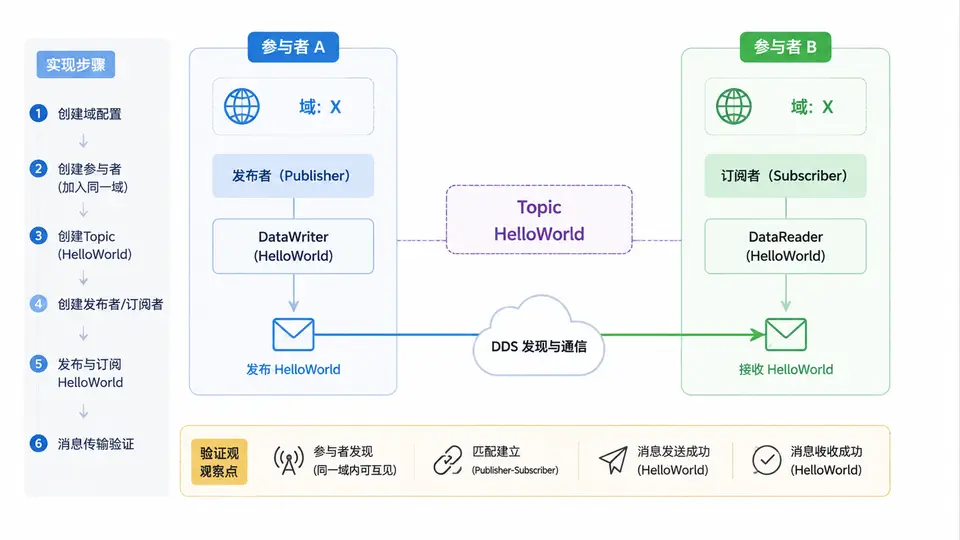
本案例将创建两个DDS参与者(Publisher与Subscriber),使它们加入同一域(Domain ID = 0),完成一条HelloWorld消息的发布与订阅。通过本案例,你将掌握DDS应用的最小可运行骨架:域参与者创建、Topic定义、Publisher/Subscriber创建、DataWriter/DataReader匹配以及数据收发。
环境与依赖
使用 Eclipse Cyclone DDS(C语言实现),安装方式:
sudo apt install cyclone-dds  # Ubuntu/Debian
# 或源码安装:https://github.com/eclipse-cyclonedds/cyclonedds
编译需链接 -lcyclonedds,并包含头文件 <dds/dds.h>。
完整实现代码
以下代码包含发布端与订阅端两个程序,通过命令行参数区分角色。使用内置的HelloWorldData类型(IDL预定义),避免额外类型生成步骤。
/* dds_helloworld.c */
#include <stdio.h>
#include <stdlib.h>
#include <string.h>
#include <dds/dds.h>
#include <HelloWorldData.h>

int main(int argc, char *argv[]) {
    if (argc < 2) {
        fprintf(stderr, "用法: %s [pub|sub]\n", argv[0]);
        return 1;
    }
    int is_pub = (strcmp(argv[1], "pub") == 0);

    dds_entity_t participant = dds_create_participant(0, NULL, NULL);
    if (participant < 0) { fprintf(stderr, "创建参与者失败: %s\n", dds_strerrno(participant)); return 1; }

    dds_entity_t topic = dds_create_topic(participant, &HelloWorldData_desc, "HelloWorld_Topic", NULL, NULL);
    if (topic < 0) { fprintf(stderr, "创建Topic失败: %s\n", dds_strerrno(topic)); return 1; }

    if (is_pub) {
        dds_entity_t pub = dds_create_publisher(participant, NULL, NULL);
        dds_entity_t writer = dds_create_writer(pub, topic, NULL, NULL);
        if (writer < 0) { fprintf(stderr, "创建Writer失败: %s\n", dds_strerrno(writer)); return 1; }

        HelloWorldData_Msg msg = { 0 };
        msg.userID = 1;
        snprintf(msg.message, 128, "Hello DDS World!");
        printf("发布消息: userID=%d, message=%s\n", msg.userID, msg.message);
        dds_return_t rc = dds_write(writer, &msg);
        if (rc != DDS_RETCODE_OK) { fprintf(stderr, "写入失败: %s\n", dds_strerrno(rc)); return 1; }
        printf("消息已发布,等待2秒后退出...\n");
        dds_sleepfor(DDS_MSECS(2000));
    } else {
        dds_entity_t sub = dds_create_subscriber(participant, NULL, NULL);
        dds_entity_t reader = dds_create_reader(sub, topic, NULL, NULL);
        if (reader < 0) { fprintf(stderr, "创建Reader失败: %s\n", dds_strerrno(reader)); return 1; }

        printf("等待消息(最多5秒)...\n");
        dds_entity_t waitset = dds_create_waitset(participant);
        dds_attach_trigger(waitset, reader, DDS_READ_STATE_ANY);
        dds_duration_t timeout = DDS_SECS(5);
        dds_entity_t triggered;
        dds_return_t rc = dds_waitset_wait(waitset, &triggered, 1, &timeout);
        if (rc == 0) { printf("超时未收到消息\n"); return 1; }

        HelloWorldData_Msg *msg = NULL;
        dds_sample_info_t info;
        rc = dds_take(reader, &msg, &info, 1, 1);
        if (rc > 0 && info.valid_data) {
            printf("收到消息: userID=%d, message=%s\n", msg->userID, msg->message);
            dds_return_t freerc = dds_return_loan(reader, (void **)&msg, 1);
            if (freerc != DDS_RETCODE_OK) fprintf(stderr, "释放内存失败: %s\n", dds_strerrno(freerc));
        } else {
            printf("未取到有效数据\n");
        }
    }

    dds_delete(participant);
    return 0;
}
编译与运行
编译(需先生成HelloWorldData类型头文件):
# 生成HelloWorldData类型(若系统未预装)
# 创建HelloWorldData.idl:
#   module HelloWorldData { struct Msg { long userID; string message; }; };
# 运行: idlc -l c HelloWorldData.idl

gcc -o dds_helloworld dds_helloworld.c -lcyclonedds -I.
运行(两个终端):
# 终端1(订阅端)
./dds_helloworld sub

# 终端2(发布端,稍后执行)
./dds_helloworld pub
验证方法与判定标准
按以下顺序验证:
- 先启动订阅端,显示“等待消息(最多5秒)...”
- 再启动发布端,显示“发布消息: userID=1, message=Hello DDS World!”
- 订阅端在5秒内收到消息并打印相同内容,即判定通过
预期输出(订阅端):收到消息: userID=1, message=Hello DDS World!
若订阅端超时未收到,请检查:
- 两端是否使用相同Domain ID(本案例均为0)
- Topic名称是否一致(均为
HelloWorld_Topic) - 网络防火墙是否阻止DDS默认端口(UDP 7400)
关键机制说明
两个参与者通过相同的Domain ID(0)自动发现彼此。Topic名称与数据类型必须完全匹配才能建立通信。发布端调用dds_write后,数据进入DDS全局数据空间;订阅端通过Waitset等待数据到达,再调用dds_take读取。本案例使用默认QoS(可靠传输、易失性),适用于同一网络内的简单通信。