3. 服务端口存活自动巡检与重启
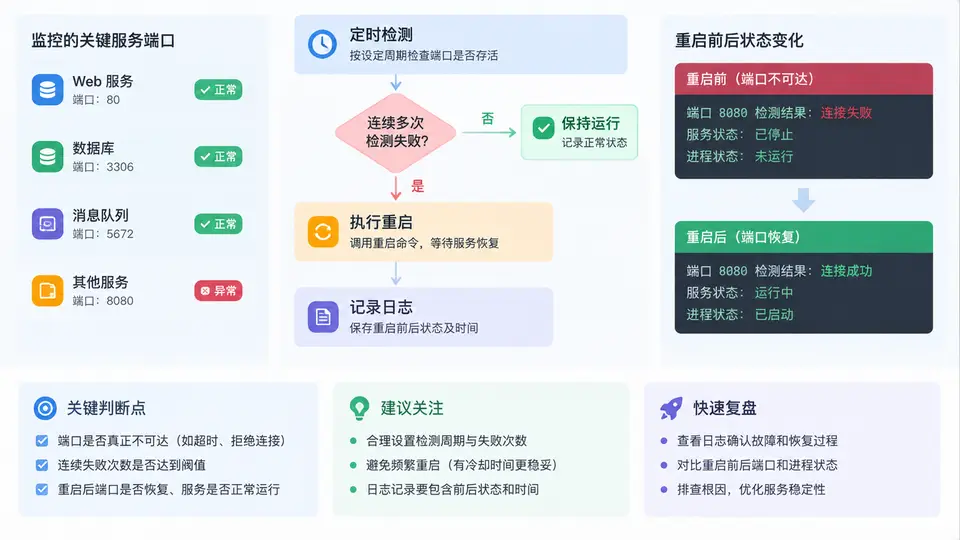
端口巡检脚本的核心结构
本案例要解决的是:对关键服务端口做定时存活检测,连续失败达到阈值后自动重启服务,并记录重启前后的状态。实现上分为四个对象:端口清单(服务名、端口、重启命令)、检测器(TCP 连接探测)、状态机(连续失败计数与阈值判断)、执行与记录(重启命令、前后状态快照)。
关键实现
下面脚本读取 services.conf,对每个服务端口做 TCP 探测,维护连续失败计数,达到阈值后执行重启并记录前后状态。依赖 Python 标准库,可直接运行。
#!/usr/bin/env python3
# port_watchdog.py
import socket, subprocess, time, json, os
from datetime import datetime

CONF = "services.conf"
LOG  = "restart.log"
CHECK_TIMEOUT = 2.0
POST_RESTART_WAIT = 5.0

def load_services(path):
    services = []
    with open(path) as f:
        for line in f:
            line = line.strip()
            if not line or line.startswith("#"):
                continue
            item = dict(kv.split("=", 1) for kv in line.split() if "=" in kv)
            services.append({
                "name": item["name"],
                "host": item.get("host", "127.0.0.1"),
                "port": int(item["port"]),
                "restart": item["restart"],
                "threshold": int(item.get("threshold", 3)),
            })
    return services

def check_port(host, port):
    start = time.time()
    try:
        with socket.create_connection((host, port), timeout=CHECK_TIMEOUT):
            return True, round((time.time() - start) * 1000, 1)
    except (socket.timeout, ConnectionRefusedError, OSError):
        return False, round((time.time() - start) * 1000, 1)

def snapshot(svc):
    alive, ms = check_port(svc["host"], svc["port"])
    return {
        "time": datetime.now().isoformat(timespec="seconds"),
        "alive": alive,
        "latency_ms": ms,
    }

def restart_service(svc):
    subprocess.run(svc["restart"], shell=True, check=False)

def log_event(record):
    with open(LOG, "a") as f:
        f.write(json.dumps(record, ensure_ascii=False) + "\n")

def main():
    services = load_services(CONF)
    fail_count = {s["name"]: 0 for s in services}

    while True:
        for svc in services:
            alive, ms = check_port(svc["host"], svc["port"])
            name = svc["name"]

            if alive:
                fail_count[name] = 0
                print(f"[OK]   {name}:{svc['port']} {ms}ms")
                continue

            fail_count[name] += 1
            print(f"[FAIL] {name}:{svc['port']} 连续失败 {fail_count[name]}/{svc['threshold']}")

            if fail_count[name] < svc["threshold"]:
                continue

            before = snapshot(svc)
            restart_service(svc)
            time.sleep(POST_RESTART_WAIT)
            after = snapshot(svc)

            record = {
                "service": name,
                "port": svc["port"],
                "fail_count": fail_count[name],
                "before": before,
                "after": after,
                "recovered": after["alive"],
            }
            log_event(record)
            print(f"[RESTART] {name} 恢复={after['alive']} 耗时={after['latency_ms']}ms")
            fail_count[name] = 0

        time.sleep(10)

if __name__ == "__main__":
    main()
配置文件与运行
# services.conf
name=order-api port=8081 restart=systemctl restart order-api threshold=3
name=pay-gateway port=9090 restart=systemctl restart pay-gateway threshold=3
name=redis-cache port=6379 restart=systemctl restart redis threshold=2
运行:python3 port_watchdog.py。脚本每 10 秒轮询一次,输出实时状态;触发重启时向 restart.log 追加一条 JSON 记录。
结果判读
| 日志字段 | 含义 | 正常值 |
|---|---|---|
| before.alive | 重启前端口是否存活 | false |
| after.alive | 重启后端口是否存活 | true |
| after.latency_ms | 重启后首次连接耗时 | < 200ms |
| recovered | 是否恢复成功 | true |
| fail_count | 触发时的连续失败次数 | = threshold |
阈值设置建议:核心服务 threshold=3,非核心服务可设 2。POST_RESTART_WAIT 需大于服务启动时间,否则复检会误判为未恢复。
重启命令使用 shell=True 时,配置文件中不要包含用户可控的拼接内容,避免命令注入。生产环境建议改用参数列表形式调用。