3. Slurm fundamentals for LS-DYNA users
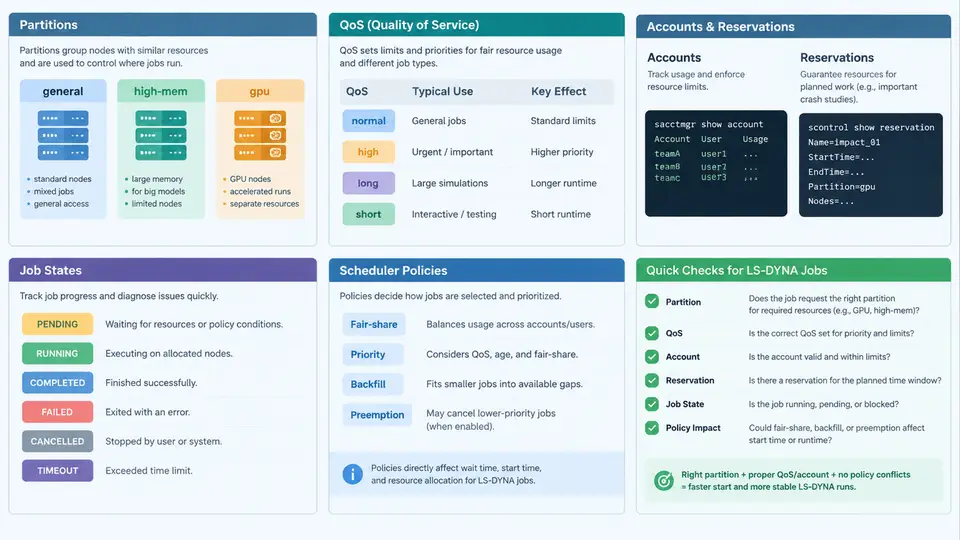
An LS-DYNA crash or impact model rarely fits the default queue. A full-vehicle frontal impact with 8–12 million elements, explicit time integration, and a 100–150 ms termination time may need 200–800 cores for several hours, while a small material calibration run finishes on 16 cores in minutes. Slurm exposes the controls that let you express these differences: partitions separate hardware pools, QoS and accounts govern priority and billing, reservations guarantee capacity for deadlines, and job states tell you whether a job is waiting on resources, priority, or a dependency. Understanding these objects is what separates "my job is pending and I don't know why" from a predictable production workflow.
Partitions: matching hardware to solver behavior
A partition is a named set of nodes with shared constraints. On a typical crash-analysis cluster you will see something like:
$ sinfo -o "%20P %5a %10l %6D %6t %N"
PARTITION            AVAIL  TIMELIMIT  NODES  STATE NODELIST
debug                   up    30:00      4    idle  cn[001-004]
short*                  up  1-00:00     32    mix   cn[005-036]
long                    up  7-00:00     48    alloc cn[037-084]
gpu                     up  2-00:00      8    idle  gn[001-008]
The * marks the default partition. For LS-DYNA, the practical mapping is: debug for deck syntax checks and single-element tests, short for subassembly and material calibration runs, long for full-vehicle models that exceed 24 hours, and gpu only if your LS-DYNA build supports the GPU-offload Run type. Node memory matters as much as core count — an implicit or MPP run with a large contact database can exceed 4 GB per rank, so check sinfo -o "%P %m %c" before requesting 64 ranks on a 128 GB node.
Accounts and QoS: priority, limits, and fairshare
Accounts group users for accounting and fairshare; QoS attaches limits and priority multipliers. A crash-analysis group might be configured as:
$ sacctmgr show assoc user=$USER format=Account,Partition,QOS,GrpTRES%30
   Account  Partition        QOS                  GrpTRES
   crash    short,long       normal               cpu=2000,mem=8T
   crash    debug            debug                cpu=64
   crash    long             urgent               cpu=4000
Two QoS values are worth knowing. normal carries the default priority and a per-user CPU cap; urgent raises priority but is usually time-boxed and audited, so reserve it for a delivery deadline. Fairshare decays usage over time: a user who consumed 50,000 CPU-hours last week will start this week at a lower priority factor than a colleague who ran nothing. You can inspect your own standing with sshare -U -l and see the effective priority of a pending job with sprio -j <jobid>.
Reservations: guaranteed capacity
When a crash test correlation must run on a fixed date, a reservation removes the scheduling uncertainty:
$ scontrol create reservationname=crash_corr start=2025-06-10T08:00 \
  duration=12:00 nodes=cn[037-052] users=jsmith accounts=crash
$ scontrol show reservation crash_corr
Inside the reservation window, only listed users and accounts can use those nodes. Submit with sbatch --reservation=crash_corr. Note that a reservation does not exempt you from QoS limits — if your job requests more CPUs than the QoS allows, it will still be rejected.
Job states: reading the scheduler's mind
The state field in squeue is the single most useful diagnostic. The table below maps the states you will actually encounter to their cause and the first action to take.
| State | Meaning | Typical cause for LS-DYNA | First action |
|---|---|---|---|
PD | Pending | Resources busy, priority, or QoS cap | squeue -j <id> -o "%.10i %.9P %.8Q %.10r" |
R | Running | — | Check slurmd -C on the node if slow |
CG | Completing | MPP ranks still draining | Wait; do not cancel prematurely |
OOM | Out of memory | Contact database or implicit solver exceeded RAM | Reduce ranks or request more memory |
TIMEOUT | Wall-clock limit | Model termination time too long | Restart from d3dump or move to long |
NODE_FAIL | Node failure | Hardware or network fault | Resubmit; check dmesg on the node |
The reason field is equally informative. Resources means the cluster is simply full; Priority means higher-priority jobs are ahead; QOSMaxCpuPerUserLimit means you have hit your own cap; AssocGrpCPUMinutesLimit means the account's allocation is exhausted. Each points to a different remedy, so always read the reason before resubmitting.
Scheduler policies that affect crash simulations
Three policies dominate day-to-day experience. Backfill lets a short job start in a gap if it will finish before the next large job's expected start — this is why a 30-minute material test can jump ahead of a 400-core full-vehicle run. Preemption, if enabled, may suspend or requeue your job when an urgent QoS job arrives; LS-DYNA jobs should therefore write restart dumps frequently (*DATABASE_BINARY_D3DUMP every 5–10 ms of simulation time) so a requeue does not lose hours of work. Fairshare decays usage, so batching many small jobs under one account can temporarily depress the whole group's priority.
Putting it together: a reproducible submission
Consider a 6-million-element side-impact model that must finish within 8 hours on 256 cores. The submission script encodes the decisions above:
#!/bin/bash
#SBATCH --job-name=side_impact
#SBATCH --partition=long
#SBATCH --account=crash
#SBATCH --qos=normal
#SBATCH --nodes=4
#SBATCH --ntasks-per-node=64
#SBATCH --mem=0
#SBATCH --time=08:00:00
#SBATCH --output=slurm-%j.out

module load ls-dyna/13.1.0-mpp
srun --mpi=pmi2 ls-dyna i=side_impact.k ncpu=256 memory=2000m
After submission, verify placement with squeue -j <jobid> -o "%.10i %.9P %.8Q %.6D %.4t %.10r". If the state is PD with reason Resources, the long partition is saturated; if reason is QOSMaxCpuPerUserLimit, you already have 2000 CPUs running under crash and must wait or negotiate a higher cap. Once running, monitor the LS-DYNA d3hsp file for the "estimated total memory" line and the messag file for negative-volume warnings — these are the earliest signs that the run will hit OOM or produce unreliable results.
d3dump every 5–10 ms of simulation time. If preemption requeues your job, srun can restart from the latest dump with i=side_impact.k r=d3dump01, losing only minutes instead of hours.--mem=0 on a partition where nodes have heterogeneous memory. Slurm will allocate the full node, but if the node has less RAM than your model needs, the job will be killed with OOM after the first contact initialization. Check sinfo -o "%N %m" first.With partitions, QoS, accounts, reservations, and job states understood, you can predict where a job will run, why it waits, and how to recover when it fails. The next step is translating an LS-DYNA model's core count and memory footprint into an accurate resource request — the subject of the following section.