1. Production computing context
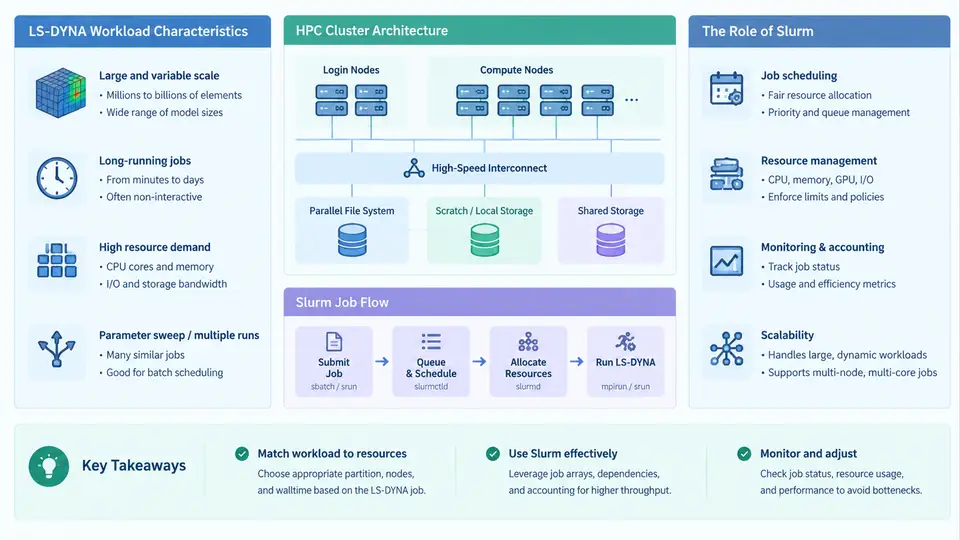
Crash simulation, drop testing, blast loading, and sheet-metal forming analysis all share a common computational signature: they are explicit dynamics problems dominated by short time steps, dense contact processing, and massive element counts. LS-DYNA is the reference solver for these problems, and running it in production means running it many times — design-of-experiments sweeps, parametric variants, model correlation runs, and regression suites. Understanding why LS-DYNA behaves the way it does on a cluster is the prerequisite for writing Slurm job scripts that actually use the hardware well.
What Makes LS-DYNA Different as a Workload
LS-DYNA's explicit central-difference time integration is conditionally stable. The stable time step is bounded by the smallest element in the mesh and the local sound speed:
Δt_crit ≈ L_min / c, c = sqrt(E / ρ)For a typical steel model with E ≈ 210 GPa and ρ ≈ 7.85e-9 t/mm³, the wave speed is roughly 5.2 mm/ms. A 1 mm element therefore forces a time step near 0.19 µs. Simulating 50 ms of physical time requires on the order of 260,000 cycles. This is why LS-DYNA jobs are measured in hours to days, and why a single slow rank can dominate wall-clock time: the solver synchronizes every cycle.
Three consequences follow directly for cluster operation:
- Scaling is sublinear and rank-count sensitive. Contact and element processing parallelize well, but communication and load imbalance grow with rank count. A model that runs 8× faster on 64 cores may only run 12× faster on 256 cores. Choosing rank count is an engineering decision, not a default.
- Memory is per-rank and often the binding constraint. Each MPI rank holds its own element and node partitions plus contact segments. A 20-million-element model may need 2–4 GB per rank; 128 ranks then require 256–512 GB on a single node, which may exceed node capacity and force multi-node decomposition.
- I/O is bursty and large.
d3plotstate files,binoutdatabases, and restart files can reach hundreds of gigabytes. Writing them to a shared parallel filesystem at full speed from hundreds of ranks can saturate the storage fabric and stall unrelated jobs.
HPC Cluster Architecture Relevant to the Solver
A production cluster presents LS-DYNA with a layered resource hierarchy. Compute nodes carry the cores and memory; a low-latency interconnect (InfiniBand HDR/NDR or equivalent) carries MPI traffic; a parallel filesystem (Lustre, GPFS, or similar) carries input decks and results; and a login or submission node carries the scheduler client. The scheduler — Slurm — is the only component that knows which of these resources are free at any moment.
Two hardware details matter repeatedly in practice. First, NUMA domains: a dual-socket node with 64 cores per socket has two memory domains, and an MPI rank that reads memory from the remote socket loses bandwidth. Binding ranks to cores within a socket, or using one rank per NUMA domain with OpenMP threads inside, usually beats naive rank placement. Second, interconnect topology: on a fat-tree or dragonfly network, ranks that communicate heavily should land on nearby switches. Slurm exposes both through --ntasks-per-node, --cpu-bind, and topology-aware placement.
Where Slurm Fits
Slurm performs four jobs in this workflow. It allocates a set of nodes and cores exclusively to a job; it launches the MPI ranks on exactly those resources via srun; it enforces limits on wall time, memory, and concurrent jobs through partitions and QOS; and it records accounting data (job ID, elapsed time, CPU-hours, exit state) that feeds chargeback and capacity planning. Without Slurm, a shared cluster degrades into contention: two engineers launching 256-rank jobs on the same nodes will oversubscribe memory and produce mutually corrupted runtimes.
From Model to Scheduled Job: A Concrete Example
Consider a full-vehicle frontal impact model: approximately 8 million solid and shell elements, 12 million nodes, a 0.7 ms initial time step, and a target of 120 ms simulated time. The engineering team wants three variants (baseline, thicker B-pillar, added reinforcement) and needs results within an overnight window.
Start by estimating cost. At 0.7 µs per cycle, 120 ms requires about 171,000 cycles. If a 128-rank run advances roughly 900 cycles per second (a plausible figure for this model size on a modern node), the run takes about 190 seconds of solver time per 1,000 cycles — roughly 5.3 hours. Three variants at 128 ranks each means 384 rank-slots concurrently, or sequential execution if the partition cannot supply that.
The Slurm submission script encodes these decisions:
#!/bin/bash
#SBATCH --job-name=fea_baseline
#SBATCH --partition=compute
#SBATCH --nodes=2
#SBATCH --ntasks-per-node=64
#SBATCH --cpus-per-task=1
#SBATCH --mem=0
#SBATCH --time=08:00:00
#SBATCH --output=slurm-%j.out
#SBATCH --error=slurm-%j.err

module load ls-dyna/12.1
module load intel-mpi/2021.9

export LSTC_LICENSE=network
export LSTC_LICENSE_SERVER=license.example.org

cd $SLURM_SUBMIT_DIR
srun --mpi=pmi2 --cpu-bind=cores \
  ls-dyna i=baseline.key ncpu=$SLURM_NTASKS memory=2000m \
  jobid=baseline
Several choices deserve comment. --mem=0 requests all memory on the allocated nodes, which is appropriate when the model's per-rank footprint is uncertain and the nodes are dedicated. --cpu-bind=cores pins each rank to a distinct physical core, preventing the scheduler from packing two ranks onto one core and halving effective throughput. ncpu=$SLURM_NTASKS passes the allocation size directly to the solver so the two never disagree — a mismatch here is one of the most common causes of a job that starts, runs slowly, and then dies with an MPI error.
Expected observable outputs are the Slurm stdout file, the LS-DYNA d3plot family, binout*, messag, and glstat. The messag file reports the actual time step and any mass-scaling warnings; glstat reports energy balance. A run whose total energy drifts upward without external work indicates hourglassing or contact instability, not a cluster problem — but the distinction only becomes visible if the job completed cleanly under Slurm.
Failure Modes and What They Tell You
Three symptoms recur in production. A job that is killed at the wall-time limit with no error usually means the estimate was wrong or the model has a shrinking time step; check messag for the reported dt trend. A job that exits immediately with a license error means the license server is unreachable from the compute node — verify with lmstat from inside an interactive allocation, not from the login node. A job that runs but produces d3plot files far smaller than expected often indicates ranks were oversubscribed or the decomposition failed; inspect the Slurm stderr for MPI rank-binding warnings.
The diagram above traces the same path the job takes: the model's size and time step determine the resource request, Slurm grants an allocation, srun places ranks on cores within NUMA domains, MPI traffic crosses the interconnect, and results land on the parallel filesystem. Every arrow is a place where a misconfiguration produces a recognizable symptom — and every symptom is diagnosable from the Slurm output files and LS-DYNA message files if you know what to look for.
Practical Takeaways for the Rest of This Course
Treat rank count, memory per rank, and wall-time limit as three coupled parameters that you tune together, not independently. Measure scaling on a reduced cycle count before committing to a long run. Keep the submission script in version control alongside the input deck so that any result can be traced back to the exact resource configuration that produced it. And read messag and glstat on every run — the cluster tells you when a job is healthy, and the solver tells you when the model is not.