3. HPC cluster architecture for CAE
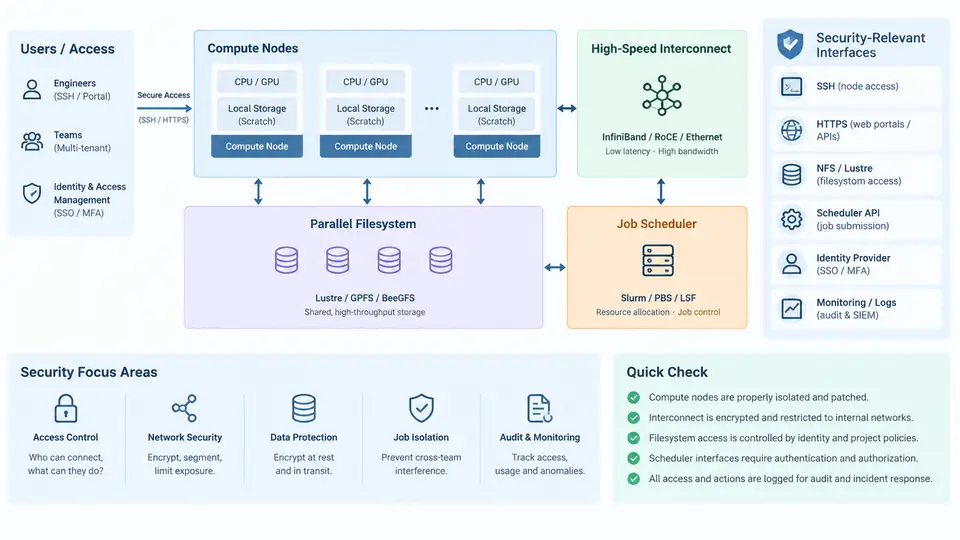
An HPC cluster used for automotive CAE is not a single machine but a layered system in which compute, network, storage, and scheduling each expose distinct interfaces that attackers or careless users can reach. Understanding the architecture is therefore a prerequisite for securing it. This section walks through the five core layers — compute nodes, high-speed interconnect, parallel filesystem, job scheduler, and the management plane that ties them together — and identifies, for each, the interfaces that matter from a security standpoint.
Compute Nodes
Compute nodes are the workers that run solver processes such as LS-DYNA, Abaqus/Explicit, Nastran, or OpenFOAM. A typical CAE node in a modern cluster carries two sockets of 32–64 cores each, 256–512 GB of DDR5 memory, local NVMe scratch, and one or two HDR InfiniBand or 100/200 GbE adapters. Nodes are usually diskless or stateless: they PXE-boot a provisioned image and mount the parallel filesystem over the fabric.
From a security perspective, the compute node is where the most valuable data lives in cleartext — crash models, CAD geometry, and simulation results. The relevant interfaces are:
- BMC/IPMI or Redfish on the service processor, reachable on the management VLAN. Default credentials, unauthenticated IPMI 2.0, and exposed KVM-over-IP are common weaknesses.
- SSH for interactive login and for the scheduler's remote execution (for example,
pdshor Slurm'sslurmd). - Node-local scratch (
/scratch,/tmp) which is shared between jobs if not cleaned between allocations. - Container runtime sockets such as
/var/run/docker.sockor/run/podman/podman.sock, which grant effective root if mounted into a job.
High-Speed Interconnect
CAE solvers are tightly coupled: an explicit crash simulation may exchange halo data every few microseconds across hundreds of ranks. The interconnect — typically InfiniBand HDR/NDR or RoCEv2 over 100/200 GbE — carries MPI traffic, storage traffic (NVMe-oF, Lustre LNet), and often management traffic if not separated.
Security-relevant properties of the fabric include:
- Partition keys (P_Keys) in InfiniBand segment the fabric into logical zones. A job that can join the wrong partition can inject or sniff MPI traffic.
- Subnet Manager (SM) controls routing and P_Key membership. Compromise of the SM allows traffic redirection.
- RoCEv2 relies on PFC/ECN for lossless behavior; misconfiguration causes congestion spreading, and VLAN separation is the primary isolation mechanism.
- IPoIB and management interfaces on the same physical ports blur the boundary between data and control planes.
Best practice is to run at least three logical fabrics: a management VLAN for BMC and provisioning, a high-speed data fabric for MPI and storage, and an optional out-of-band monitoring network. P_Key enforcement should be tied to job allocation so that a job only sees its own partition.
Parallel Filesystem
CAE workloads are I/O-heavy at job start (reading meshes and restart files) and job end (writing d3plot,odb, or field output). Parallel filesystems such as Lustre, GPFS/Spectrum Scale, or BeeGFS aggregate many OSTs or storage targets behind metadata and object servers. The security-relevant interfaces are:
- Client mounts on compute nodes, often with root-squash disabled for performance, which means a compromised node can act as root on the filesystem.
- Metadata servers (MDS) — a single point of trust; unauthorized access can enumerate or delete entire project trees.
- POSIX permissions and ACLs, which in multi-team environments must map to project boundaries, not just Unix groups.
- Quotas and OST pools, which are both a performance control and a denial-of-service boundary.
For multi-team platforms, the practical rule is: one project directory per team, owned by a project group, with ACLs that deny cross-team read. Lustre's default ACL on the project root propagates to new files, which prevents the common failure where a user creates a world-readable file inside a shared directory.
Job Scheduler
The scheduler — Slurm, PBS Pro, LSF, or Grid Engine — is the control plane of the cluster. It decides who runs what, where, and with which resources. Its interfaces are the most security-critical because they combine authentication, authorization, and remote execution.
- Submission interfaces:
sbatch,qsub, REST APIs (slurmrestd), and web portals. Each must authenticate the user and enforce project quotas. - Accounting database (SlurmDBD, PBS datastore): holds job history, project associations, and fairshare. It is a target for tampering with billing or priority.
- Compute daemon (
slurmd,pbs_mom): runs as root on nodes and accepts commands from the controller. Mutual authentication (Munge, TLS) is mandatory. - Pro/epilog scripts: run as root before and after jobs; a writable epilog is a privilege-escalation path.
A hardened Slurm deployment uses Munge for authentication, slurmdbd with TLS, per-project associations, and PrivateData=jobs so users cannot enumerate other teams' jobs. The scheduler should also enforce MaxNodes and MaxTime per association to limit the blast radius of a runaway job.
Management Plane and Provisioning
Above the four layers sits the management plane: PXE/TFTP, configuration management (Ansible, Salt), image repositories, monitoring (Prometheus, Grafana), and log aggregation. These interfaces are often the weakest link because they are assumed to be internal. A compromised provisioning server can reimage every node with a backdoored kernel; a compromised monitoring endpoint can leak job metadata.
Putting It Together: A Reference Topology
The diagram below shows a minimal but realistic multi-team CAE cluster. Note the separation of management, data, and storage fabrics, and the fact that the scheduler controller and the parallel filesystem MDS sit on the management side while compute nodes straddle both.
Practical Hardening Checklist
The following table summarizes the interfaces that most often need attention during a security review of a CAE cluster. It is intended as a working checklist, not an exhaustive audit framework.
| Layer | Interface | Typical Risk | Mitigation |
|---|---|---|---|
| Compute node | BMC / Redfish | Default creds, exposed KVM | Mgmt VLAN, unique passwords, disable IPMI 1.5 |
| Compute node | Container socket | Privilege escalation | Rootless Podman, no socket mount in jobs |
| Interconnect | P_Key membership | Cross-job traffic injection | Bind P_Key to job allocation |
| Filesystem | Client mount | Root on storage | Enable root-squash, per-project ACLs |
| Scheduler | slurmd / pbs_mom | Unauthenticated remote exec | Munge or TLS, restrict ports to controller |
| Scheduler | Epilog scripts | Root code execution | Root-owned, non-writable, signed |
| Management | PXE / TFTP | Node reimaging | Signed images, isolated provisioning VLAN |
What to Verify After Deployment
Once the cluster is built, a short verification pass catches most misconfigurations. From a login node, confirm that a job cannot see another team's P_Key by running ibv_devinfo -v inside an allocation and checking the reported partition. On a compute node, verify that mount | grep lustre shows the expected client options and that touch /mnt/lustre/teamB/test fails for a teamA user. On the scheduler, run scontrol show config | grep PrivateData and confirm it is set to jobs. Finally, from an external host, attempt to reach the BMC port and confirm it is filtered. These four checks — fabric isolation, filesystem ACLs, scheduler privacy, and BMC exposure — cover the majority of real-world incidents in multi-team CAE environments.