3. MADYMO installation and licensing on Lin
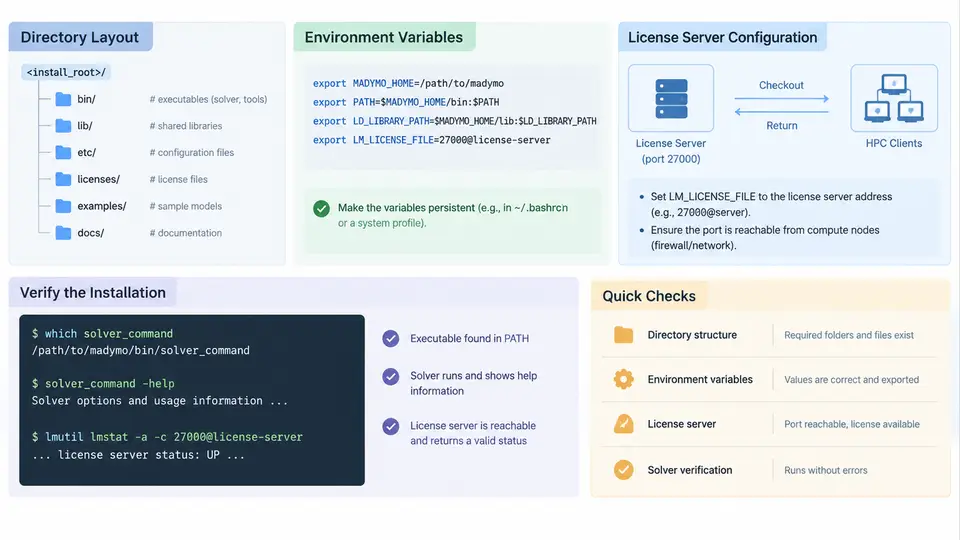
A production MADYMO deployment on an HPC cluster is not simply an unpacked tarball. It is a controlled filesystem layout, a deterministic environment, a reachable license service, and a solver binary that has been proven to run a real deck. This section walks through each of those four layers in the order you would actually build them, using a representative installation root of /opt/madymo and a representative version tag of 2023.1. Substitute your own paths and version strings, but keep the structure.
Directory layout: separate the immutable from the mutable
The single most common operational mistake is installing the solver into a user home directory or into a shared scratch filesystem. Both break under load: home directories are often NFS-mounted with small quotas and slow metadata operations, and scratch is periodically purged. A production layout should place the read-only installation on a stable, cluster-wide mounted path, and keep all writable state elsewhere.
A workable convention is to split the tree into four top-level directories under a versioned root:
| Path | Purpose | Writable? |
|---|---|---|
/opt/madymo/2023.1/ | Versioned installation root; the unit you upgrade or roll back | No |
/opt/madymo/2023.1/bin/ | Solver executables such as madymo, plus wrapper scripts | No |
/opt/madymo/2023.1/lib/ | Shared objects, runtime libraries, and any bundled third-party dependencies | No |
/opt/madymo/2023.1/share/ | Documentation, example decks, and reference material | No |
/opt/madymo/current | Symlink to the active version, so environments never hard-code a version | No |
/var/madymo/license/ | License server state, logs, and the license file on the license host | Yes (license host only) |
$HOME/.madymo/ | Per-user preferences and local scratch for small runs | Yes (per user) |
The current symlink is what makes upgrades safe. When you deploy 2023.2, you unpack it alongside 2023.1, verify it, and only then repoint the symlink. Rolling back is a single ln -sfn command. Never let job scripts reference a concrete version number directly; they should reference /opt/madymo/current.
Ownership matters too. The installation tree should be owned by a service account such as madymo or by root, with group read and execute permissions for the cluster user group. A typical hardening step is:
chown -R root:madymo /opt/madymo/2023.1
chmod -R 755 /opt/madymo/2023.1
chmod -R 750 /var/madymo/license
This prevents ordinary users from modifying binaries while still allowing them to execute the solver and read the examples.
Environment variables: the minimum viable set
MADYMO needs to find its own binaries, its shared libraries, and its license configuration. On a cluster, the cleanest approach is a module file rather than a hand-edited .bashrc, because modules are reproducible and can be loaded per job. The essential variables are:
MADYMO_ROOT— the installation root, e.g./opt/madymo/current. Many wrapper scripts and example makefiles reference this.PATH— must include$MADYMO_ROOT/binso thatmadymoresolves without an absolute path.LD_LIBRARY_PATH— must include$MADYMO_ROOT/libso the dynamic loader finds bundled shared objects. On some builds this is unnecessary if the binaries carry anRPATH, but you should verify rather than assume.LM_LICENSE_FILEorMADYMO_LICENSE_FILE— points to the license server, discussed below.
A minimal module file might look like this:
#%Module1.0
proc ModulesHelp { } {
    puts stderr "MADYMO 2023.1 solver environment"
}
set root /opt/madymo/2023.1
prepend-path PATH            $root/bin
prepend-path LD_LIBRARY_PATH $root/lib
setenv MADYMO_ROOT           $root
setenv MADYMO_LICENSE_FILE   27000@licsrv01.cluster.local
Two details are worth emphasizing. First, use prepend-path rather than setenv PATH, so that the module composes with the rest of the environment instead of clobbering it. Second, the license variable should be set here, not in a user's shell profile, so that batch jobs inherit it automatically.
--export=NONE), add module load madymo/2023.1 to the job script itself. Do not rely on the submitting shell's environment reaching the compute node.
License server configuration
MADYMO uses FlexNet-style floating licensing. One host on the cluster acts as the license server; compute nodes and login nodes are clients. The server runs a vendor daemon and a license manager daemon, both reading a license file supplied by the vendor.
On the license host, place the license file at a stable path such as /var/madymo/license/madymo.lic. The file contains a SERVER line binding the license to a hostname and a MAC address, a VENDOR line naming the vendor daemon and its port, and one or more INCREMENT or FEATURE lines describing the licensed capabilities and seat counts. A representative structure is:
SERVER licsrv01.cluster.local 001122334455 27000
VENDOR madymo /var/madymo/license/madymo_d
USE_SERVER
INCREMENT madymo_solver madymo 2023.1 31-dec-2025 20 \
    VENDOR_STRING=HPC DUP_GROUP=UHD ISSUED=01-jan-2024 \
    SN=EXAMPLE-0001 SIGN="..."
The SERVER line's MAC address must match the license host's actual interface. If the host has multiple NICs, or if the cluster uses bonded interfaces, this is the first thing to check when the daemon refuses to start. The port after the MAC address is the license manager port; clients connect to it, and it must be reachable through any firewall between compute nodes and the license host.
Start the daemons with the vendor's lmgrd binary, pointing at the license file and a log:
/opt/madymo/current/bin/lmgrd -c /var/madymo/license/madymo.lic \
    -l /var/madymo/license/lmgrd.log
For production, wrap this in a systemd unit so the daemon restarts after a reboot. The unit should run as the madymo service account, not as root, and should depend on the network being online.
On the client side, the only configuration needed is the license variable already set by the module. Clients do not need a copy of the license file; they query the server. If your site requires it, LM_LICENSE_FILE can carry a port-and-host pair such as 27000@licsrv01.cluster.local, which is exactly what the module sets.
Verifying a working solver installation
Installation is not complete until the solver has run a real deck and produced a result you can inspect. The verification sequence below moves from cheap checks to a full solve, so that failures are localized quickly.
- Binary resolves and reports a version. Run
madymo -version(or the equivalent flag for your build) after loading the module. A missing shared library will surface here as a loader error, which tells youLD_LIBRARY_PATHorRPATHis wrong. - License checkout succeeds. Run a trivial invocation that forces a license checkout, such as
madymo -helpif your build checks out on startup, or a minimal deck. A license failure typically prints a FlexNet error code;-15means cannot connect to the license server,-21means the feature is not present in the license file, and-5means no seats are available. - A reference deck solves. Use one of the example decks shipped under
$MADYMO_ROOT/share/examples. Run it in a scratch directory, not in the installation tree. - Output is inspectable. Confirm that the expected result files were written and that the solver's end-of-run summary reports normal termination.
A concrete verification run looks like this:
module load madymo/2023.1
mkdir -p /scratch/$USER/madymo_check && cd /scratch/$USER/madymo_check
cp $MADYMO_ROOT/share/examples/airbag/airbag_basic.xml .
madymo -i airbag_basic.xml -o airbag_basic.out 2>&1 | tee run.log
ls -l airbag_basic.out
grep -i "normal termination" run.log
The observable success criteria are: the process exits with status 0, run.log contains a normal-termination message, and the output file is non-empty and contains the expected result blocks. If the solver exits non-zero but the log shows a license error, the problem is licensing, not the installation. If the log shows a missing library or an unresolved symbol, the problem is the environment. If the solver starts, checks out a license, and then fails inside the model, the installation is fine and the issue is in the deck.
For a cluster-wide rollout, run this same check once on a login node and once inside a batch job on a compute node. The two environments can differ in mounted filesystems, module availability, and network reachability to the license server, and a solver that works interactively but fails in batch is almost always an environment or license-reachability problem rather than a binary problem.
The four layers are interdependent, and the verification chain is ordered so that each stage isolates one of them. A solver that resolves but cannot check out a license points at the server or the environment variable; a solver that checks out a license but fails on a reference deck points at the installation or the deck itself. Working through the chain in order turns a vague "MADYMO does not run" report into a specific, actionable diagnosis.