1. MADYMO in production simulation
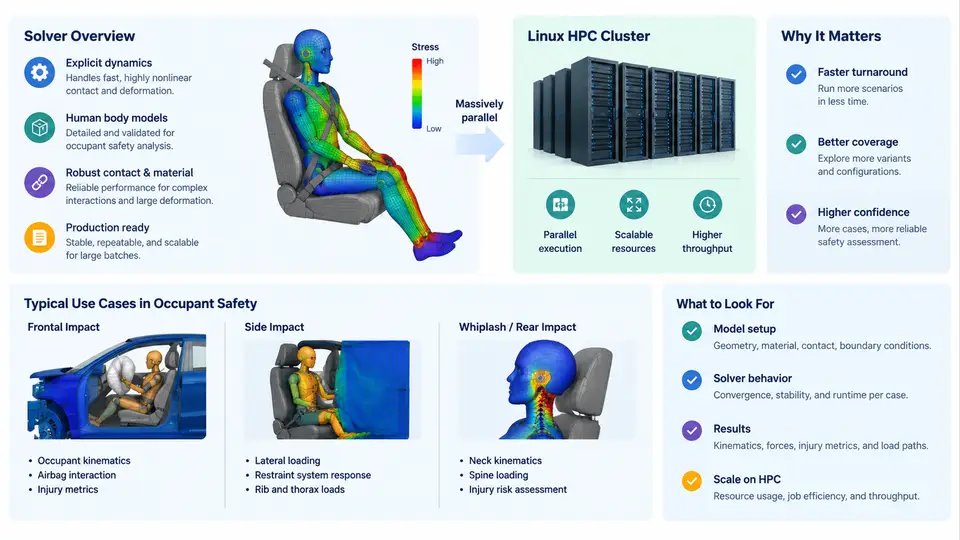
MADYMO (Mathematical Dynamic Model) is a multi-body and finite element solver developed by TASS International (now part of Siemens) for the simulation of occupant safety, vehicle crashworthiness, and restraint system performance. In production environments, MADYMO is not used as a single-run analysis tool but as a high-throughput simulation engine that must deliver hundreds or thousands of design variants within tight program timelines. Understanding what the solver does, where it fits in the occupant safety workflow, and why Linux HPC clusters are the standard execution platform is essential before configuring, scripting, or optimizing any production pipeline.
The MADYMO Solver: Core Capabilities
MADYMO combines two complementary formulations in a single solver:
- Multi-body (MB) dynamics — rigid bodies connected by kinematic joints and force elements. This formulation is computationally cheap and is used for restraint system concept studies, dummy positioning, and airbag deployment kinematics where the dominant physics is rigid-body motion and lumped compliance.
- Finite element (FE) analysis — deformable structures, airbag fabrics, seat belts, and contact interactions. FE models capture local deformation, stress distribution, and material nonlinearity that multi-body models cannot represent.
Most production occupant safety models are coupled MB-FE models: the dummy is represented as a multi-body chain (or a hybrid dummy with FE components), the airbag is an FE membrane, and the seat and instrument panel may be rigid or deformable depending on the fidelity required. The solver advances the coupled system in time using an explicit integration scheme, with a typical stable time step in the range of 0.5–2 µs for FE-dominated models and larger steps for MB-dominated models.
A production MADYMO run is defined by a single input deck (the .xml file in MADYMO 7.x and later, or the legacy .dat format) that specifies:
- Model definition: bodies, joints, FE meshes, materials, contacts.
- Initial conditions: dummy position, belt routing, airbag folding state.
- Boundary conditions: sled pulse (acceleration vs. time), prescribed velocities, fixed nodes.
- Output requests: time-history channels (head acceleration, chest deflection, femur force), animation files, and injury criteria.
- Solver controls: time step, termination time, contact thickness, hourglass control.
The solver writes time-history output (typically .th or .csv files) and animation output (typically .kn3 or .inc files) that are post-processed in tools such as MADYMO's own madymo post-processor, MADPost, or third-party CAE environments.
Typical Production Use Cases in Occupant Safety
In a vehicle development program, MADYMO production runs cluster around several recurring analysis types:
| Use Case | Typical Model Type | Key Output | Run Time (single core, indicative) |
|---|---|---|---|
| Frontal impact — driver occupant | Coupled MB-FE, 50th percentile male | HIC, chest deflection, femur load | 10–40 min |
| Side impact — far-side occupant | MB with FE airbag and door trim | Head excursion, pelvis acceleration | 15–60 min |
| Out-of-position (OOP) airbag deployment | FE airbag + MB dummy, close proximity | Head/neck injury metrics vs. time | 30–120 min |
| Restraint system parameter sweep | MB or coupled, 20–200 variants | Injury criteria across parameter space | 5–20 min per variant |
| Seat belt geometry optimization | MB with FE belt | Belt force, chest compression | 10–30 min per design |
These run times are indicative for a single core on a modern x86-64 processor. In practice, a production program may require 500–5,000 individual MADYMO runs across a vehicle program, driven by design-of-experiments (DOE) studies, robustness assessments, and regulatory load cases. The aggregate compute demand is what makes HPC cluster execution not merely convenient but mandatory.
Why Linux HPC Clusters
MADYMO is a CPU-bound, memory-intensive solver. A typical coupled MB-FE model may require 2–16 GB of RAM and scale to 4–32 cores depending on the FE mesh size and contact complexity. Linux HPC clusters provide three properties that production simulation depends on:
- Parallel throughput — job schedulers (Slurm, PBS Pro, LSF) distribute hundreds of independent MADYMO runs across hundreds of nodes, reducing a DOE study from days to hours.
- Consistent, scriptable environment — Linux provides a stable shell, module system, and filesystem semantics that allow MADYMO to be invoked identically from a login node, a batch script, or an automated pipeline.
- Scalable shared storage — Lustre, GPFS, or NFS-mounted project directories allow input decks, restart files, and output to be shared across compute nodes without manual data movement.
The standard production pattern is a job array: a single submission script that launches N independent MADYMO runs, each with a different parameter set, all reading from a common model directory and writing to per-variant output directories. The scheduler handles node allocation, and the user monitors completion through the scheduler's job accounting and the presence of expected output files.
#!/bin/bash
#SBATCH --job-name=madymo_sweep
#SBATCH --array=1-200
#SBATCH --ntasks=8
#SBATCH --mem=16G
#SBATCH --time=02:00:00
#SBATCH --output=logs/sweep_%A_%a.out

module load madymo/2023.1
cd $SLURM_SUBMIT_DIR/cases/case_${SLURM_ARRAY_TASK_ID}
madymo -i model.xml -o output/ -nthreads 8
In this example, 200 independent MADYMO runs are launched as a single job array. Each task runs on 8 cores with 16 GB of memory. The scheduler queues tasks as resources become available, and the user collects results from the per-case output directories. This pattern is the backbone of production occupant safety simulation on Linux HPC clusters.
From Single Run to Production Throughput
The transition from a single MADYMO run to a production simulation capability involves three concerns that are independent of the solver physics:
- Input parameterization — the model must be templated so that design variables (belt anchor positions, airbag vent size, seat stiffness) can be substituted programmatically. This is typically done with a scripting layer (Python, Perl, or shell) that reads a parameter table and generates per-variant input decks.
- Job orchestration — the scheduler must be configured with appropriate queue limits, wall-clock limits, and memory limits. MADYMO jobs that exceed memory limits are killed by the scheduler, producing incomplete output; jobs that exceed wall-clock limits are terminated mid-simulation.
- Result aggregation — after all runs complete, time-history outputs must be parsed, injury criteria computed, and results tabulated for engineering review. This is often the most error-prone step because output formats vary between MADYMO versions and model configurations.
The diagram below summarizes the production simulation chain from model definition through HPC execution to engineering decision.
What This Means for Production Practice
Three practical implications follow from the structure above:
- Model quality dominates total cost. A model that is numerically unstable or that requires manual intervention per run cannot be scaled to a 500-case DOE. Production readiness means the model runs to completion unattended, with deterministic output paths and no interactive prompts.
- Scheduler configuration is part of the simulation setup. Memory limits, wall-clock limits, and core counts must be matched to the model. A 16 GB model submitted with an 8 GB memory limit will be killed; a 30-minute model submitted with a 15-minute wall-clock limit will be terminated before it writes final output.
- Output parsing must be automated. Manual extraction of HIC or chest deflection from hundreds of runs is not viable. A production pipeline includes a parser that reads the solver's time-history output, computes the required injury criteria, and writes a consolidated results table.
The remainder of this course builds on this foundation: configuring MADYMO for Linux HPC environments, writing robust submission scripts, managing shared storage, monitoring job arrays, and troubleshooting the failure modes that appear only at production scale.