3. Baseline performance profiling
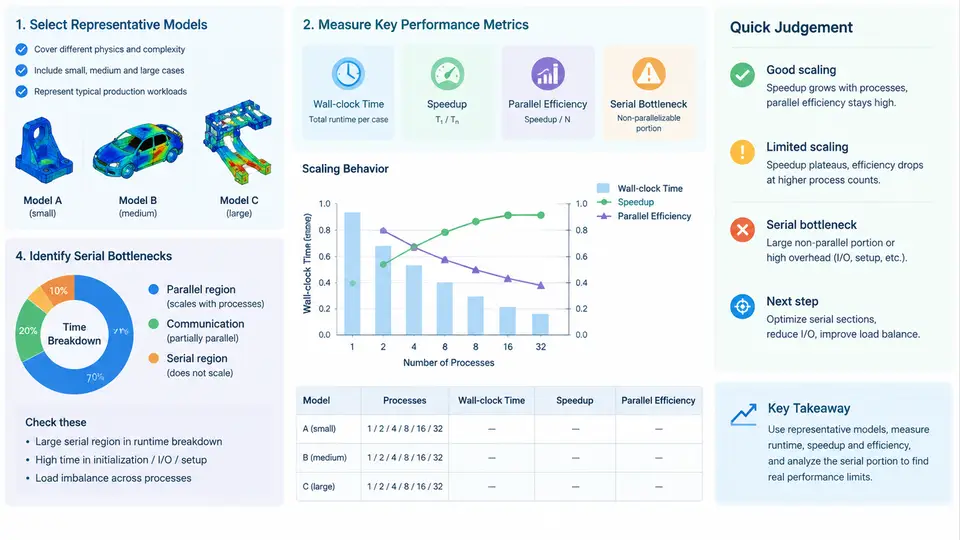
Before any tuning effort can be justified, you need a trustworthy baseline. A baseline is not simply "the runtime we got last time"; it is a documented, reproducible measurement of a representative model on a defined hardware and software configuration, expressed in metrics that let you compare future changes fairly. This chapter covers how to select representative models, how to measure wall-clock time correctly, how to compute speedup and parallel efficiency, and how to locate the serial portions that cap your scalability.
Selecting Representative Models
A single model rarely represents a whole workload. Choose a small set (typically three to five) that spans the dimensions that actually affect LS-DYNA scaling:
- Element formulation and count. A shell-dominated crash model scales differently from a solid-element impact model because of differing contact and element processing costs.
- Contact intensity. Models with large, persistent contact surfaces (e.g.,
*CONTACT_AUTOMATIC_SURFACE_TO_SURFACE) stress the contact search and force-assembly paths far more than models with limited contact. - Material complexity. A model using
*MAT_JOHNSON_COOKwith damage and a model using*MAT_PLASTIC_KINEMATIChave different per-element cost profiles. - Problem size and duration. Include at least one model large enough to run for several minutes on the target core count, so that startup and I/O overheads do not dominate.
- Explicit vs. implicit. If your workload includes implicit or implicit-explicit switching, profile those separately; their parallel behavior is fundamentally different.
For each selected model, record the deck name, element count, node count, contact definition, termination time, and any special features (SPH, ALE, thermal, etc.). This metadata is part of the baseline, because a change in the model invalidates the comparison.
Measuring Wall-Clock Time Correctly
LS-DYNA reports several timing values. The one that matters for scalability is the total wall-clock time of the solve, not the CPU time summed across ranks. On a Linux cluster, wrap the run with a monotonic timer and capture the LS-DYNA timing summary:
/usr/bin/time -v mpirun -np 64 ls-dyna_d R=model.key NCPU=64 \
  memory=2000m memory2=200m 2> run_64.log

# Extract the key line from the LS-DYNA timing block
grep -E "Total wall clock|Elapsed time" run_64.log
Run each configuration at least three times and use the median. The first run may include filesystem cache warming; discard it or warm the cache deliberately. Pin the MPI ranks to cores (--bind-to core for OpenMPI, -bind-to core for Intel MPI) and disable frequency scaling or record the CPU governor, because turbo behavior can shift wall-clock time by 10–20% between runs.
NCPU=64 with a run that used a different memory setting or a different MPI implementation. The baseline must hold the software stack constant; only the variable under study (core count, decomposition, solver option) should change.Speedup and Parallel Efficiency
With wall-clock times for a reference run T1 (usually one core, or the smallest practical count) and a parallel run TN on N cores, define:
- Speedup S(N) = T1 / TN
- Parallel efficiency E(N) = S(N) / N × 100%
Efficiency above roughly 80% is generally considered good for explicit LS-DYNA runs; below 60% usually signals a serial bottleneck or excessive communication. The table below shows a representative baseline for a hypothetical 2-million-element crash model (values are illustrative, not measured):
| Cores | Wall-clock (s) | Speedup | Efficiency |
|---|---|---|---|
| 1 | 7200 | 1.00 | 100% |
| 8 | 980 | 7.35 | 92% |
| 32 | 290 | 24.8 | 78% |
| 64 | 185 | 38.9 | 61% |
| 128 | 142 | 50.7 | 40% |
The efficiency drop from 32 to 128 cores is the signal to investigate. Plotting speedup against core count makes the knee visible; the point where the curve departs from linear is where serial overhead begins to dominate.
Identifying Serial Bottlenecks
LS-DYNA's timing summary breaks the solve into phases. The most common serial or poorly parallelized contributors are:
- Initialization and input processing. Reading the deck, building contact surfaces, and partitioning the mesh are largely serial. If initialization is a large fraction of total time, the model is too small for the core count.
- Contact force assembly. Contact search and force accumulation involve communication and can serialize on a few heavily loaded ranks.
- Element processing imbalance. If the domain decomposition assigns unequal element counts or unequal cost (e.g., a few ranks own all the contact surface), the slowest rank determines wall-clock time.
- I/O and d3plot output. Writing state data to disk is serialized and can dominate if output frequency is high.
- MPI communication. Look for high message counts or large halo exchanges in the timing block.
The figure below shows how these phases contribute to wall-clock time and where the serial fraction caps scalability.
To quantify the serial fraction, apply Amdahl's law in reverse: if efficiency at N cores is E, the serial fraction f satisfies E = 1 / (f + (1−f)/N). For the 64-core case above with E = 0.61, solving gives f ≈ 0.02, meaning about 2% of the work is serial — enough to cap speedup near 50× regardless of core count. This is why identifying and reducing the serial fraction matters more than adding cores.
Practical Baseline Checklist
- Model metadata recorded (deck, element/node count, contact, termination time).
- Hardware and software stack documented (CPU model, MPI, LS-DYNA version, compiler flags).
- At least three runs per configuration; median reported.
- Rank binding and CPU governor recorded.
- Wall-clock time extracted from the LS-DYNA timing summary, not CPU time.
- Speedup and efficiency computed against a consistent reference run.
- Timing breakdown inspected for serial phases (init, I/O, contact, comm).
Once this baseline is in place, every subsequent change — decomposition strategy, contact algorithm, output frequency, or MPI tuning — can be evaluated against a stable reference. Without it, you are optimizing against noise.