3. HPC infrastructure for crash simulation
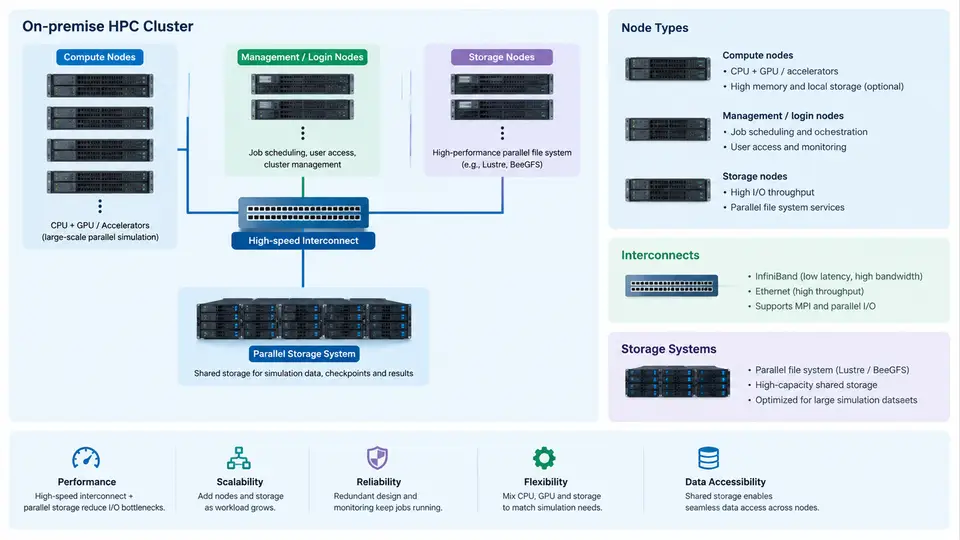
Crash simulation is one of the most infrastructure-hungry workloads in automotive engineering. A single full-vehicle frontal impact model can contain 15–25 million shell and solid elements, run for 120–150 ms of physical time, and require hundreds of CPU-hours per design iteration. When an OEM evaluates 50–200 load cases across multiple vehicle variants, the aggregate demand quickly exceeds what any single workstation can deliver. This chapter examines the on-premise HPC infrastructure that makes such workloads tractable: cluster architecture, node specialization, interconnect selection, and storage tiering.
Cluster Architecture Overview
An on-premise crash simulation cluster is typically organized into four functional planes: a management plane (head nodes, schedulers, provisioning), a compute plane (simulation nodes), an interconnect fabric (low-latency, high-bandwidth network), and a storage plane (parallel file system plus local scratch). The management plane runs workload managers such as Slurm or PBS Professional, which allocate nodes to jobs, enforce fair-share policies, and manage job queues. The compute plane executes the actual LS-DYNA, Pam-Crash, or Radioss solvers. The interconnect determines how efficiently explicit time integration can scale across nodes. The storage plane must sustain the I/O patterns of checkpoint writes, restart reads, and result file generation.
A representative mid-size automotive cluster might comprise 2 head nodes, 4 login/visualization nodes, 256 compute nodes, and 2–4 storage servers, all connected via a non-blocking or lightly oversubscribed fabric. The key design question is not "how many cores" but "what balance of CPU, memory bandwidth, interconnect latency, and storage throughput matches the solver's scaling behavior."
Node Types and Their Roles
Crash simulation clusters are rarely homogeneous. Different node classes serve different phases of the workflow:
| Node Type | Typical Configuration | Primary Workload |
|---|---|---|
| Login / Pre-processing | 16–32 cores, 128–256 GB RAM, GPU optional | Model assembly, meshing, LS-PrePost, job submission |
| Compute (standard) | 64–128 cores, 256–512 GB RAM, no GPU | Explicit dynamic solver (LS-DYNA MPP, Pam-Crash) |
| Compute (high-memory) | 64 cores, 1–2 TB RAM | Large full-vehicle models, implicit springback, NVH |
| GPU-accelerated | 32 cores + 4–8 GPUs, 512 GB RAM | GPU-offloaded solver (LS-DYNA GPU, Radioss GPU) |
| Storage / I/O | Dual-socket, 256 GB RAM, NVMe cache, JBOD | Lustre/GPFS OSS, NFS gateway, checkpoint staging |
The standard compute node dominates the fleet. For explicit crash solvers, memory bandwidth per core matters more than raw clock speed: a 64-core node with 8-channel DDR5-4800 delivers roughly 300 GB/s, which sustains the element-by-element data flow of explicit time integration. High-memory nodes are reserved for models that exceed 512 GB or for implicit phases where the stiffness matrix factorization demands large working sets. GPU nodes are increasingly attractive because explicit solvers are naturally data-parallel, but GPU memory capacity (typically 40–80 GB per device) limits the model size per node unless domain decomposition is carefully tuned.
Interconnect Selection
The interconnect is the single most consequential infrastructure choice for scaling efficiency. Crash solvers use domain decomposition: the model is partitioned into subdomains, one per MPI rank, and contact detection requires frequent all-to-all communication between neighboring subdomains. Latency and bandwidth directly determine parallel efficiency.
Three interconnect classes are common in automotive HPC:
- InfiniBand HDR/NDR (200–400 Gb/s) — the default for tightly coupled crash simulation. NDR delivers ~400 Gb/s per port with sub-1.5 µs latency. A 256-node cluster with a fat-tree topology and 2:1 oversubscription is typical.
- RoCEv2 (RDMA over Converged Ethernet) — 100–400 Gb/s Ethernet with RDMA. Lower cost and simpler cabling, but requires careful PFC/ECN tuning to avoid congestion collapse under all-to-all patterns.
- Omni-Path or proprietary fabrics — less common today but still present in legacy installations.
For a 10-million-element full-vehicle model, scaling from 64 to 512 cores on InfiniBand NDR typically yields 70–85% parallel efficiency. On 100 GbE RoCEv2 without tuning, the same job may drop to 50–60% because contact communication stalls dominate. The practical guidance: if the model exceeds 5 million elements and runs on more than 128 cores, InfiniBand or well-tuned RoCEv2 is mandatory.
Storage Architecture
Crash simulation I/O is bursty and write-heavy. During a run, the solver writes checkpoint files (d3plot, d3thdt) every few milliseconds of physical time. A single d3plot for a full-vehicle model can be 20–80 GB. Restart files add another 10–30 GB. The storage system must absorb these bursts without stalling compute nodes.
A tiered storage design is standard:
- Tier 0 — Node-local NVMe scratch (1–4 TB per node). The solver writes temporary scratch and, in some workflows, d3plot files locally. This isolates I/O from the shared fabric.
- Tier 1 — Parallel file system (Lustre, GPFS, or WekaFS). Delivers 100–500 GB/s aggregate throughput across 2–8 OSS/MDS nodes. Stores input decks, restart files, and final results.
- Tier 2 — Archive / cold storage (tape or object store). Retains completed load cases for regulatory traceability, often 5–10 years.
A common pitfall is treating the parallel file system as scratch. When 200 nodes simultaneously write d3plot files to Lustre, the metadata server becomes a bottleneck and job completion times stretch by 30–50%. The fix is to configure the solver to write to node-local NVMe first, then stage results to Lustre after the run completes.
Practical Sizing Example
Consider a mid-size OEM planning a cluster for 120 full-vehicle crash load cases per week, each averaging 8 million elements and 12 hours on 256 cores. The aggregate demand is 120 × 256 × 12 = 368,640 core-hours per week, or roughly 2,200 cores running continuously. With a 70% utilization target, the cluster needs approximately 3,100 cores — about 48 nodes of 64 cores each. Add 4 high-memory nodes for implicit springback, 2 GPU nodes for solver evaluation, and 2 storage nodes with 500 TB usable capacity. The interconnect should be InfiniBand NDR with a 2:1 oversubscribed fat-tree. This configuration is a reasonable starting point; actual sizing must account for queue wait times, license constraints, and peak demand during vehicle program milestones.