1. Course overview
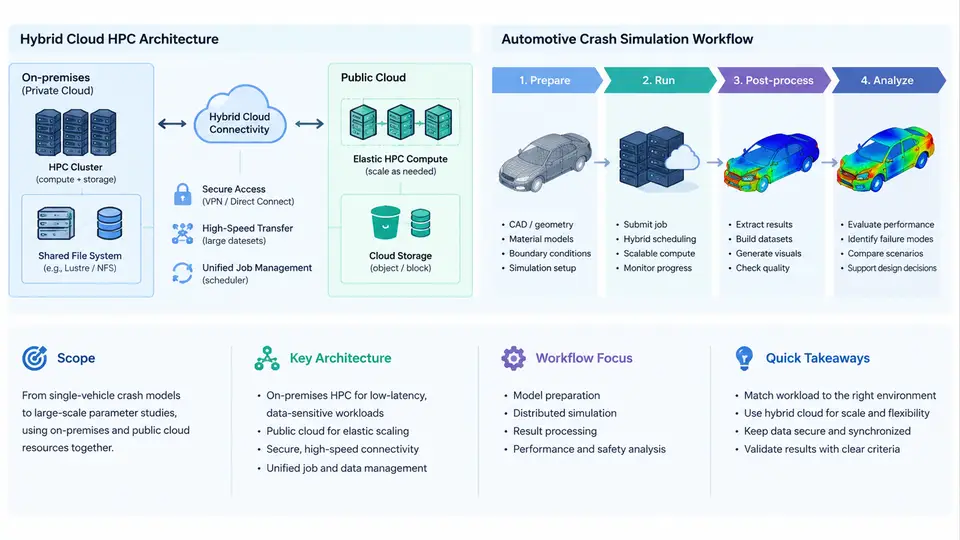
Automotive crash simulation is one of the most compute-hungry workloads in mechanical engineering. A single full-vehicle frontal impact model routinely contains 8–15 million shell and solid elements, several hundred thousand spot welds and rivets, multiple material laws (elastic-plastic metals, foams, composites, adhesives), and contact definitions that must be resolved at every explicit time step. A 150 ms physical event typically requires 1–3 million explicit time steps at a stable time increment of 0.5–1.5 µs, and each step touches the entire mesh. The result is a job that consumes tens of thousands of core-hours and produces hundreds of gigabytes of d3plot, binout, and time-history output. This course is about running those jobs efficiently and economically on a hybrid cloud HPC platform, without sacrificing the solver fidelity that crash engineers depend on.
What This Course Covers
The scope is deliberately narrow and practical. We focus on the LS-DYNA explicit solver as the reference code, because it dominates the automotive crash domain, but the architecture and workflow patterns transfer directly to Radioss, Abaqus/Explicit, and Pam-Crash. Across 30 chapters the course moves through four layers:
- Platform layer — hybrid cloud HPC architecture: on-premises clusters, cloud burst regions, high-speed interconnect, parallel file systems, job schedulers, and the identity and data plumbing that ties them together.
- Workflow layer — the crash simulation lifecycle: model preparation, deck assembly, solver execution, output management, and CAE post-processing.
- Engineering layer — solver tuning, contact and hourglass control, mass scaling, and the numerical decisions that determine whether a job finishes overnight or fails at cycle 400,000.
- Operations layer — cost governance, queue policy, checkpoint/restart strategy, and reproducibility for regulatory evidence.
What the course does not cover: CAD surface cleanup, meshing methodology, or material characterization testing. Those are upstream disciplines. We assume a valid, solver-ready deck exists and concentrate on executing it at scale.
Hybrid Cloud HPC Architecture
A hybrid cloud HPC platform for crash simulation is not simply "a cluster plus a cloud account." It is a single logical compute fabric with two physical homes, and the design problem is deciding what lives where. The governing principle is data gravity: the model deck, the material database, and the accumulated result archive are large and persistent, while compute demand is spiky. Therefore, persistent storage and the license server stay on-premises or in a fixed cloud region, and compute capacity is elastic.
Three tiers define the architecture:
| Tier | Typical Location | Role | Key Constraint |
|---|---|---|---|
| Persistent data | On-prem NAS or cloud object store | Deck repository, material library, result archive | Capacity and durability, not latency |
| Scratch / working set | Parallel file system (Lustre, GPFS, WekaFS) | Active job I/O, d3plot streaming | Aggregate bandwidth ≥ 1 GB/s per 100 cores |
| Elastic compute | On-prem nodes + cloud burst instances | LS-DYNA MPP ranks | Interconnect latency and license availability |
The critical engineering detail is the interconnect. LS-DYNA MPP uses MPI for domain decomposition and contact communication. On-premises, InfiniBand HDR (200 Gb/s) or NDR (400 Gb/s) delivers sub-2 µs latency. In the cloud, you must select instance families with high-performance networking — for example, Elastic Fabric Adapter or equivalent RDMA-capable fabric — because standard TCP Ethernet at 25–50 Gb/s will collapse scaling efficiency beyond roughly 64 ranks. A practical rule: measure parallel efficiency at 128, 256, and 512 ranks on the target fabric before committing a production job. If efficiency at 512 ranks falls below 70%, the job is better run as two smaller jobs or on a different instance type.
The Crash Simulation Workflow
The workflow has five stages, and each maps to a different part of the platform. Understanding this mapping is what allows you to place the right resources in the right place.
- Model preparation and deck assembly. The CAE engineer assembles the deck from subsystem models, applies boundary conditions and initial velocity, and defines output requests. This is interactive, low-CPU, and latency-sensitive — it belongs on a workstation or VDI, not on the cluster.
- Pre-flight validation. Before consuming 20,000 core-hours, run a short check: initial penetration in contacts, negative volume warnings, mass scaling summary, and estimated stable time step. LS-DYNA reports these in the first few hundred cycles. A 5-minute, 8-rank run catches most deck errors.
- Solver execution. The production run, launched through the scheduler (Slurm, PBS Pro, or a cloud-native batch service). This is the elastic tier. Checkpoint intervals should be set so that a node failure costs no more than 30–45 minutes of work.
- Output management. d3plot files are written at intervals; binout and ASCII time-history files accumulate. For a 10-million-element model, expect 40–120 GB of d3plot per run. These must be staged off scratch promptly, because scratch is expensive and shared.
- Post-processing and reporting. Intrusion, acceleration, and injury-criterion extraction in LS-PrePost, Animator, or Meta. This is GPU-friendly and can run on a visualization node or even a well-provisioned workstation.
How the Pieces Fit Together
The diagram below shows the end-to-end relationship: where data lives, where compute runs, and how a job flows from deck submission to archived result. Note that the scheduler is the single control point — it decides whether a job runs on-premises or bursts to the cloud, based on queue depth, license availability, and cost policy.
Why This Architecture Matters for Crash Simulation Specifically
Crash simulation has three characteristics that make it a poor fit for either pure on-premises or pure cloud:
- Bursty demand. Vehicle programs run in cycles: months of model build-up followed by weeks of intense DOE sweeps (design of experiments) with hundreds of variants. On-premises capacity sized for the peak sits idle most of the year; cloud-only capacity makes the persistent data and license costs unpredictable.
- Heavy I/O. LS-DYNA writes d3plot files continuously. If scratch bandwidth is insufficient, the solver stalls on I/O and CPU utilization drops below 60%. This is why the parallel file system is a first-class architectural component, not an afterthought.
- Long-running, failure-prone jobs. A 12-hour run on 256 cloud instances has a non-trivial probability of at least one interruption. Checkpoint/restart is not optional; it is the mechanism that makes cloud burst economically safe.
What You Will Be Able to Do After This Course
By the end of the 30 chapters, you should be able to size a hybrid HPC platform for a given crash workload, configure LS-DYNA MPP for near-linear scaling on both InfiniBand and RDMA-capable cloud fabric, design a checkpoint strategy that survives preemption, and produce a defensible cost-per-simulation figure that stands up to finance review. The remainder of the course builds these capabilities in sequence, starting with the platform architecture in detail and progressively moving toward solver-level tuning and operational governance.