3. Platform architecture
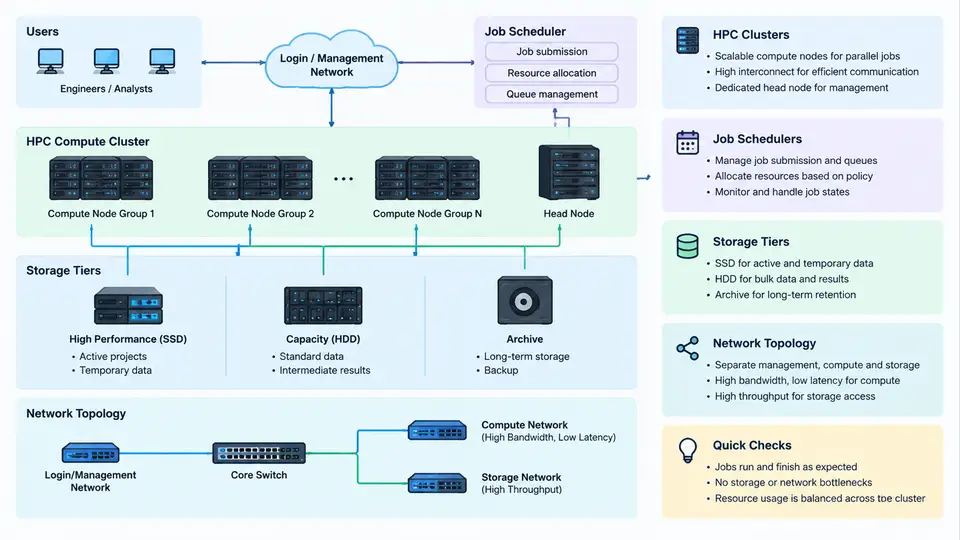
Crash CAE workloads are among the most demanding in the CAE domain. A single full-vehicle explicit dynamics model may contain 8–15 million elements, run for 150–300 ms of physical time, and require 12–48 hours of wall-clock time on 256–1024 CPU cores. The platform architecture must therefore be designed around three non-negotiable constraints: massive parallel scalability, high-throughput I/O for restart and d3plot output, and deterministic job scheduling that respects license availability. This section describes how the four architectural layers — compute cluster, job scheduler, storage tiers, and network fabric — fit together in a production crash CAE environment.
Compute Cluster: Node Classes and Sizing
A typical crash CAE HPC cluster is not homogeneous. It is partitioned into node classes optimized for different phases of the simulation workflow:
| Node Class | Typical Configuration | Primary Workload | Interconnect |
|---|---|---|---|
| Thin compute | 2× 64-core AMD EPYC, 512 GB DDR5 | LS-DYNA/Pam-Crash explicit solver | InfiniBand HDR 200G |
| Fat compute | 2× 64-core, 2 TB DDR5, NVMe scratch | Large model preprocessing, implicit springback | InfiniBand HDR 200G |
| GPU node | 4× NVIDIA H100, 1 TB host RAM | GPU-accelerated solver, ML surrogate training | InfiniBand NDR 400G |
| Service node | 2× 32-core, 256 GB | License server, scheduler master, visualization | Ethernet 25G |
The thin compute class dominates capacity. For a 10-million-element full-vehicle model, empirical scaling on LS-DYNA MPP shows that parallel efficiency drops below 70% beyond approximately 512 cores unless the model is decomposed with a balanced domain decomposition. A practical rule: allocate 15,000–25,000 elements per core for explicit crash analysis. This means a 10M-element model maps to 400–660 cores, which fits comfortably within a 512-core allocation on four 128-core nodes.
Job Scheduler: Policy and License-Aware Scheduling
The job scheduler is the control plane of the platform. In crash CAE environments, Slurm is the de facto standard, though PBS Professional and LSF remain in some OEM shops. The scheduler must handle three crash-specific requirements:
- License-aware scheduling: LS-DYNA and Pam-Crash licenses are finite and expensive. A job requesting 512 cores may need 512 solver tokens. The scheduler must integrate with the license server (e.g., FlexLM) via a prolog script that checks token availability before dispatching.
- Exclusive node allocation: Explicit solvers are memory-bandwidth-bound. Sharing a node between two jobs degrades both. Production queues typically enforce
--exclusivefor crash jobs. - Restart-aware preemption: Crash jobs write restart files at intervals (e.g., every 5 ms of physical time). A preempted job can resume from the last restart rather than restarting from zero. The scheduler should support requeue with checkpoint awareness.
A representative Slurm partition configuration for crash CAE:
# slurm.conf excerpt
PartitionName=crash Nodes=node[001-064] Default=NO MaxTime=72:00:00
  State=UP OverSubscribe=NO
  AllowGroups=crash_users
  PriorityTier=10

PartitionName=crash_debug Nodes=node[001-004] MaxTime=04:00:00
  State=UP OverSubscribe=NO PriorityTier=20

# License-aware prolog (simplified)
#!/bin/bash
# /etc/slurm/prolog.d/check_lsdyna_license.sh
REQUIRED_TOKENS=$SLURM_NTASKS
AVAILABLE=$(lmstat -a -c 27000@license-srv | grep -c "Users of LS-DYNA")
if [ "$AVAILABLE" -lt "$REQUIRED_TOKENS" ]; then
  echo "Insufficient LS-DYNA tokens: need $REQUIRED_TOKENS, have $AVAILABLE"
  exit 1
fi
When a job is submitted with sbatch -N 4 --ntasks-per-node=128 -p crash crash_job.sh, the scheduler allocates four exclusive nodes, runs the prolog to verify license tokens, and dispatches the job. If tokens are insufficient, the job remains in PENDING state with reason License rather than failing outright — this allows the job to start automatically when another job releases tokens.
Storage Tiers: From Scratch to Archive
Crash CAE generates enormous I/O. A single full-vehicle simulation may write 50–200 GB of d3plot files, plus restart files of 10–30 GB each. The storage architecture must separate hot scratch from warm project storage and cold archive:
The critical design principle is data locality. The solver should read input decks from Tier 1 (parallel FS) and write d3plot and restart files to Tier 0 (node-local NVMe) during the run. After the job completes, a post-processing script stages the results to Tier 2 for visualization and reporting. This prevents the parallel file system from becoming a bottleneck during the write-intensive explicit solver phase.
For a 512-core job writing 200 GB of d3plot over 24 hours, the average write bandwidth is only ~2.3 MB/s per node — well within NVMe capability. However, burst writes during contact initialization or output steps can spike to 500 MB/s per node. Node-local NVMe absorbs these bursts; a shared parallel file system would serialize them and stall the solver.
Network Topology: Fat-Tree vs. Dragonfly+
Crash CAE communication patterns are dominated by nearest-neighbor halo exchanges during domain decomposition. Each MPI rank exchanges boundary node data with adjacent ranks. For a well-decomposed model, most communication is between ranks on the same node or adjacent nodes. This makes a fat-tree topology with 1:1 or 2:1 oversubscription the standard choice for crash clusters up to ~1000 nodes.
For larger clusters (2000+ nodes), a Dragonfly+ topology reduces cabling cost and latency for inter-group communication. However, crash CAE rarely scales beyond 1024 cores per job, so the practical benefit of Dragonfly+ is limited to multi-job throughput rather than single-job latency.
| Topology | Oversubscription | Typical Scale | Crash CAE Suitability |
|---|---|---|---|
| Fat-tree (2-level) | 1:1 or 2:1 | Up to 1024 nodes | Excellent for single-job scaling |
| Fat-tree (3-level) | 2:1 or 3:1 | 1024–4096 nodes | Good; slight latency increase |
| Dragonfly+ | Variable | 4096+ nodes | Best for multi-job throughput |
Putting It Together: A Reference Architecture
A production crash CAE platform for a mid-size OEM might look like this: 64 thin compute nodes (128 cores each, 512 GB RAM, 4 TB NVMe), 4 fat nodes (2 TB RAM), 2 GPU nodes, 2 service nodes, all connected via InfiniBand HDR 200G in a 2-level fat-tree with 2:1 oversubscription. Storage consists of 2 TB/node NVMe scratch, a 1 PB Lustre parallel file system, a 300 TB NAS, and a 2 PB object store archive. Slurm manages scheduling with license-aware prologs and exclusive node allocation. This configuration supports approximately 20–30 concurrent full-vehicle crash jobs, with a peak throughput of 40–50 jobs per day depending on model size and solver time.
The architecture is not static. As model sizes grow toward 20–30 million elements and GPU-accelerated solvers mature, the balance between CPU and GPU nodes, the ratio of NVMe to parallel FS capacity, and the network oversubscription ratio will all need periodic reassessment. The key is to instrument the platform — track job wait time, solver scaling efficiency, I/O wait percentage, and license utilization — and let those metrics drive capacity planning rather than intuition.