3. Data volume and checkpointing strategies
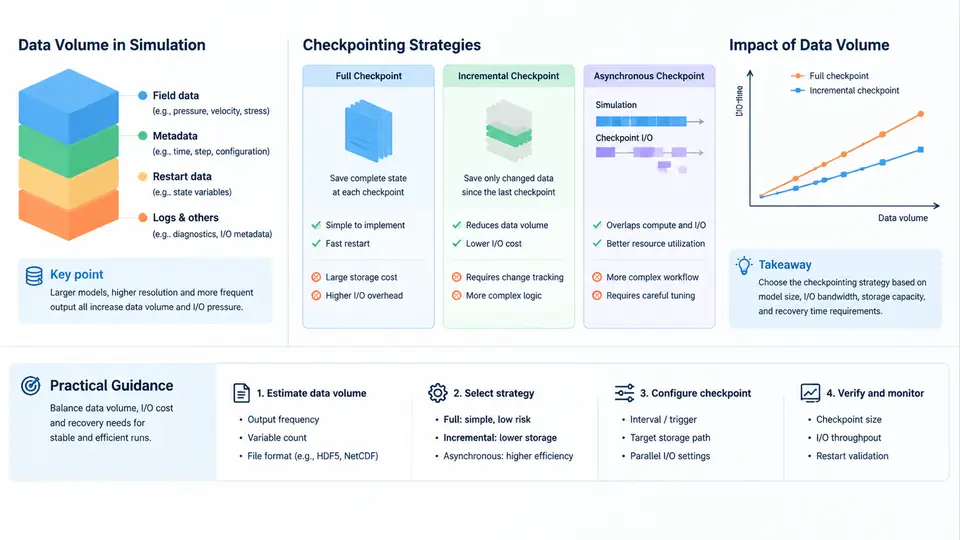
In explicit crash simulation, the cost of a run is rarely dominated by CPU time alone. Once a model exceeds a few million elements and the solver writes full-field results at high frequency, the I/O subsystem becomes the bottleneck. A typical LS-DYNA or Radioss job on 64–256 cores can spend 20–40% of wall-clock time inside write and fsync calls. Understanding how to estimate output volume, choose a state-dump cadence, and manage restart files is therefore a first-class engineering skill, not an afterthought.
Estimating d3plot size before you submit
The d3plot family is the primary result database in LS-DYNA. Its size is driven by four factors: the number of nodes, the number of solid/shell elements, the number of state dumps, and whether you write the full model or a subset. A practical first-order estimate for a single-state, single-precision database is:
bytes_per_state ≈ N_nodes × 6 × 4        (nodal coordinates + velocities)
                + N_solids × 8 × 4       (solid stress/strain tensors)
                + N_shells × 12 × 4      (shell resultants)
                + N_nodes × 4            (nodal scalar, e.g. temperature)
For a 5-million-node, 4-million-solid, 1-million-shell model, one state is roughly 5e6×24 + 4e6×32 + 1e6×48 + 5e6×4 ≈ 120 MB + 128 MB + 48 MB + 20 MB ≈ 316 MB. If you request 200 states, the raw database is ~63 GB. Add the d3plot header, the binout files, and the d3thdt time-history file, and a single run can easily produce 80–120 GB. This is the number that must be checked against the scratch quota before submission, not after the job dies at 03:00.
*DATABASE_BINARY_D3PLOT settings, then multiply by the planned number of states. This catches unit errors and unexpected output blocks far more reliably than spreadsheet arithmetic.Choosing state-dump frequency
The state-dump interval is controlled by DT in *DATABASE_BINARY_D3PLOT (or DT/CYCL in Radioss). The trade-off is direct: halving DT doubles the database size and roughly doubles the write time, but improves temporal resolution for post-processing. For crash pulses lasting 80–120 ms, a common starting point is DT = 1.0 ms, giving 80–120 states. For occupant-safety correlation where peak acceleration must be resolved, DT = 0.5 ms is often required; for early-stage topology screening, DT = 2.0 ms is usually sufficient.
A useful rule is to set DT so that the Nyquist frequency of the output exceeds the highest frequency of interest in the signal. If the crash pulse contains energy up to 500 Hz, DT ≤ 1 ms is mandatory; if you only care about the 50 Hz structural response, DT = 5 ms is defensible. Document this reasoning in the run log — it is the justification a reviewer will ask for.
Restart file management
Restart files (d3dump in LS-DYNA, restart in Radioss) are written at intervals controlled by *DATABASE_BINARY_D3DUMP or *DATABASE_RESTART. Unlike d3plot, restart files must contain the complete solver state — element erosion flags, contact history, material internal variables, and time-step data — so each dump is typically 1.5–3× the size of a single d3plot state. For the model above, one restart dump is ~500–900 MB.
The recovery granularity you need determines the restart cadence. If a node fails after 6 hours and the last restart was 2 hours earlier, you lose 2 hours of compute. On a 256-core job at $0.05/core-hour, that is $25.60 of wasted allocation — often more than the storage cost of keeping frequent restarts. A practical policy is:
- Short jobs (< 4 h): restart every 30–60 min, keep the last 2 dumps.
- Medium jobs (4–24 h): restart every 20–30 min, keep the last 3 dumps, rotate older ones to cold storage.
- Long jobs (> 24 h): restart every 15 min, keep the last 4 dumps, and verify each dump's integrity with a checksum before deleting the previous one.
d3dump caused by a full filesystem is indistinguishable from a valid one until you try to restart from it — and by then the previous good dump is gone.I/O overhead versus recovery granularity
Every restart write is a synchronization point: all MPI ranks must flush their state before the next time step can proceed. On a Lustre or GPFS filesystem, a 900 MB collective write from 256 ranks typically takes 2–8 seconds, depending on stripe count and contention. If you restart every 15 minutes of simulated time and the job runs 10 hours, that is 40 writes × 5 s = 200 s of pure I/O stall — about 0.6% of wall-clock time. Acceptable. But if you restart every 2 minutes, the same job pays 5% overhead, and the filesystem may start throttling.
The optimal cadence minimizes I/O_cost × frequency + expected_recovery_loss × failure_rate. In practice, most HPC centers recommend a restart interval of 15–30 minutes for crash jobs, with d3plot written less frequently (every 1–2 ms of simulated time) because it is only needed for post-processing, not recovery.
Practical configuration example
The following LS-DYNA keyword snippet illustrates a balanced configuration for a 10-hour, 256-core crash job with a 100 ms pulse:
*DATABASE_BINARY_D3PLOT
$    DT      LCDT      BEAM      NPLTC      PSETID
     1.0e-3   0         0         0          0
*DATABASE_BINARY_D3DUMP
$    DT      LCDT
     900.0   0
*DATABASE_BINARY_D3THDT
$    DT      LCDT
     1.0e-4   0
*DATABASE_EXTENT_BINARY
$    NEIPH   NEIPS   MAXINT   STRFLG   SIGFLG   EPSFLG   RLTFLG   ENGFLG
     0       0       8        1        1        1        1        1
Here DT = 1.0e-3 writes a d3plot state every 1 ms of simulated time (100 states total), while DT = 900.0 writes a restart dump every 900 seconds of wall-clock time. The d3thdt file captures time-history at 0.1 ms resolution for accelerometer and force channels. MAXINT = 8 limits the number of integration points written per element, which can cut d3plot size by 30–50% for thick shells without losing the through-thickness stress gradient needed for failure assessment.
Monitoring and verification
After submission, monitor three things: the growth rate of the output directory, the filesystem's free space, and the solver's I/O wait time. On Slurm, sstat -j <jobid> --format=JobID,AveCPU,AveRSS,MaxRSS gives a coarse view; for finer detail, parse the LS-DYNA messag file for the "CPU time" and "elapsed time" columns — a growing gap between them indicates I/O stall. If the gap exceeds 15%, reduce d3plot frequency or increase the filesystem stripe count before the job hits the quota wall.
Finally, verify each restart dump with a checksum (md5sum d3dump*) and confirm that the file size matches the expected value from the estimation formula. A dump that is 10% smaller than expected is almost certainly truncated and should not be relied upon for recovery.