1. Crash simulation data landscape
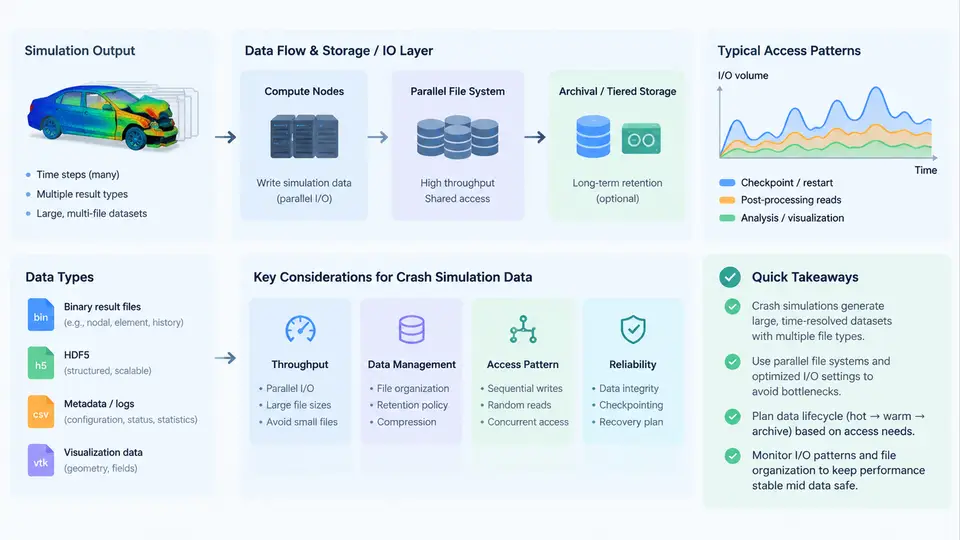
Before any storage architecture, parallel file system tuning, or I/O scheduling decision can be made, you need a precise mental model of what a crash simulation actually writes to disk. Crash solvers are not general-purpose applications; they emit a small number of highly specialized file families, each with its own access pattern, update frequency, and lifetime. Getting this taxonomy right is the foundation of every later chapter, because a storage strategy that is optimal for one output family can be catastrophic for another.
This chapter surveys the three dominant explicit crash solvers — LS-DYNA, PAM-CRASH, and Radioss — and maps their principal output types onto concrete storage characteristics: file size growth, write frequency, record structure, and whether the data is written once or repeatedly overwritten.
The Three Output Families
Despite vendor-specific naming, crash simulation output falls into three functional families that behave very differently on storage.
Time-history data is a small set of scalar or low-dimensional signals sampled at every timestep. A typical LS-DYNA binout database or PAM-CRASH TH file might track a few hundred channels — nodal accelerations at a dummy head, section forces in a B-pillar, energy totals. Each timestep appends a few kilobytes. Over 200,000 cycles this accumulates to tens or hundreds of megabytes, but the writes are tiny, frequent, and strictly sequential. Time-history is the "heartbeat" of a running job and is often the only output that must survive a crash of the solver itself.
State/geometry data is the heavy payload. LS-DYNA's d3plot, Radioss's ANIM (animation) files, and PAM-CRASH's DSY/PSY families store the full mesh — nodal coordinates, velocities, stresses, plastic strains — for every part at selected intervals. A single state of a 5-million-element full-vehicle model can exceed 1 GB. These files are written in large, contiguous blocks, but only every N cycles (the DT or output interval), producing a bursty, high-bandwidth write pattern.
Restart and checkpoint data captures the complete solver state so a job can resume after a wall-clock limit or node failure. LS-DYNA writes d3dump files; Radioss writes RST; PAM-CRASH writes REST. Restart files are large (comparable to a state), written infrequently, and are frequently overwritten in place — a pattern that stresses metadata and block allocation rather than raw throughput.
Storage Characteristics at a Glance
| Output family | LS-DYNA | PAM-CRASH | Radioss | Write pattern | Typical size |
|---|---|---|---|---|---|
| Time-history | binout |
TH |
T01 / TH |
Small appends every cycle | 10 MB – 1 GB |
| State / geometry | d3plot |
DSY, PSY |
ANIM |
Large contiguous bursts | 1 GB – 100+ GB |
| Restart / checkpoint | d3dump |
REST |
RST |
Infrequent, often overwritten | 0.5 – 5 GB |
The table already hints at the central engineering tension: time-history wants low-latency small writes, state data wants maximum sequential bandwidth, and restart data wants fast overwrite semantics. A single parallel file system must serve all three simultaneously, often from the same job.
Why the Distinction Matters for I/O Engineering
Consider a concrete example. A full-vehicle frontal impact model with 8 million elements runs on 512 MPI ranks. The solver is configured to write a d3plot state every 5 ms of simulated time, and the event lasts 120 ms — that is 24 states. If each state is 1.2 GB, the job writes roughly 29 GB of state data. Meanwhile, binout accumulates 400 channels × 200,000 cycles × 8 bytes ≈ 640 MB, but in 200,000 separate small writes. The restart file is written every 30 minutes of wall-clock time and is 2 GB, overwritten each time.
If you tune the file system only for the 29 GB of state data — large stripe counts, huge block sizes — the 200,000 tiny binout appends may suffer from metadata contention and lock serialization. Conversely, optimizing for binout latency with small blocks will cripple d3plot throughput. The correct approach is to recognize that these are different workloads sharing one resource, and to separate them where possible — different directories, different file systems, or at minimum different I/O scheduling classes.
d3plot/ANIM on a directory with a high stripe count (e.g., lfs setstripe -c 8) and binout/TH on a directory with a lower stripe count and smaller stripe size. Restart files benefit from a dedicated OST pool to avoid competing with state writes.
File Format and Record Structure
The internal structure of these files also affects I/O behavior. LS-DYNA d3plot is a binary, record-oriented format with a fixed header followed by per-state blocks. Each state block contains geometry, then per-variable data arrays. Because the format is not self-describing in a modern sense, readers must know the model's element and node counts to parse it — but for the writer, this means each state is a predictable, contiguous byte range. That predictability is what allows efficient collective I/O: all ranks can compute their exact file offsets and issue a single aggregated write.
binout is different. It is a directory-like container holding multiple "bins" (one per output type: nodout, elout, glstat, matsum, etc.). Each bin has its own header and data stream. The solver appends to each bin independently, which means the file is not written as one contiguous stream but as several interleaved streams. On a parallel file system, this can cause false sharing if multiple ranks write to the same file region. LS-DYNA mitigates this by having rank 0 own the binout file, but the serialization point remains a scalability concern at high rank counts.
Radioss ANIM files are similarly record-based but use a different convention: the file is written in "animation" blocks that can be split across multiple files (ANIM1, ANIM2, …) when a size threshold is reached. This is a deliberate design choice to avoid single-file size limits and to allow parallel writing by multiple I/O groups. PAM-CRASH DSY files follow a comparable multi-file scheme.
Visualizing the Data Flow
The diagram below maps the three output families from solver memory to storage, showing the relative write frequency, block size, and the storage subsystem each family stresses most.
What This Means for the Rest of the Course
Every subsequent chapter builds on this taxonomy. When we discuss parallel I/O strategies, we will ask: which output family does this optimization target? When we tune Lustre striping, we will ask: does this help d3plot bandwidth without hurting binout latency? When we design checkpoint policies, we will ask: how often must d3dump be written to bound restart cost without saturating the file system?
The key takeaway is that crash simulation data is not a monolithic "output." It is a portfolio of three distinct workloads with conflicting storage requirements. Recognizing this early prevents the most common mistake in HPC I/O engineering: optimizing for the average case and delivering a mediocre result for every case.
d3plot dominates total bytes written, it should dominate your tuning effort. In practice, a job can spend more wall-clock time blocked on binout metadata operations than on d3plot data transfer, especially at high rank counts. Always profile per-file-family I/O time, not just aggregate throughput.
With this landscape established, the next chapter examines how the solver's timestep and output interval interact with storage throughput requirements — the first quantitative step toward sizing a file system for a given crash model.