3. Mapping solver license features to HPC r
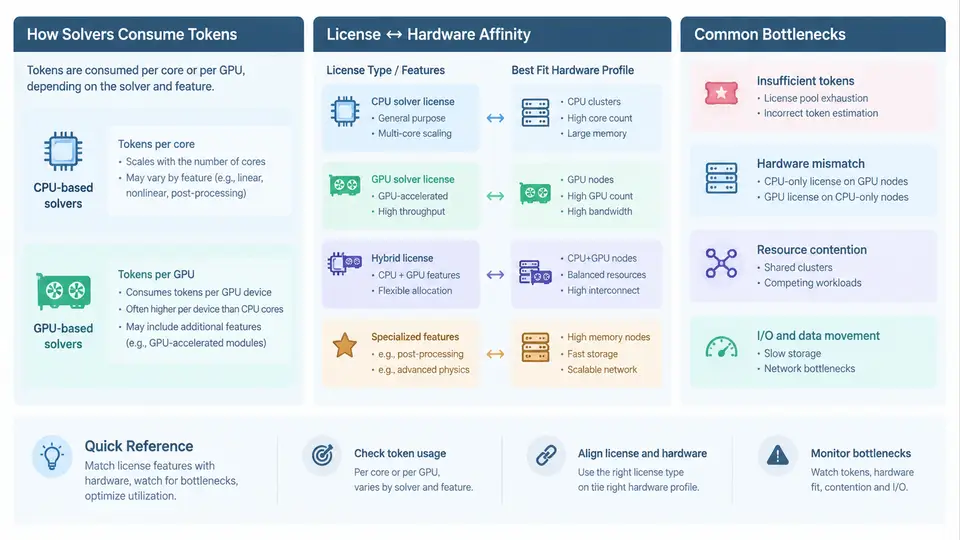
Once you understand what a license pool contains, the next question is how a solver actually draws from it while it runs on a cluster. The mapping between license features and HPC resources is not one-to-one. A single job can consume multiple tokens, and the number of tokens it consumes often depends on how many cores, GPUs, or parallel ranks you assign to it. Getting this mapping wrong produces two opposite failures: jobs that stall waiting for tokens they never needed, or jobs that run but leave expensive hardware idle because the license model throttles concurrency.
How Solvers Consume Tokens per Core and per GPU
Most commercial CAE solvers use one of three licensing models, and each behaves differently against hardware scaling.
- Per-seat (node-locked or floating): one token grants one concurrent user or one solver instance, regardless of core count. Ansys Mechanical, for example, typically checks out one
mechanicaloransysfeature per running instance. Adding cores does not add token cost, so this model rewards large single-node runs. - Per-core / per-HPC-task: the solver checks out one token per parallel process or per core. LS-DYNA SMP/MPP and many CFD solvers follow this pattern. A 64-core run may consume 64 tokens of the same feature, so the license pool size directly caps the maximum job width.
- Per-GPU or per-accelerator: GPU-enabled solvers such as Ansys Fluent GPU Solver or Altair AcuSolve GPU check out a distinct feature (for example
fluent_gpu) per GPU, sometimes plus a base solver token. GPU tokens are usually scarcer and more expensive than CPU tokens.
The practical consequence is that token consumption is a function of the launch command, not just the model. If you submit a job with -np 128 against a per-core feature, you are requesting 128 tokens. If the pool only has 96, the job either queues or fails at checkout depending on the solver's behavior.
Affinity Between License Types and Hardware Profiles
Not every hardware profile suits every license type. The goal is to match the token cost curve to the hardware scaling curve so that neither resource is wasted.
| License model | Best-fit hardware | Scaling behavior | Risk if mismatched |
|---|---|---|---|
| Per-seat floating | High-core single node (32–128 cores), large memory | Flat token cost, good core scaling up to memory bandwidth limit | Running many small jobs wastes cores; running one huge job may hit memory limits |
| Per-core / per-task | Multi-node MPI clusters, moderate cores per node | Token cost grows linearly with ranks; efficiency drops past ~256–512 ranks for many solvers | Oversubscribing tokens blocks other users; undersubscribing leaves nodes idle |
| Per-GPU | GPU nodes (4–8 GPUs per node), high host memory | Token cost per GPU; strong speedup for dense linear algebra | GPU tokens exhausted while CPU tokens idle; poor models see little speedup |
A useful heuristic: for per-core solvers, the optimal job width is the point where parallel efficiency times tokens-per-rank is maximized. If a 64-rank run takes 10 hours and a 128-rank run takes 6 hours, the 128-rank run consumes twice the tokens for only a 1.67× speedup. On a constrained pool, the 64-rank run may deliver more total throughput across the queue.
Common Bottlenecks and How They Appear
Three bottlenecks dominate real deployments.
1. Token starvation at scale. A per-core solver with a 200-token pool cannot run a 256-rank job. Symptoms: the job sits in PEND state with reason License, or the solver aborts with LICENSE ERROR: feature not available. The fix is either to cap job width via scheduler resource limits or to negotiate a larger pool. In Slurm, you can enforce this with a license resource:
#SBATCH --licenses=ansys:64
#SBATCH --nodes=2
#SBATCH --ntasks-per-node=32
srun -n 64 fluent 3ddp -g -t64 -i case.jou
Here the job requests 64 ansys tokens and 64 tasks. If the pool has fewer than 64 free, Slurm holds the job until they are available, preventing mid-run checkout failures.
2. GPU token scarcity. GPU features are often licensed in small quantities. A node with 8 GPUs may only have 4 GPU tokens available. Symptoms: GPU jobs queue behind each other while CPU nodes sit idle. The fix is to schedule GPU jobs with explicit GPU and license constraints, and to reserve GPU tokens for models that actually benefit from acceleration.
3. License server latency and checkout storms. When hundreds of ranks start simultaneously, each rank may contact the license server. If the server or network cannot handle the burst, checkout times out. Symptoms: intermittent Cannot connect to license server errors at job start, even though tokens are free. Mitigations include enabling license queuing, increasing the vendor daemon's TIMEOUT, and staggering rank startup.
Putting It Together: A Mapping Workflow
Before submitting a production job, walk through this sequence:
- Identify the license feature name and model (per-seat, per-core, per-GPU) from the vendor's licensing guide.
- Determine the token cost for your intended rank/GPU count.
- Compare against the current free token count using
lmstat -a -c 27000@license-hostor your scheduler's license view. - Choose the largest job width that fits the free tokens and still gives acceptable parallel efficiency.
- Encode the token request in the scheduler submission so the job cannot start without them.
- After the run, check the solver log for checkout/checkin messages and confirm tokens were released.
The diagram below summarizes how a job's hardware request translates into token consumption across the three license models, and where bottlenecks typically appear.
The mapping is ultimately a scheduling problem. Treat license tokens as a first-class resource alongside cores, memory, and GPUs. When you encode token requests in the job submission, the scheduler becomes the single point of truth for both hardware and license availability, and the two can no longer drift apart.