1. CAE solver licensing landscape
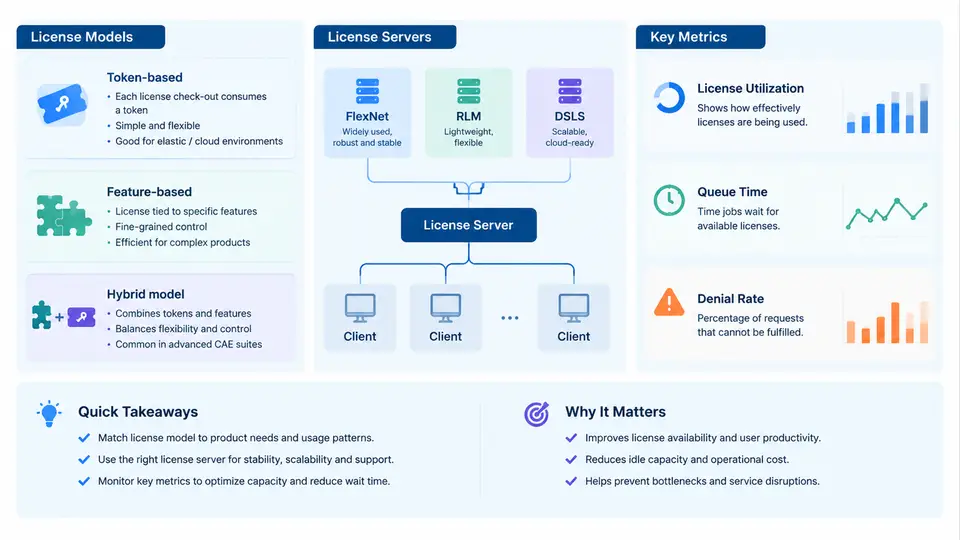
Every CAE workload — a nonlinear structural solve, a CFD transient, an electromagnetic sweep — begins not with meshing but with a license check. Before the solver reads a single element, it must acquire the rights to run. Understanding how those rights are structured, served, and measured is the foundation for any capacity optimization effort. If you cannot read the licensing layer, you cannot explain why a 128-core node sits idle while a queue of jobs waits.
This chapter maps the three dominant licensing models used by mainstream CAE vendors, the license servers that enforce them, and the metrics that tell you whether your investment is being used or wasted.
Three Licensing Models
Token-based licensing grants access through abstract units called tokens. A solver consumes a number of tokens proportional to the resources it uses — typically the number of cores, sockets, or parallel processes. Ansys, for example, issues ansys and mech tokens; a job running on 32 cores may draw 32 tokens, while the same job on 8 cores draws 8. The key property is elasticity: token consumption scales with parallelism, so the license pool becomes a shared, fungible resource across all products that draw from it.
Feature-based licensing grants access to a named capability rather than a quantity. A checkout of Simcenter_Nastran_Desktop or Abaqus/Standard is a binary event: you either hold the feature or you do not. Feature licenses are often node-locked or tied to a specific user, and they do not scale with core count. This makes them predictable for budgeting but rigid for throughput — a single feature license can only serve one concurrent job regardless of how many cores are available.
Hybrid models combine both. Dassault Systèmes' DSLS (Dassault Systèmes License Server) is a canonical example: it issues feature-level entitlements that internally consume token-like credits, and it supports both named-user and shared-pool configurations. Siemens' Simcenter portfolio similarly mixes feature checkouts with token consumption for HPC-enabled solvers. Hybrid models are the most common in large enterprises because they let procurement negotiate per-seat access for occasional users while pooling tokens for heavy batch workloads.
License Servers: FlexNet, RLM, and DSLS
Three license managers dominate CAE deployments. Each enforces the vendor's model but exposes different diagnostics.
FlexNet Publisher (formerly FLEXlm) is the most widely deployed. It uses a lmgrd daemon plus a vendor daemon, reads a license.dat file, and logs checkouts to a report log. Its lmstat and lmutil tools are the primary interface for real-time inspection. FlexNet supports token pooling, borrowable licenses, and queuing when configured with QUEUE directives.
RLM (Reprise License Manager) is lighter-weight and increasingly common with CFD and multiphysics vendors. It uses a single rlm daemon, a license.lic file, and the rlmutil command set. RLM's rlmstat output is more compact than FlexNet's, and its ISV server model makes per-vendor isolation straightforward.
DSLS is Dassault's proprietary server. It manages both feature and token entitlements, supports on-premises and cloud deployment, and exposes a REST API for programmatic license queries — a significant advantage for building automated capacity dashboards.
The table below summarizes the operational differences that matter most when you are diagnosing contention.
| Attribute | FlexNet Publisher | RLM | DSLS |
|---|---|---|---|
| Primary daemon | lmgrd + vendor daemon |
rlm |
DSLS service |
| License file | license.dat |
license.lic |
Server-managed |
| Query tool | lmstat, lmutil |
rlmstat |
Web UI / REST API |
| Token pooling | Yes | Yes | Yes |
| Borrowing | Yes | Limited | Yes |
| Queue support | QUEUE directive |
Via ISV | Native |
Key Metrics: Utilization, Queue Time, Denial Rate
Three metrics form the diagnostic triangle for license capacity. They are interdependent, and reading them in isolation leads to wrong conclusions.
License utilization is the fraction of available license units in use over a time window. For a token pool of 200 tokens sampled every minute, if the average concurrent checkout is 140, utilization is 70%. High utilization is not automatically good — sustained utilization above roughly 85% correlates strongly with queue growth and denial events. Low utilization below 40% suggests over-procurement or a pool that is misaligned with actual solver demand.
Queue time measures how long a job waits between submission and license acquisition. In FlexNet, this appears in the debug log as QUEUED entries; in RLM, as queued events. Queue time is the most direct measure of user pain. A useful threshold: if the 95th-percentile queue time exceeds 10% of the job's expected runtime, the license pool is a bottleneck, not the compute nodes.
Denial rate is the fraction of checkout requests that fail outright — the license server returns -5 (FlexNet) or LICENSE_REJECTED (RLM). Denials occur when the pool is exhausted and no queue is configured, or when a feature is not entitled at all. A denial rate above 1–2% indicates a hard capacity shortfall; a denial rate near zero with high queue time indicates a queueing configuration that is absorbing demand but delaying it.
Reading the Three Metrics Together
The SVG below shows how the three metrics interact across a typical workday and how to interpret their joint pattern.
In the example above, utilization climbs from 30% at 08:00 to a peak of 92% at 12:00. Queue time rises in tandem, and denials begin to appear around 11:00. The correct response is not simply "buy more tokens" — it is to check whether the peak is driven by a few large jobs that could be rescheduled, or by a genuine increase in concurrent demand. If the peak is a daily pattern, a token pool increase of 15–20% may eliminate denials without over-provisioning for the morning trough.
Practical Inspection Commands
To gather these metrics from a live FlexNet server, the following commands are the starting point. They are illustrative and assume a vendor daemon named ansyslmd.
# Real-time checkout summary
lmutil lmstat -a -c 27000@license-host

# Filter for a specific feature
lmutil lmstat -f mech -c 27000@license-host

# Extract queue events from the debug log
grep "QUEUED" /var/log/flexnet/lmgrd.log | tail -50

# Count denials in the last hour
grep "DENIED" /var/log/flexnet/lmgrd.log | grep "$(date +%Y-%m-%d)" | wc -l
For RLM, the equivalent is rlmutil rlmstat -a -c 5053@license-host. For DSLS, query the REST endpoint /api/license/usage with your API key.
The output of lmstat -a shows each feature, the number of licenses issued, and the users holding them. A healthy pool shows issued counts well below total, with no QUEUED entries. A saturated pool shows issued counts at or near total, with a growing queue list.
What to Carry Forward
The licensing layer is a shared, finite resource that sits between your users and your compute capacity. Token models scale with cores; feature models do not; hybrid models require per-product tuning. FlexNet, RLM, and DSLS each expose the same three metrics — utilization, queue time, denial rate — through different tools. The next step is to instrument these metrics continuously, because license contention is invisible until you measure it, and by then the queue has already formed.