1. Multi-solver CAE landscape
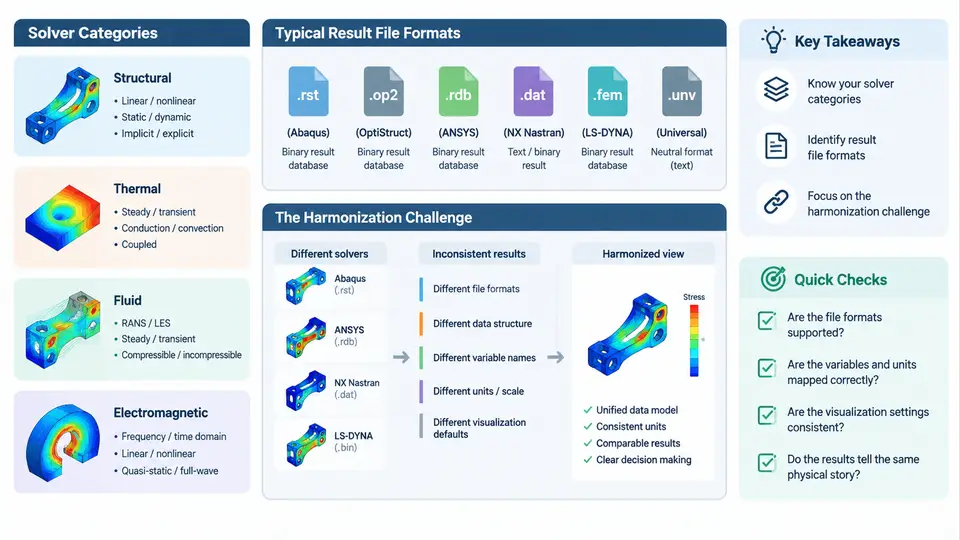
Modern CAE workflows rarely rely on a single solver. A typical vehicle program may run Nastran for NVH, Abaqus for nonlinear crash and contact, ANSYS Mechanical for thermal-structural coupling, LS-DYNA for explicit impact, and Fluent or STAR-CCM+ for CFD. Each tool was designed around its own physics assumptions, discretization schemes, and data model. The result is a fragmented landscape where the same physical quantity — displacement, stress, temperature, pressure — is stored under different names, on different meshes, with different sign conventions and units. Results harmonization is the discipline of making these heterogeneous outputs comparable, mergeable, and reportable within one consistent frame of reference.
Solver Categories and Their Output Characteristics
It helps to classify solvers by the mathematical character of their solution, because that determines what the result file actually contains.
- Implicit structural solvers (Nastran SOL 101/103, Abaqus Standard, ANSYS): solve
K·u = Fat equilibrium. Outputs are nodal displacements, element stresses, reaction forces, and modal quantities. Results are typically stored per load case or per mode. - Explicit dynamics solvers (LS-DYNA, Abaqus Explicit, Radioss): integrate equations of motion over many small time steps. Outputs are time-history states — displacement, velocity, stress, and contact forces at discrete time increments. Data volume is large and inherently transient.
- CFD solvers (Fluent, STAR-CCM+, OpenFOAM): solve conservation equations on a volume mesh. Outputs are cell-centered fields (pressure, velocity, turbulence quantities) plus wall quantities such as
y+and heat transfer coefficient. - Thermal and multiphysics solvers: produce nodal temperature fields and, in coupled runs, mapped thermal loads on structural meshes.
The critical observation is that these categories disagree not only in file syntax but in where data lives: implicit structural results are naturally nodal, CFD results are naturally cell-centered, and explicit results are naturally time-series. Harmonization must reconcile all three axes — spatial location, temporal sampling, and physical naming.
Result File Formats in Practice
Each solver ecosystem has a native format, and most also support at least one interchange format. The table below summarizes the formats you will encounter most often.
| Format | Typical Producer | Data Model | Harmonization Notes |
|---|---|---|---|
.op2 |
Nastran | Binary, nodal + element results, per subcase | Well-documented; strong choice as a neutral structural hub |
.odb |
Abaqus | Binary database, frames, field and history output | Rich but proprietary; export to .fil or CSV for exchange |
d3plot |
LS-DYNA | Binary time-state database | Large; requires state selection before mapping |
.rst |
ANSYS Mechanical | Binary, result sets per load step | Node/element numbering differs from Nastran |
.cas / .dat |
Fluent | Mesh + cell-centered fields | Requires cell-to-node interpolation for structural mapping |
.vtk / .vtu |
OpenFOAM, ParaView | Open, ASCII or binary, arbitrary fields | Excellent neutral format for visualization and exchange |
.h5 / .hdf5 |
Many modern solvers | Hierarchical, self-describing | Best long-term archive; needs a defined schema |
No single format is universally accepted. In practice, teams adopt a hub-and-spoke strategy: pick one neutral format (commonly .op2 for structural, .vtk/.h5 for general fields) and write converters from each solver into it. This keeps the number of conversion paths linear rather than quadratic.
Where Harmonization Actually Breaks
The difficulty is not reading files — parsers exist. The difficulty is that four independent mismatches appear simultaneously:
- Mesh mismatch. Two solvers rarely share identical node coordinates or element connectivity. Mapping requires interpolation, and interpolation introduces error that must be quantified, not ignored.
- Naming and semantic mismatch. Nastran reports
VONMISESstress; Abaqus reportsS, Mises; ANSYS reportsS_EQV. The same quantity, three identifiers. Worse, some solvers report stress at element centroid, others extrapolate to nodes. - Unit and sign convention mismatch. One model in N·mm·MPa, another in m·N·Pa. Coordinate systems may be global in one solver and local in another; shell normals may point in opposite directions.
- Temporal mismatch. An explicit run may have 500 states; an implicit run may have 3 load steps. Comparing peak values requires resampling onto a common time base.
A Concrete Harmonization Workflow
Consider a bracket analyzed in both Nastran (linear static, load case LC1, 120 N downward at a bolt hole) and Abaqus (nonlinear, same load). The goal is a single comparison plot of von Mises stress along a defined path.
# Step 1 — Export to a neutral format
nastran_export --input bracket.op2 --subcase LC1 --output bracket_nastran.vtk
abaqus_export --input bracket.odb --step Step-1 --frame 1 --output bracket_abaqus.vtk

# Step 2 — Normalize units to a common system (N, mm, MPa)
unit_convert --input bracket_abaqus.vtk --from m-N-Pa --to mm-N-MPa

# Step 3 — Map Abaqus results onto the Nastran mesh
field_map --source bracket_abaqus.vtk --target bracket_nastran.vtk \
          --method nearest_node --tolerance 0.5 --output mapped.vtk

# Step 4 — Extract the comparison path and report
path_extract --input mapped.vtk --path path.csv --field von_mises --output compare.csv
After mapping, inspect three things before trusting the comparison: the mapping residual (distance from each target node to its nearest source node), the resultant force balance, and the peak location. If the peak stress in the mapped field appears at a different node than in the source, the mapping is likely too coarse near the stress concentration.
Visual Overview of the Harmonization Pipeline
The diagram below shows how heterogeneous solver outputs converge through format conversion, unit normalization, and field mapping into a single comparison-ready dataset.
What This Means for the Rest of the Course
Every subsequent chapter builds on the four mismatches identified here. Mesh mapping, unit and coordinate normalization, temporal resampling, and semantic field alignment are not optional refinements — they are the core operations that determine whether a multi-solver comparison is trustworthy. The practical takeaway from this chapter is a discipline: never compare raw solver outputs directly. Convert to a neutral format, normalize units and conventions, map onto a common mesh, verify the mapping, and only then produce the comparison. The verification checks listed in the diagram — residual, force balance, peak location, unit consistency, sign convention, and time-base alignment — form the minimum acceptance criteria for any harmonized dataset.