3. Crash FE fundamentals
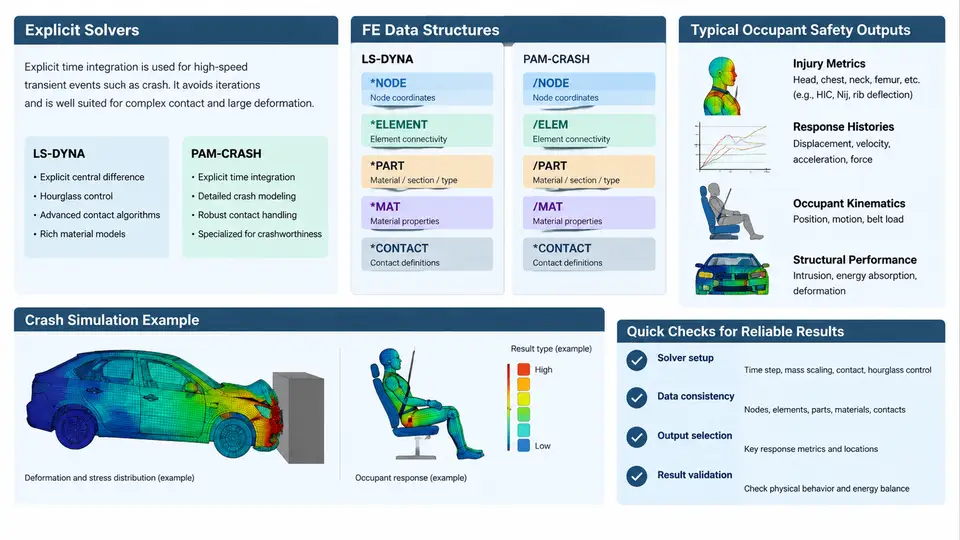
Before any integration between MADYMO and a crash FE model can be trusted, the analyst must understand what the FE solver actually produces, how it stores that information, and which quantities are meaningful for occupant safety. This chapter establishes that foundation by examining the explicit time-integration scheme, the two dominant crash codes in occupant safety workflows (LS-DYNA and PAM-CRASH), their file and data structures, and the output channels that feed restraint and occupant models.
Why Explicit Integration Dominates Crash Simulation
Crash events unfold over roughly 50–150 ms, but the underlying physics involves high-frequency stress waves, contact nonlinearity, and large deformations. An implicit solver would need to assemble and factorize a global stiffness matrix at every iteration, and convergence becomes fragile once elements distort or contacts switch on and off. The explicit central-difference method avoids matrix factorization entirely: nodal accelerations are computed directly from the assembled force vector, and the solution advances one small time step at a time.
The governing update for a diagonal mass matrix M is:
a_n = M⁻¹ (F_ext − F_int)
v_(n+1/2) = v_(n−1/2) + a_n · Δt
x_(n+1) = x_n + v_(n+1/2) · Δt
Because M is diagonal (lumped mass), the inversion is trivial and the scheme is embarrassingly parallel. The price is conditional stability: the time step must satisfy the Courant–Friedrichs–Lewy condition, approximately Δt ≤ L_min / c, where L_min is the smallest element characteristic length and c is the dilatational wave speed. A single 2 mm solid element in steel with c ≈ 5100 m/s yields Δt ≈ 0.4 µs, so a 100 ms event requires on the order of 250,000 steps. This is why mass scaling, element quality control, and selective sub-cycling are routine practices rather than optional refinements.
LS-DYNA and PAM-CRASH: Two Codes, Two Data Philosophies
LS-DYNA and PAM-CRASH both implement explicit dynamics, but their input and output conventions differ in ways that matter when coupling to MADYMO.
LS-DYNA uses a keyword-driven deck. The model is organized into *NODE, *ELEMENT_SHELL, *ELEMENT_SOLID, *PART, *SECTION, *MAT_*, *CONTACT_*, and *BOUNDARY_* blocks. Parts are the fundamental grouping unit; each part references a section and a material. Output requests are controlled through *DATABASE_BINARY_D3PLOT (state dumps at fixed intervals), *DATABASE_ASCII_* (nodal, element, and interface time histories), and *DATABASE_BINARY_INTFOR for contact interface forces. The d3plot family is the primary carrier of geometry and field results; binout aggregates ASCII-style time-history data.
PAM-CRASH (ESI) uses a block-structured input with /NODE, /SHELL, /SOLID, /PART, /MAT, /CONTACT, and /FUNCT definitions. Time-history output is requested via /TH (time history) and /TITLE, while full-field results are written to the DSY (binary results) and THS (time-history) files. PAM-CRASH also exposes a /SAFETY family of cards for occupant-relevant outputs such as belt forces and accelerometer definitions.
| Aspect | LS-DYNA | PAM-CRASH |
|---|---|---|
| Input style | Keyword deck (*KEYWORD) | Block cards (/BLOCK) |
| Full-field results | d3plot | DSY |
| Time histories | binout, *DATABASE_ASCII_* | THS, /TH |
| Contact forces | INTFOR, rcforc | /CONTACT output blocks |
| Restraint interface | *MAT_SEATBELT, *ELEMENT_SEATBELT_* | /BELT, /SAFETY |
For MADYMO integration, the practical consequence is that the coupling layer must map part or group identifiers to the FE mesh, and must know whether a given quantity is stored per-node, per-element, or per-interface. LS-DYNA's binout is a self-describing binary container that can be read with lsda or py_d3plot; PAM-CRASH's THS is a structured ASCII/binary hybrid typically parsed with ESI's PAMVIEW or PAMREAD utilities.
Typical Occupant Safety Outputs
Occupant safety analysis does not consume the entire FE result set. It consumes a targeted subset of physical quantities, usually sampled at specific locations and at a fixed rate (commonly 10 kHz, i.e. 0.1 ms intervals, to resolve restraint loading and head impact events).
- Accelerations at the B-pillar, rocker, tunnel, seat track, and steering column. These define the vehicle environment imposed on the occupant model.
- Intrusion and deformation of the footwell, toe pan, and instrument panel, often expressed as displacement time histories at selected nodes.
- Contact forces between the occupant and interior surfaces, and between the occupant and airbag.
- Belt forces at the retractor, anchor, and buckle, plus belt payout (webbing extension) time histories.
- Airbag pressure and volume from the gas-flow or uniform-pressure model, used to drive the MADYMO airbag representation.
- Seat cushion and back frame forces, which influence occupant kinematics during rebound.
These quantities are typically extracted as time histories and then either applied as boundary conditions to a MADYMO occupant model or compared against MADYMO predictions for validation. The sampling rate and filtering must be consistent: ISO 6487 specifies channel filter classes (CFC 60, CFC 180, CFC 600, CFC 1000) that determine the maximum usable frequency content. Applying an unfiltered FE acceleration to a MADYMO model while comparing against a CFC 60 filtered sled test is a common source of apparent mismatch.
From FE Output to Occupant Model Input
The integration workflow can be summarized as a signal chain: the FE solver produces raw nodal and interface data; a post-processor extracts and filters the relevant channels; a mapping layer associates FE locations with MADYMO input points; and the occupant model consumes those channels as prescribed motion or force input. The diagram below shows this chain with the concrete file types and the decision points where filtering and coordinate transformation occur.
Practical Extraction Example
Consider a frontal 56 km/h full-width rigid barrier simulation in LS-DYNA. The analyst needs the B-pillar acceleration at the seat track attachment to drive a MADYMO Hybrid III 50th percentile occupant model. The workflow is:
- Identify the node set corresponding to the seat track attachment in the FE mesh. In LS-DYNA, this is typically a
*SET_NODEreferenced by*DATABASE_HISTORY_NODE. - Request acceleration output at 10 kHz using
*DATABASE_ASCII_NODEwithDT=1e-4, or rely onbinoutnodal data if the d3plot interval is fine enough. - After the run, extract the channel and apply a CFC 60 filter to match the sled test data used for validation.
- Transform the acceleration from the vehicle coordinate system to the MADYMO occupant model's local frame. LS-DYNA uses a right-handed system with X forward, Y left, Z up; MADYMO's default is also right-handed but the occupant model may be defined in a different orientation.
- Align time zero: the FE simulation may start at t=0 with the vehicle already in contact, while the sled test defines t=0 at a specific trigger. A constant offset must be applied.
Key Takeaways for Integration
The explicit solver's time step, the code-specific file structures, and the filtering conventions are not background trivia—they directly determine whether the coupled MADYMO simulation is physically meaningful. The analyst should be able to answer three questions before coupling: which FE channel represents the physical quantity of interest, what filtering and sampling were applied, and how the FE coordinate and time references map to the occupant model. When those three are consistent, the integration becomes a straightforward data transfer; when they are not, no amount of solver tuning will produce a valid occupant response.