1. Course overview
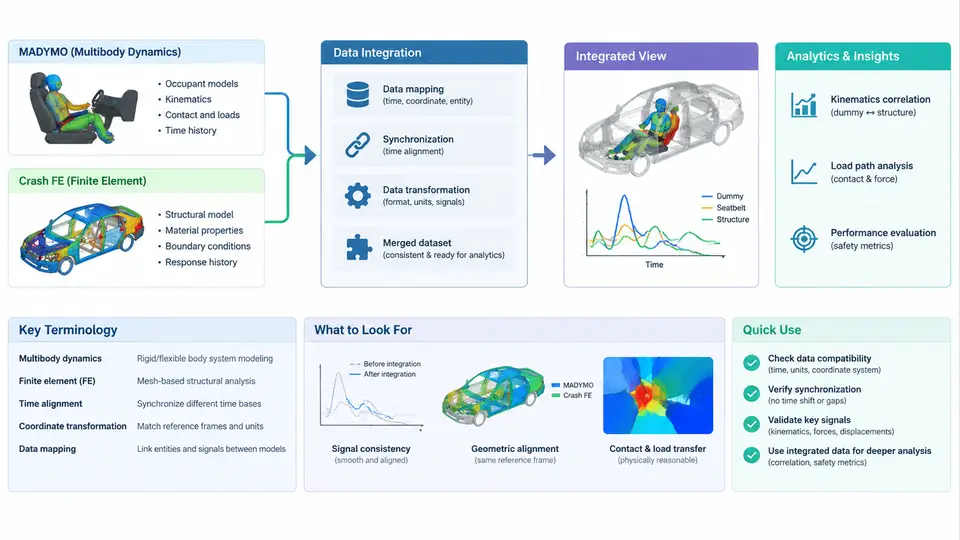
Crash safety engineering has evolved into a discipline where two complementary simulation paradigms must work together. On one side, MADYMO (Mathematical Dynamic Model) provides a multi-body and finite-element hybrid solver specialized in occupant kinematics, restraint system behavior, and injury criteria prediction. On the other side, crash FE codes such as LS-DYNA, PAM-CRASH, or Radioss simulate the structural deformation of the vehicle body, chassis, and safety cage under impact loading. Neither model alone tells the complete story: the FE model knows how the vehicle crushes, while MADYMO knows how the occupant moves inside that crushing vehicle. Data integration is the practice of coupling these two worlds so that occupant response is computed against a realistic, time-varying structural environment rather than a simplified rigid boundary.
This course addresses the full analytics pipeline: how crash FE results are extracted, transformed, and fed into MADYMO occupant models; how coupling signals are defined and validated; and how the integrated results are post-processed into engineering metrics that support design decisions. The goal is not merely to run two solvers in sequence, but to build a traceable, repeatable workflow where every data handoff is understood and every result can be defended.
Key Terminology
Before proceeding, establish a shared vocabulary. These terms appear throughout the course and in any integration project.
| Term | Definition | Typical Unit / Format |
|---|---|---|
| Multi-body (MB) model | Rigid-body occupant representation in MADYMO with joints, contacts, and restraint interactions | XML / MADYMO input deck |
| FE occupant model | Deformable occupant mesh (e.g., THUMS, GHBMC) used inside MADYMO or co-simulated | Nodal coordinates, element connectivity |
| Coupling surface | Geometry extracted from the crash FE model that MADYMO uses as a contact boundary | Facet set, rigid body, or moving mesh |
| Prescribed motion | Time-history of position/orientation applied to a MADYMO body from FE results | Translation (m), rotation (rad), velocity |
| Pulse / acceleration field | Deceleration signal from the FE model applied to the occupant environment | g or m/s², time series |
| Injury criterion | Quantitative metric derived from occupant response (HIC, Nij, chest deflection, etc.) | Dimensionless or mm |
| Time alignment | Synchronization of FE and MADYMO time bases, including t=0 definition | ms |
| Co-simulation | Simultaneous execution of FE and MADYMO solvers exchanging data at each time step | MADYMO–LS-DYNA coupling, MPI |
Two conventions deserve emphasis. First, time zero must be defined identically in both models—typically the moment of bumper-to-barrier contact. A mismatch of even 5 ms can shift peak occupant loading and invalidate injury criteria. Second, coordinate systems must be declared explicitly: vehicle coordinate system (X forward, Y left, Z up) versus occupant local axes. All transformations between them should be documented in the integration script, not left implicit.
End-to-End Integration Workflow
The integration workflow can be understood as five connected stages, each with distinct inputs, operations, and verification points. The SVG below illustrates the data flow and the key artifacts exchanged at each boundary.
Each stage produces a verifiable artifact. In Stage 1, the crash FE model must be solved with sufficient output frequency—typically every 0.1–0.5 ms—to capture occupant-relevant accelerations without aliasing. In Stage 2, extraction scripts read binary outputs (d3plot, binout, or nodout) and export ASCII time histories. A common pitfall is extracting acceleration from a node that is not representative of the occupant compartment; always verify that the chosen reference node lies on the seat cross-member or B-pillar base, not on a flexible panel that rings at high frequency.
Stage 3 is where most integration errors occur. Raw FE accelerations contain high-frequency noise from element ringing and contact chatter. Apply a low-pass filter consistent with the injury criterion being evaluated: SAE J211 recommends CFC 60 for HIC and CFC 600 for femur force. Resampling must preserve peak values; simple decimation can clip a 2 ms spike. Coordinate transformation from vehicle to occupant frame should be implemented as a single rotation matrix applied to all channels, with the matrix documented in the script header.
Stage 4 applies the transformed data to the MADYMO model. Prescribed motion is assigned to the seat and floor bodies; the coupling surface is attached to the instrument panel or knee bolster. If the FE model shows significant intrusion, the coupling surface must be updated at each time step—this is where co-simulation becomes necessary. In a sequential (non-co-simulated) approach, the intrusion is pre-computed and applied as a time-dependent rigid body motion, which is acceptable when occupant mass is small relative to vehicle mass.
Stage 5 computes injury criteria and compares them against regulatory or internal targets. A typical passenger car frontal offset case might yield HIC₁₅ around 450–650, chest deflection of 25–35 mm, and femur forces below 4 kN. These values are illustrative only; actual results depend on pulse severity, restraint tuning, and occupant size. The analytics stage should also include a correlation check: if physical sled or vehicle test data exist, overlay the MADYMO occupant response against measured accelerometers and belt load cells. A time shift of more than 3 ms or a peak magnitude difference exceeding 15% usually indicates a problem in the coupling definition or time alignment.
What This Course Delivers
Across the following chapters, you will build a complete integration capability: extracting and cleaning crash FE signals, constructing MADYMO coupling definitions, executing both sequential and co-simulated runs, and post-processing results into defensible engineering metrics. The emphasis throughout is on traceability—every number in the final report should be traceable back to a specific node, a specific filter setting, and a specific model version. That discipline is what separates a useful analytics workflow from a collection of disconnected simulations.