3. Python environment setup for CAE analyti
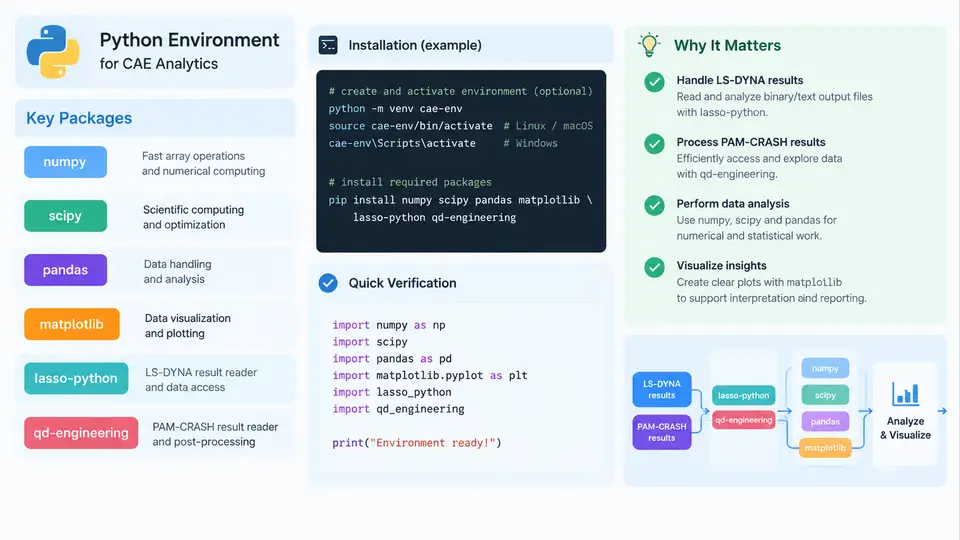
Before any LS-DYNA or PAM-CRASH result file can be parsed, the analyst needs a Python environment that can handle three distinct workloads: dense numerical arrays (nodal coordinates, element connectivity, time histories), tabular metadata (part lists, material assignments, run logs), and binary or ASCII result readers that decode solver-specific formats. A single pip install numpy pandas matplotlib is rarely sufficient in practice, because CAE analytics also depends on version compatibility between NumPy, SciPy, and the compiled extensions inside dedicated readers such as lasso-python and the qd-engineering toolchain. This section walks through a reproducible setup that a CAE engineer can rebuild on a workstation or an HPC login node.
Choosing an interpreter and isolation strategy
Use CPython 3.10 or 3.11 for CAE work. These versions are the sweet spot for binary wheel availability: NumPy, SciPy, pandas, and matplotlib all publish prebuilt wheels, and the compiled readers used for LS-DYNA d3plot and PAM-CRASH DSY files generally ship wheels for the same ABI. Avoid the system Python on Linux distributions, because it is often pinned to an older version and protected by the package manager.
Create one virtual environment per project rather than a single global environment. A solver-version-specific environment prevents the classic failure where upgrading pandas for a new dashboard silently breaks a reader that was compiled against an older NumPy C API.
# Linux / macOS
python3.11 -m venv ~/venvs/cae-analytics
source ~/venvs/cae-analytics/bin/activate

# Windows PowerShell
py -3.11 -m venv $HOME\venvs\cae-analytics
$HOME\venvs\cae-analytics\Scripts\Activate.ps1

python -m pip install --upgrade pip setuptools wheel
On Windows, install the Microsoft Visual C++ Redistributable before adding compiled readers; missing vcruntime140.dll is the most common cause of an ImportError that looks like a Python problem but is actually a runtime dependency problem.
Installing the core scientific stack
Install the numerical core first, then the readers, so that dependency resolution has a stable base. Pin versions in a requirements.txt so the environment can be reproduced on another machine or in a container.
pip install "numpy==1.26.4" "scipy==1.13.1" "pandas==2.2.2" "matplotlib==3.9.0"

# dedicated CAE readers
pip install lasso-python
pip install qd-engineering
Verify the installation with an import check that also prints the resolved versions. This catches the case where a reader pulls in a different NumPy build than the one you pinned.
python -c "import numpy, scipy, pandas, matplotlib, lasso; \
print('numpy', numpy.__version__); \
print('scipy', scipy.__version__); \
print('pandas', pandas.__version__); \
print('matplotlib', matplotlib.__version__); \
print('lasso', lasso.__version__)"
If lasso imports but raises an error only when a d3plot is opened, the problem is usually a missing or mismatched shared library rather than the Python package itself. Reinstalling the wheel with --force-reinstall --no-cache-dir resolves most of these cases.
Configuring matplotlib for headless and report use
CAE analytics frequently runs on a headless node or inside a batch job, where the default interactive backend fails. Set a non-interactive backend explicitly and configure a deterministic style so that contour plots and time-history curves look identical across machines.
import matplotlib
matplotlib.use("Agg")          # headless-safe; use "QtAgg" for interactive work
import matplotlib.pyplot as plt

plt.rcParams.update({
    "figure.dpi": 120,
    "savefig.dpi": 300,
    "font.size": 10,
    "axes.grid": True,
    "axes.titlesize": 11,
    "figure.autolayout": True,
})
For report-quality output, save as PNG at 300 dpi for embedding and as PDF for vector figures. Avoid relying on the default color cycle for contour plots; use an explicit colormap such as viridis or coolwarm so that stress and displacement fields remain readable in grayscale printouts.
Reader-specific configuration
The dedicated readers need a small amount of configuration before they are useful. For lasso-python, the typical pattern is to open a result database, list the available states, and extract a field for a chosen time step. The example below is illustrative and uses a placeholder path; the exact API names depend on the installed version.
import lasso
from lasso.dyna import D3plot, ArrayType

db = D3plot("run_01/d3plot")
print("states:", db.header.n_timesteps)

# nodal displacement at the last state
disp = db.arrays[ArrayType.node_displacement]   # shape (n_states, n_nodes, 3)
last = disp[-1]
print("max |u| =", (last**2).sum(axis=1).max()**0.5)
For PAM-CRASH, the qd-engineering toolchain provides readers for DSY and related time-history files. The workflow is similar: open the database, enumerate time steps, and pull nodal or element results into NumPy arrays for downstream analysis.
from qd_engineering import crash_reader

dsy = crash_reader.open("run_02/DSY")
times = dsy.time_steps()
print("time range:", times[0], "to", times[-1])

# nodal displacement for a node set
node_ids = [101, 102, 103]
u = dsy.nodal_displacement(node_ids, step=-1)
print(u.shape)
Both readers return NumPy arrays, which is the key integration point: once results are arrays, pandas and matplotlib can be applied without any solver-specific code. A common pattern is to flatten a time history into a DataFrame with columns time, node_id, ux, uy, uz, and magnitude, then filter and plot with standard pandas operations.
Verifying the environment end to end
A setup is only trustworthy once it has been exercised on a real result file. The verification below checks the full chain: reader import, file open, array extraction, DataFrame construction, and plot generation. Run it once after installation and keep it as a smoke test.
import numpy as np, pandas as pd
import matplotlib; matplotlib.use("Agg")
import matplotlib.pyplot as plt
import lasso
from lasso.dyna import D3plot, ArrayType

db = D3plot("run_01/d3plot")
disp = db.arrays[ArrayType.node_displacement]
mag = np.linalg.norm(disp, axis=2)          # (n_states, n_nodes)

df = pd.DataFrame(mag.T, columns=[f"t{i}" for i in range(mag.shape[0])])
peak = df.max(axis=1)
print("peak displacement:", peak.max())

fig, ax = plt.subplots()
ax.plot(peak.values)
ax.set_xlabel("node index"); ax.set_ylabel("max |u|")
fig.savefig("smoke_test.png")
print("smoke test passed")
Expected output is a printed peak displacement value and a written smoke_test.png. If the script fails at the D3plot call, the file path or the reader version is wrong; if it fails at np.linalg.norm, the array shape is not what the reader returned, which usually means a different result type was requested. If the plot is empty, the time-step index is out of range.
requirements.txt and a smoke_test.py in every CAE analytics project. When a reader is upgraded, rerun the smoke test before touching production scripts. This single habit prevents most "it worked yesterday" failures in result post-processing.
The diagram summarizes the layered structure: the interpreter hosts the core stack, the core stack hosts the readers, and the readers convert solver-specific binary output into NumPy arrays that feed the pandas and matplotlib pipeline. The verification band at the bottom is the part most often skipped, and it is precisely the part that turns a fragile installation into a dependable analytics environment.