1. Crash simulation results analytics lands
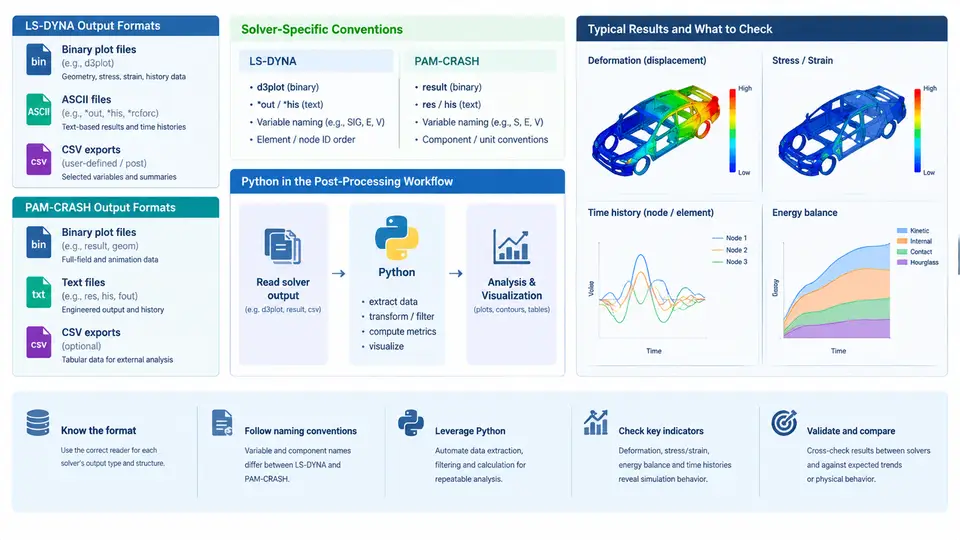
Crashworthiness simulation is one of the most data-intensive activities in automotive CAE. A single full-vehicle frontal impact model may contain 5–15 million elements, run for 120–150 ms of physical time, and write output at intervals of 0.1–1.0 ms. The result is a heterogeneous collection of time-history curves, nodal and elemental field data, section forces, and rigid-wall contact records. Before any Python code can be written, the analyst must understand what each solver actually writes to disk, how those files are structured, and where Python fits into a workflow that has traditionally been dominated by vendor GUIs.
Two Solvers, Two Philosophies
LS-DYNA and PAM-CRASH both solve explicit dynamic crash problems, but their output conventions reflect different design histories. LS-DYNA, developed by LSTC and now distributed by Ansys, uses a keyword-driven input deck and produces a family of ASCII and binary output files whose names are largely fixed by the solver. PAM-CRASH, originally from ESI Group, uses a similar explicit formulation but organizes its results around the .DSY / .THS / .ERF family and the PAM-CRASH result database, with a stronger emphasis on the PAM-VIEW post-processor as the primary consumer.
The practical consequence is that a Python post-processing pipeline must be solver-aware. The same physical quantity — say, the resultant force on a rigid wall — is stored in a different file, under a different naming convention, with a different time base, depending on which solver produced it.
LS-DYNA Output Formats
LS-DYNA writes several output streams during a crash run. The most important for analytics are:
d3plot— the primary binary state database. Contains nodal coordinates, displacements, velocities, accelerations, element stresses and strains, and shell/solid state variables at each output state. This is the file that LS-PrePost reads and that Python libraries such aslasso-pythonorqd-plotparse.binout— a binary time-history database containingnodout,elout,secforc,rcforc,glstat,matsum, andspcforcrecords. This is the workhorse for scalar time-series analytics.nodout— ASCII nodal time-history output, useful for quick inspection but rarely used in production pipelines because of its size.glstat— global statistics: kinetic energy, internal energy, hourglass energy, total energy, and mass scaling. Essential for energy-balance checks.matsum— per-material energy and mass summaries, used to detect unphysical energy growth in a single material.rcforc— rigid-wall contact forces, the primary source for occupant-loading metrics.
A critical convention: LS-DYNA's binout is a single binary file that contains multiple "families" of records. Reading it requires a parser that understands the LS-DYNA binary format, not a generic CSV reader. The lasso-python library exposes this through lasso.dyna.Binout, which returns NumPy arrays keyed by record name.
PAM-CRASH Output Formats
PAM-CRASH organizes results differently. The main outputs are:
.DSY— the binary result database, analogous tod3plot. Contains nodal and elemental field data at each time step..THS— time-history file, analogous tobinout. Stores scalar and vector time series for selected nodes, elements, sections, and rigid walls..ERF— error and diagnostic file, containing solver warnings, element failures, and energy-balance information..OUT— ASCII listing output, useful for quick checks but not for automated analytics.
PAM-CRASH's .THS file uses a fixed-width ASCII format with a header block that declares the number of time steps, the number of channels, and the channel names. This makes it easier to parse with plain Python than LS-DYNA's binary binout, but the channel naming is solver-specific and often requires a mapping table to align with LS-DYNA equivalents.
binout with internal record families; PAM-CRASH uses separate files per result type. A Python pipeline that must handle both should abstract the reader behind a common interface that returns a dictionary of NumPy arrays keyed by a normalized channel name.
Where Python Fits
Vendor GUIs (LS-PrePost, PAM-VIEW, Animator) are excellent for interactive inspection but poor for batch processing, regression testing, and design-space exploration. Python fills three distinct roles in a crash analytics workflow:
- Extraction and normalization. Read
d3plot,binout,.DSY, and.THSinto NumPy arrays, resample onto a common time base, and rename channels to a solver-agnostic schema. - Metric computation. Compute occupant-loading metrics (HIC, NIC, chest deflection), structural metrics (intrusion, section force, energy absorption), and stability metrics (hourglass energy ratio, mass scaling ratio).
- Reporting and regression. Generate plots, tables, and pass/fail verdicts against targets, and compare a new run against a baseline to detect unintended changes.
The following SVG illustrates the data flow from solver output to analytics-ready arrays, showing where each solver's files enter the pipeline and where normalization occurs.
A Minimal Extraction Example
To make the abstraction concrete, consider extracting the resultant rigid-wall force from an LS-DYNA run and the equivalent channel from a PAM-CRASH run. The goal is a single function that returns a NumPy array of shape (n_times,) in newtons on a common time base.
import numpy as np
from lasso.dyna import Binout

def read_lsdyna_wall_force(binout_path, wall_id):
    b = Binout(binout_path)
    # rcforc records: 'force' has shape (n_states, n_walls, 3)
    forces = b.read("rcforc", "force")
    times  = b.read("rcforc", "time")
    # resultant magnitude for the requested wall
    idx = wall_id - 1
    fx, fy, fz = forces[:, idx, 0], forces[:, idx, 1], forces[:, idx, 2]
    return times, np.sqrt(fx**2 + fy**2 + fz**2)

def read_pamcrash_wall_force(ths_path, channel_name):
    # .THS is fixed-width ASCII; header declares n_steps and n_channels
    with open(ths_path) as f:
        header = f.readline().split()
        n_steps, n_channels = int(header[0]), int(header[1])
        names = [f.readline().strip() for _ in range(n_channels)]
        data = np.loadtxt(f, max_rows=n_steps)
    col = names.index(channel_name)
    return data[:, 0], data[:, col]
Both functions return (time, force) pairs. The normalization layer then resamples both onto a common time vector — typically the LS-DYNA state times, since they are usually the coarser grid — using linear interpolation. After this step, downstream metric code does not need to know which solver produced the data.
binout time vector is in milliseconds by default, while PAM-CRASH's .THS time column is often in seconds. A silent unit mismatch will produce a force curve that looks plausible but is off by a factor of 1000.
What to Watch For
Three failure modes are common when building a cross-solver pipeline:
- Channel name drift. PAM-CRASH channel names in
.THSare user-defined in the input deck and may change between runs. A mapping table maintained alongside the model is more reliable than string matching. - Missing records. LS-DYNA's
binoutonly contains records that were requested via*DATABASE_BINARY_D3PLOTor*DATABASE_ASCII_*cards. Ifrcforcis absent, the extraction function must fail loudly, not return zeros. - State-count mismatch.
d3plotandbinoutmay have different numbers of states if output intervals differ. Never assume they share a time vector.
With these conventions understood, the rest of the course can focus on the analytics themselves: computing occupant metrics, comparing runs, and automating report generation. The extraction layer described here is the foundation that makes those tasks solver-independent.