3. CAE data ingestion
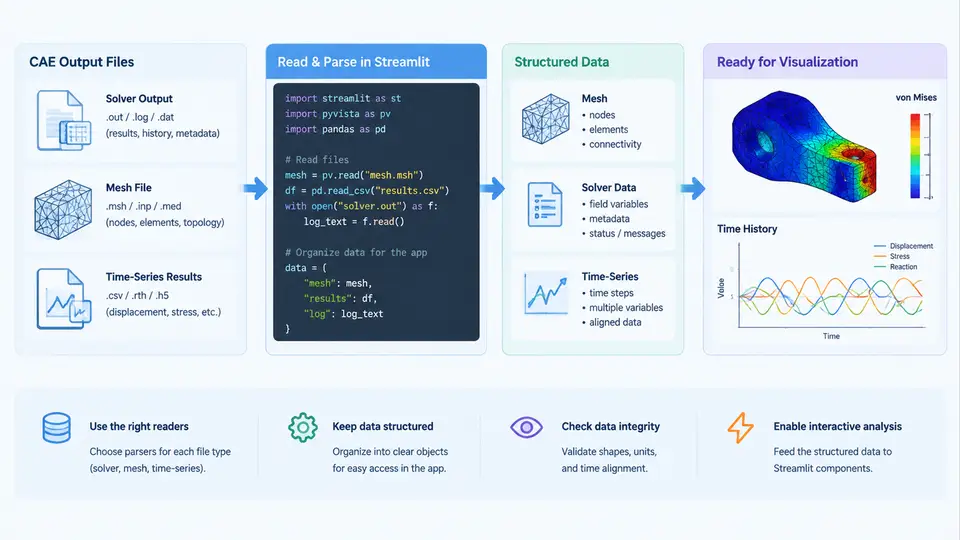
Every interactive CAE analytics application stands or falls on one capability: getting simulation data into the app reliably, quickly, and in a form that widgets can manipulate. Streamlit itself is agnostic about data origin — it renders whatever a Python function returns. The engineering challenge therefore lives entirely in the ingestion layer, where solver-specific file formats, mesh topology, and time-series structure must be normalized into pandas DataFrames, NumPy arrays, or lightweight geometry objects that survive Streamlit's rerun model.
This section covers the three dominant data families you will encounter: solver output files (nodal and elemental results), mesh files (geometry and connectivity), and time-series results (transient or parametric sweeps). For each family we examine the concrete parsing path, the caching strategy that keeps the app responsive, and the failure modes that produce silent wrong answers rather than exceptions.
Solver Output Files: From Binary Blobs to DataFrames
Commercial solvers rarely emit CSV. Nastran writes OP2 or punch files; Abaqus writes ODB or FIL; ANSYS writes RST or RTH; OpenFOAM writes raw ASCII/binary field directories. The pragmatic ingestion strategy is to convert once, cache aggressively, and never parse inside a widget callback.
For Abaqus ODB, the standard path is the odbAccess Python API, which only runs inside abaqus python or abaqus cae -noGUI. A common production pattern is a headless extraction script that dumps nodal displacement and stress into Parquet:
# extract_odb.py — run with: abaqus python extract_odb.py
from odbAccess import openOdb
import numpy as np, pandas as pd

odb = openOdb('bracket.odb', readOnly=True)
step = odb.steps['LoadStep']
frame = step.frames[-1]                    # last increment
disp = frame.fieldOutputs['U']
stress = frame.fieldOutputs['S']

rows = []
for v in disp.values:
    s = stress.getSubset(region=v.instance).values[0]
    rows.append({
        'node': v.nodeLabel,
        'ux': v.data[0], 'uy': v.data[1], 'uz': v.data[2],
        'mises': s.mises,
        'instance': v.instance.name,
    })
pd.DataFrame(rows).to_parquet('bracket_results.parquet')
odb.close()
The Streamlit side then reads Parquet with pd.read_parquet, which is columnar, compressed, and roughly an order of magnitude faster than re-parsing ODB. For Nastran OP2, pyNastran provides op2 = OP2() followed by op2.read_op2('model.op2'); displacement tensors are exposed as op2.displacements[subcase_id] with .data and .node_gridtype arrays. For OpenFOAM, pyfoam or direct parsing of constant/polyMesh/points plus 0/U works, but for interactive apps the cleaner route is foamToVTK followed by meshio or pyvista.read.
nodeLabel directly, a model with labels 1001–5000 will allocate 5001 slots and silently misalign every result. Always build an explicit label → index mapping and store it alongside the array.
Mesh Files: Geometry, Connectivity, and the Label Mapping Problem
Mesh ingestion serves two purposes in a Streamlit app: rendering (plotting the deformed shape or contour) and spatial querying (selecting nodes by bounding box, computing element centroids). The meshio library handles the widest format range — VTK, VTU, STL, Gmsh, Abaqus INP, Nastran BDF, CGNS — behind a single API:
import meshio
mesh = meshio.read('bracket.inp')
points = mesh.points                    # (n_nodes, 3) float64
cells  = mesh.cells_dict['hexahedron']  # (n_elem, 8) int32 connectivity
node_ids = mesh.point_data.get('node_id')  # original solver labels, if present
The critical detail is that mesh.points is indexed 0..n-1, while solver results are keyed by original labels. You must reconcile these before any plot. A robust pattern is to attach the solver label array as point_data during conversion, then build a lookup:
label_to_idx = {int(lbl): i for i, lbl in enumerate(node_ids)}
result_df['mesh_idx'] = result_df['node'].map(label_to_idx)
assert result_df['mesh_idx'].notna().all(), "Unmatched node labels"
That assertion is not decorative. In practice, mismatches arise from rigid-body elements, MPC nodes, or solver-internal nodes that appear in the ODB but not in the exported mesh. Catching them at ingestion time is far cheaper than debugging a contour plot that looks plausible but is shifted by one node.
Time-Series Results: Structure, Resampling, and Widget Binding
Transient and parametric results arrive as a sequence of frames, each with a time or load-factor value. The natural in-memory representation is a long-format DataFrame with columns [time, node, component, value], or a wide format with one column per node-component pair. Long format is preferable for Streamlit because st.selectbox and st.slider bind cleanly to categorical and numeric columns respectively.
Consider a modal or transient run with 200 frames and 50,000 nodes. A naive long DataFrame is 10 million rows — workable in pandas but sluggish for repeated filtering. Two mitigations matter:
- Store as a 3-D NumPy array
(n_frames, n_nodes, n_components)in a.npzfile, and convert to DataFrame only for the currently selected frame or node subset. - Precompute derived scalars — von Mises, principal stresses, resultant displacement magnitude — at ingestion time so the app never recomputes them per rerun.
import numpy as np
data = np.load('transient.npz')       # keys: times, values, node_ids
times, values = data['times'], data['values']   # (F,), (F, N, 6)
mises = np.sqrt(0.5*((values[...,0]-values[...,1])**2 +
                     (values[...,1]-values[...,2])**2 +
                     (values[...,2]-values[...,0])**2 +
                     6*(values[...,3]**2 + values[...,4]**2 + values[...,5]**2)))
np.savez_compressed('transient_derived.npz', times=times,
                    values=values, mises=mises, node_ids=data['node_ids'])
Caching: The Difference Between Usable and Unusable
Streamlit reruns the entire script on every widget interaction. Without caching, a 400 MB ODB parse would execute on every slider drag. The @st.cache_data decorator solves this for serializable returns (DataFrames, arrays, dicts), while @st.cache_resource handles non-serializable objects such as open file handles or PyVista plotters.
import streamlit as st

@st.cache_data(show_spinner="Loading solver results…")
def load_results(path: str) -> pd.DataFrame:
    return pd.read_parquet(path)

@st.cache_resource
def load_mesh(path: str):
    import meshio
    return meshio.read(path)
Two rules prevent the most common caching bugs. First, never mutate a cached DataFrame in place — return a copy or use .copy() before assignment, otherwise the cache is silently corrupted across sessions. Second, include a version or file-mtime argument in the cache key so that re-running the solver invalidates stale data:
import os
@st.cache_data
def load_results(path: str, mtime: float) -> pd.DataFrame:
    return pd.read_parquet(path)

mtime = os.path.getmtime('bracket_results.parquet')
df = load_results('bracket_results.parquet', mtime)
Putting It Together: A Minimal Ingestion Pipeline
The diagram below shows how the three data families converge into a single cached session state that widgets consume. Note that mesh and results are loaded independently and joined only at plot time — this keeps the cache granular so that changing a result variable does not invalidate the mesh.
Verification Checklist Before Wiring Widgets
Before connecting any slider or selector, confirm the following on the loaded data. Each item corresponds to a failure mode observed in real CAE apps:
| Check | How to Verify | Symptom if Skipped |
|---|---|---|
| Node label alignment | assert set(result.node) ⊆ set(mesh_labels) |
Contour plot shifted by one node; plausible but wrong |
| Unit consistency | Compare max displacement against hand calculation or solver log | Stress contours off by 10⁶ (mm vs m) |
| Frame count match | assert values.shape[0] == len(times) |
Slider index out of range at final frame |
| Cache invalidation | Re-run solver, check mtime changes, reload app | Stale results displayed after re-solve |
| Missing values | df.isna().sum() per column |
Plotly silently drops NaN nodes; holes in contour |
load_*() functions wrapped in cache decorators and pass the results to widgets.
With the ingestion layer verified, the app can safely assume that df contains solver-accurate values keyed by mesh index, that mesh holds the geometry those indices refer to, and that transient provides a consistent time axis. Every subsequent widget — contour selector, time slider, probe tool — operates on this normalized foundation, which is what makes the difference between a demo that works on one model and an application that survives contact with real project data.