1. Course overview
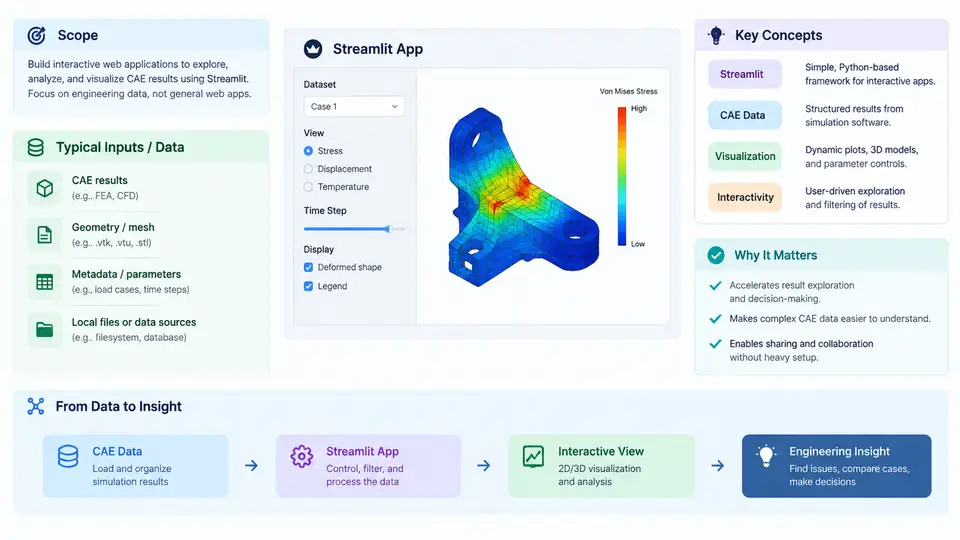
Computer-aided engineering (CAE) has always been a data-rich discipline. A single structural solve can emit displacement fields, stress tensors, modal frequencies, and convergence histories; a transient thermal run can produce gigabytes of time-series output. Yet the value of that data is often locked behind desktop post-processors, static reports, or scripts that only their author can run. Interactive CAE analytics applications close that gap: they turn simulation results and engineering models into browser-based tools that colleagues, reviewers, and decision-makers can query directly — without installing a solver, learning a scripting API, or waiting for an analyst to regenerate a plot.
Streamlit is a Python framework that makes building such tools unusually fast. You write ordinary Python, and Streamlit renders it as a reactive web app: widgets such as sliders, selectors, and file uploaders become inputs, and any change re-executes the script top to bottom, refreshing outputs automatically. For CAE work, this means a mesh-quality dashboard, a parametric study explorer, or a load-case comparison tool can be built in tens of lines rather than a full front-end project.
Scope of the Course
This course covers the full path from raw engineering data to a deployed interactive application. The scope is deliberately end-to-end but CAE-focused:
- Data ingestion — reading solver outputs (CSV, JSON, VTK, HDF5, Excel), mesh metadata, and material libraries into pandas DataFrames or NumPy arrays.
- Interactive analytics — filtering, aggregating, and comparing results across design variants, load cases, or time steps.
- Visualization — embedding Plotly, Matplotlib, and PyVista figures so users can zoom, hover, and inspect values.
- Parametric exploration — wiring sliders and selectboxes to derived quantities such as safety factor, mass, or first natural frequency.
- State and performance — caching expensive computations with
@st.cache_data, managing session state, and keeping large result sets responsive. - Deployment — packaging the app, handling dependencies, and sharing it via Streamlit Community Cloud or an internal server.
What the course does not cover is solver development, meshing theory, or finite element formulation. We assume results already exist or can be produced by an external solver; the focus is on the analytics layer that sits on top.
Core Concepts and Technical Context
Three ideas recur throughout the course and are worth establishing now.
1. The reactive execution model. Streamlit reruns your entire script on every interaction. This is simple but has consequences: expensive operations must be cached, and state that should persist across reruns must live in st.session_state. Understanding this model early prevents most performance and correctness bugs.
2. Separation of compute and presentation. A well-structured CAE app keeps data loading and numerical processing in plain Python functions, and reserves Streamlit calls for layout and widgets. This makes the analytics testable outside the browser and keeps the UI code thin.
3. Engineering semantics over generic dashboards. A CAE analytics app is not a business dashboard. Its axes carry physical units, its thresholds come from allowables and standards, and its comparisons must respect load-case definitions and coordinate conventions. The course emphasizes domain-correct labeling, unit handling, and traceable provenance of every displayed number.
st.session_state. Plan your state early.
How a CAE Analytics App Is Structured
The diagram below shows the typical data and control flow of an interactive CAE analytics application. Solver outputs and metadata enter a loading layer, pass through cached processing, and feed both the widget controls and the visualization layer. User interactions loop back into the processing stage, which is why caching and session state matter.
A Minimal Working Example
To make the concepts concrete, consider a small app that loads a table of simulation results and lets the user filter by load case and inspect the safety factor. The example below is illustrative; the numbers are synthetic and meant only to show the mechanics.
import streamlit as st
import pandas as pd

st.title("Load Case Explorer")

@st.cache_data
def load_results(path: str) -> pd.DataFrame:
    df = pd.read_csv(path)
    df["safety_factor"] = df["allowable_stress_MPa"] / df["max_stress_MPa"]
    return df

df = load_results("results/static_cases.csv")

case = st.selectbox("Load case", sorted(df["load_case"].unique()))
subset = df[df["load_case"] == case]

st.metric("Min safety factor", f"{subset['safety_factor'].min():.2f}")
st.dataframe(subset[["part_id", "max_stress_MPa", "safety_factor"]])
Three things are worth noting. First, @st.cache_data ensures the CSV is read and the safety factor computed only once per unique file, not on every widget interaction. Second, the selectbox drives the filter, and the metric and table update automatically. Third, the safety factor is computed from an allowable stress and a peak stress — both must share the same unit before division, which is why unit normalization belongs in the loading layer.
allowable_stress_MPa is in MPa and max_stress_MPa is actually in Pa, the safety factor will be off by a factor of 106. Normalize units immediately after loading and record the convention in the column names.
What You Will Be Able to Build
By the end of the course, you should be able to take a folder of solver results and produce an app that a non-specialist can use to answer real engineering questions: Which design variant has the lowest mass while staying above a safety factor of 1.5? How does the first natural frequency shift as plate thickness increases? Which elements exceed a stress threshold under the worst load case? These are the questions that interactive analytics answers well, and Streamlit is a practical vehicle for delivering them.
The remainder of the course moves from environment setup and data loading through visualization, caching, state management, and finally deployment. Each chapter builds on the same running example so that the techniques accumulate into a single coherent application rather than a set of disconnected snippets.