3. Data ingestion pipelines for CAE
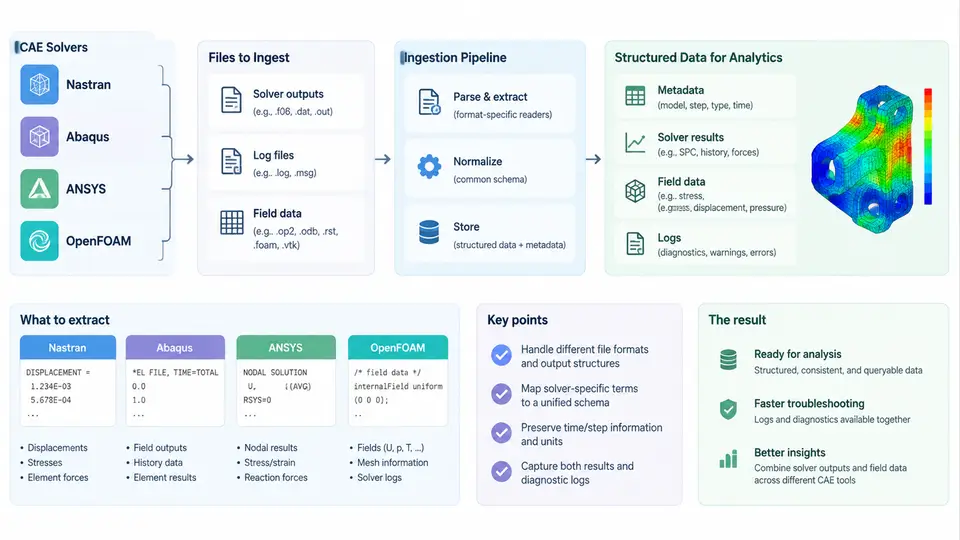
CAE data ingestion is the first hard boundary in any enterprise data science platform. Unlike business data, CAE results are heterogeneous, solver-specific, and often stored in binary containers that were never designed for downstream analytics. A robust ingestion pipeline must normalize four solver families — Nastran, Abaqus, ANSYS, and OpenFOAM — into a common internal representation while preserving provenance, units, coordinate conventions, and mesh topology. This section describes the extraction mechanisms, the intermediate data model, and the practical failure modes you will encounter.
What Actually Comes Out of a Solver
Every CAE run produces three distinct data classes, and each requires a different extraction strategy:
- Field data — nodal or elemental results such as displacement, stress, temperature, or pressure. These are large, dense, and typically binary.
- Log and status files — solver stdout, convergence histories, warnings, and fatal messages. These are text, line-oriented, and highly solver-specific.
- Model metadata — mesh coordinates, element connectivity, material assignments, load case definitions, and units. This is the context that makes field data interpretable.
A common mistake is to treat these as one stream. In practice, field data should flow through a columnar or array-oriented path (Parquet, HDF5, Zarr), while logs flow through a text parsing and event-extraction path. Metadata is small and belongs in a relational or document store keyed by a run identifier.
Solver-Specific Extraction
Nastran writes results to .op2 (binary) or .f06 (text). The .op2 format is the reliable source for field data; the .f06 file is best parsed for warnings, fatal messages, and grid point stress summaries. For .op2, use pyNastran:
from pyNastran.op2.op2 import OP2
op2 = OP2()
op2.read_op2("wing_static.op2")
for subcase, disp in op2.displacements.items():
    node_ids = disp.node_gridtype[:, 0]
    t1, t2, t3 = disp.data[0, :, 0], disp.data[0, :, 1], disp.data[0, :, 2]
Note that op2.displacements is keyed by subcase ID, and disp.data has shape (n_modes, n_nodes, n_components). For static analysis, n_modes = 1. Always verify that node_ids matches the model's grid ordering before joining with coordinates.
Abaqus produces .odb files, which are HDF5-based but with a proprietary schema. The supported path is the Abaqus Python API (odbAccess), which must run inside the Abaqus environment:
from odbAccess import openOdb
odb = openOdb("bracket.odb")
step = odb.steps["Step-1"]
frame = step.frames[-1]
stress = frame.fieldOutputs["S"]
for v in stress.values:
    elem_label = v.elementLabel
    mises = v.mises
Because odbAccess requires the Abaqus Python interpreter, the standard enterprise pattern is to run a small extraction script inside the solver environment and export to CSV or Parquet, then ingest that artifact into the platform. Do not attempt to read .odb directly with generic HDF5 tools; the schema is not stable across versions.
ANSYS Mechanical APDL writes .rst (binary results) and .out (log). The .rst file can be read with pyansys / ansys-mapdl-reader:
from ansys.mapdl import reader as pymapdl_reader
rst = pymapdl_reader.read_binary("plate.rst")
disp = rst.nodal_displacement(0)   # first result set
nodes = rst.nodes
ANSYS result sets are indexed by load step and substep. The nodal_displacement call returns an array aligned with rst.nodes, so the join is positional and does not require node ID matching — but you must record the result set index to preserve traceability.
OpenFOAM is the outlier: it stores field data as plain-text or binary dictionaries in a time-step directory structure (0/, 0.5/, 1/). Each field file contains an internal field and boundary patches. Parsing is straightforward but must handle the OpenFOAM dictionary syntax:
# 0.5/U — velocity field
dimensions      [0 1 -1 0 0 0 0];
internalField   nonuniform List<vector>
1200
(
(0.12 0.00 0.03)
(0.15 0.01 0.02)
...
)
Use foamToVTK or foamToEnsight to convert to a standard format, or parse the dictionaries directly with a tokenizer that respects the nonuniform List<type> header. The cell count on the line after the header must match the number of tuples; a mismatch indicates a truncated or corrupted write.
Log and Convergence Extraction
Log files carry the operational truth of a run. For Nastran, fatal messages appear as *** USER FATAL MESSAGE; for Abaqus, ***ERROR; for ANSYS, *** ERROR ***; for OpenFOAM, FOAM FATAL ERROR. A regex-based extractor should capture severity, timestamp (if present), and the offending line. Convergence data — residual norms per iteration — is best extracted into a time-series table keyed by run ID and iteration number.
INFO, WARNING, ERROR, FATAL. This makes cross-solver dashboards possible without solver-specific branching in the UI.Normalized Intermediate Model
The ingestion pipeline should converge on a solver-agnostic schema. A practical minimal model is:
| Entity | Key fields | Purpose |
|---|---|---|
| Run | run_id, solver, version, case_name, started_at, status | Provenance and lifecycle |
| Mesh | run_id, node_id, x, y, z | Coordinates in model units |
| Field | run_id, result_set, node_id, component, value, unit | Nodal results |
| LogEvent | run_id, severity, message, source_line | Operational diagnostics |
| Convergence | run_id, iteration, residual_name, value | Solver behavior |
Units must be recorded explicitly. Nastran and Abaqus do not enforce a unit system; ANSYS and OpenFOAM require consistent units but do not store them in the result file. The pipeline should attach a unit dictionary at ingestion time, derived from the model deck or a run manifest.
Pipeline Architecture
The following diagram shows the ingestion flow from solver artifacts through extraction, normalization, and storage. Note that field data and logs take separate paths and rejoin only at the run-level metadata store.
Practical Failure Modes and Verification
Three failure modes dominate real ingestion work. First, node ID mismatch: Nastran and Abaqus may renumber nodes internally, so joining field data to mesh coordinates by array position rather than by explicit ID is safer. Verify by checking that the coordinate range of the joined mesh matches the bounding box reported in the solver log. Second, truncated binary files: a killed solver process leaves an .op2 or .rst file with a valid header but incomplete data blocks. pyNastran will raise on read; catch this and mark the run as INCOMPLETE rather than failing the whole batch. Third, unit ambiguity: a model in mm–N–MPa produces stresses three orders of magnitude larger than the same model in m–N–Pa. If the unit dictionary is missing, flag the run for manual review instead of guessing.
A minimal verification step after ingestion is to compare the maximum nodal displacement magnitude against the value printed in the solver's summary section. For the Nastran example above, the .f06 file contains a MAXIMUM DISPLACEMENT line; if the ingested maximum differs by more than 1%, the extraction or unit handling is wrong. This single check catches the majority of ingestion defects before they reach analytics.