3. Feature engineering for crashworthiness
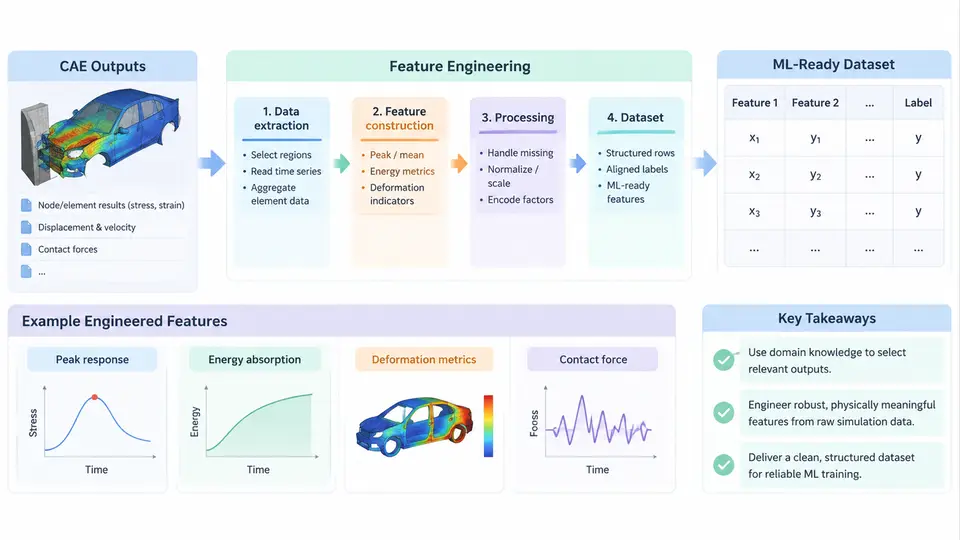
Crash simulation produces some of the richest — and messiest — data in mechanical engineering. A single frontal offset impact run may generate hundreds of thousands of shell elements, each carrying time histories for displacement, velocity, acceleration, plastic strain, and stress across several hundred millisecond steps. Before any surrogate model, classifier, or anomaly detector can consume this, the raw solver output must be transformed into a compact, consistent, and physically meaningful feature matrix. This chapter focuses on that transformation: what to extract, how to compute it, and how to assemble a dataset that a model can actually learn from.
Why raw CAE output is not ML-ready
Three structural problems block direct use of solver dumps. First, dimensionality: a full-field result is far too wide for tabular learners and too irregular for naive sequence models. Second, heterogeneity: nodal coordinates, element connectivity, material cards, and scalar history outputs live in different files with different indexing. Third, inconsistency: mesh topology changes between design variants, so element ID 40231 in one run has no correspondence to element ID 40231 in another. Feature engineering resolves all three by mapping each run onto a fixed-length vector whose entries have stable physical meaning regardless of mesh differences.
Feature families for crashworthiness
Practical crash ML pipelines draw on four feature families, each tied to a physical quantity engineers already trust.
- Global response features — peak acceleration, mean acceleration over a time window, HIC (Head Injury Criterion), chest deflection, intrusion at defined measurement points, and total energy absorbed. These are scalar per run and directly comparable across variants.
- Regional / sectional features — force and displacement aggregated over structural zones such as the front rail, B-pillar, or rocker. Aggregation is done by spatial selection (a bounding box or a named component set), not by element ID.
- Time-series shape features — rise time to peak, pulse duration above a threshold, number of local maxima, and decay slope. These capture crash-pulse character that a single peak value loses.
- Design / metadata features — gauge thickness, material grade, yield strength, and geometric parameters. These are inputs, not outputs, but they belong in the same matrix so the model can learn input–response relationships.
The guiding principle is physical invariance: a feature must mean the same thing whether the mesh has 80,000 or 120,000 elements. Spatial selection and scalar reduction achieve this; raw nodal arrays do not.
Extracting features from solver output
Most crash solvers (LS-DYNA, Radioss, Abaqus/Explicit) write nodal and element time history to a binary or ASCII database. A common workflow reads the database with a Python library, selects nodes or elements by geometric region, and reduces each time history to scalars. The following example assumes a nodal acceleration database and a region defined by a bounding box — a representative, reproducible pattern rather than a specific vendor API.
import numpy as np

# accel: shape (n_nodes, n_steps), coords: shape (n_nodes, 3)
# time: shape (n_steps,), region: (xmin, xmax, ymin, ymax, zmin, zmax)

def select_region(coords, region):
    xmin, xmax, ymin, ymax, zmin, zmax = region
    mask = (
        (coords[:, 0] >= xmin) & (coords[:, 0] <= xmax) &
        (coords[:, 1] >= ymin) & (coords[:, 1] <= ymax) &
        (coords[:, 2] >= zmin) & (coords[:, 2] <= zmax)
    )
    return mask

def region_features(accel, time, mask, threshold=50.0):
    a = accel[mask]                      # (n_region_nodes, n_steps)
    a_mean = a.mean(axis=0)              # spatial average over region
    peak = a_mean.max()
    t_peak = time[a_mean.argmax()]
    above = time[a_mean >= threshold]
    duration = (above.max() - above.min()) if above.size else 0.0
    return {
        "peak_accel": float(peak),
        "time_to_peak": float(t_peak),
        "pulse_duration": float(duration),
        "mean_accel": float(a_mean.mean()),
    }
Two details matter for correctness. First, the spatial average must be taken before the peak, not after — averaging per-node peaks overstates the regional response because different nodes peak at different times. Second, the threshold used for pulse duration must be fixed across the entire dataset; changing it per run makes the feature incomparable. A threshold of 50 g is a reasonable starting point for occupant-region acceleration, but it should be documented and held constant.
From per-run features to a dataset
Once each run yields a feature dictionary, the dataset is assembled by concatenating design metadata with response features and attaching a label or target. For a regression task such as predicting peak intrusion, the target is a scalar; for a classification task such as flagging runs that exceed a injury threshold, the target is binary. The table below shows a minimal schema for a frontal-impact study.
| Column | Type | Source | Example |
|---|---|---|---|
| run_id | string | metadata | FR_0042 |
| gauge_front_rail | float (mm) | design | 1.8 |
| yield_strength | float (MPa) | material card | 590 |
| peak_accel | float (g) | region feature | 62.4 |
| time_to_peak | float (ms) | region feature | 38.1 |
| pulse_duration | float (ms) | region feature | 21.7 |
| max_intrusion | float (mm) | target | 142.0 |
Three data-hygiene steps are non-negotiable before training. Missing-value handling: a run that diverged or terminated early may lack a valid peak; mark it explicitly rather than imputing a zero, which would be physically misleading. Outlier review: a peak acceleration of 900 g usually indicates a modeling error, not a real design, and should be inspected before it distorts scaling. Leakage control: features derived from the target — for example, using intrusion to compute a feature when intrusion is the label — must be excluded.
Scaling, encoding, and splitting
Crash features span several orders of magnitude: yield strength in hundreds of MPa, pulse duration in tens of ms. Distance-based and gradient-based learners both benefit from standardization. Fit the scaler on the training split only, then apply it to validation and test splits; fitting on the full dataset leaks distribution information. Categorical design variables such as material grade should be one-hot encoded or mapped to an ordinal scale only when a genuine physical ordering exists.
Splitting must respect the study design. If the dataset contains several mesh refinements of the same geometry, a random split will place near-duplicates in both train and test, inflating apparent accuracy. Group by geometry or by design family so that the test set contains genuinely unseen configurations. This is the single most common source of over-optimistic crash ML results.
Verification and common failure modes
Before handing a dataset to a model, verify it against the simulation it came from. Recompute one feature by hand from a known run and compare it to the pipeline output; a mismatch usually points to a unit error or an off-by-one in the time index. Check that the feature matrix has no constant columns — a feature that never varies carries no information and often signals a selection bug. Confirm that the target distribution is plausible: if predicted intrusion values cluster at a single value, the extraction may be reading the wrong time step.
Typical failure symptoms and their causes are worth memorizing. A model that performs well on validation but poorly on new geometries almost always indicates a random rather than grouped split. Features that change scale between runs point to inconsistent units or a threshold that was altered mid-dataset. A sudden drop in feature variance after a solver version upgrade suggests that a database keyword or output interval changed, silently altering the time history. Each of these is caught by the verification steps above, not by the model.
The output of this chapter is a versioned, documented feature matrix: one row per simulation run, columns with fixed physical meaning, units recorded, and a split that respects the study design. That artifact is the foundation for every downstream task — surrogate regression, classification, sensitivity analysis, or optimization — and its quality determines the ceiling of everything that follows.