3. Solver output formats and parsing
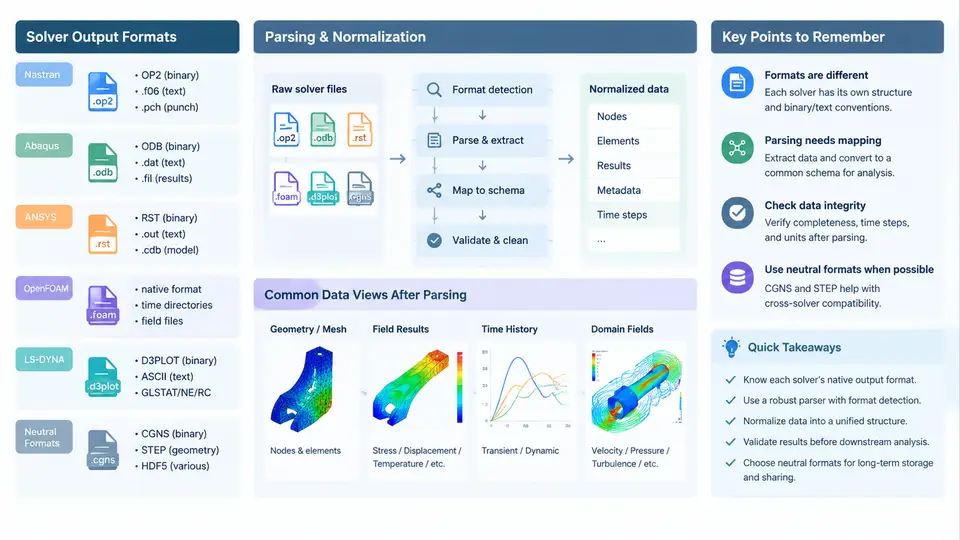
A CAE data lake is only as useful as its ability to ingest heterogeneous solver output without losing engineering meaning. Each major solver family writes results in its own dialect: fixed-column ASCII, keyword-driven blocks, directory-based field dumps, or binary result databases. This section examines the dominant formats, the parsing strategies that work in practice, and the neutral formats that let the lake stay solver-agnostic.
Why Format Diversity Is the Core Engineering Problem
Parsing is not a file-reading exercise; it is a semantic reconstruction task. A displacement vector in Nastran, Abaqus, and OpenFOAM carries the same physical meaning but arrives with different indexing, different coordinate conventions, and different time-step bookkeeping. The parser must recover three things consistently: topology (nodes, elements, connectivity), fields (nodal or elemental results), and metadata (units, coordinate systems, step/time identity). If any of these is silently dropped, downstream analytics produce plausible but wrong answers.
Solver-Specific Formats
Nastran output is dominated by fixed-format or free-field ASCII. The punch file (.pch), the output2/op2 binary database, and the newer HDF5-based .h5 are common. The op2 format is compact and widely supported, but its record structure is version-sensitive. A practical parser reads the op2 header to identify the analysis code and table codes before decoding result blocks. For text output, fixed-column parsing is mandatory because fields are position-defined, not delimiter-defined.
Abaqus uses keyword blocks in .inp for input and .odb (a proprietary binary database) for results. The .fil file is a Fortran-record ASCII/binary hybrid often used for third-party transfer. The recommended ingestion path is the Abaqus Python API (odbAccess), which exposes steps, frames, and field outputs as objects rather than raw bytes. Parsing .odb without the API is fragile and should be avoided.
ANSYS results live in the .rst (structural) or .rth (thermal) binary files, readable through the MAPDL result file API or PyMAPDL. Legacy .out files remain common in archives and require block-aware text parsing keyed on result headers such as NODE, ELEMENT, and TIME.
OpenFOAM is the outlier: results are a directory tree, not a single file. Each time step is a directory named by simulation time, containing field files such as U, p, and k. The header carries class, object, dimensions, and location. Parsing must respect the OpenFOAM dictionary syntax, including nonuniform List<vector> blocks and boundary field patches. The dimensions line is the only reliable unit record and must be captured.
LS-DYNA produces d3plot binary state databases plus ASCII nodout, elout, and glstat files. The d3plot family is state-based: each state contains geometry and results, so the parser must track state indices and time values together. ASCII nodout is convenient for spot checks but too slow for full-lake ingestion.
Neutral Formats as the Interchange Layer
CGNS (CFD General Notation System) is the standard neutral container for CFD: it stores a structured or unstructured mesh plus flow solutions in a hierarchical node tree (Base → Zone → FlowSolution). STEP (ISO 10303) is the neutral format for geometry, not results; it carries B-rep solids and assemblies and is used to link simulation results back to CAD identity. A well-designed lake stores native solver output as the immutable source of truth and writes CGNS or STEP-derived geometry references as the queryable interchange layer.
Parsing Strategy in Practice
A robust ingestion pipeline treats each solver as a plugin behind a common interface. The plugin declares which file extensions it handles, how to detect version, and how to yield canonical records. The following pseudo-configuration shows how a lake might register parsers and their validation rules:
parsers:
  - name: nastran_op2
    match: ["*.op2"]
    reader: pyNastran.op2
    validate:
      node_count: match_model
      element_count: match_model
      time_steps: monotonic
  - name: openfoam_case
    match: ["system/controlDict"]
    reader: foamfile
    validate:
      dimensions_present: true
      patch_coverage: full
  - name: lsdyna_d3plot
    match: ["d3plot*"]
    reader: lasso-python
    validate:
      state_count: match_control
      time_values: monotonic
Two validation gates matter most. First, count reconciliation: the number of nodes and elements parsed must equal the model definition; a mismatch usually means a truncated file or a misread header. Second, time monotonicity: step times must increase; a non-monotonic sequence signals a restarted or corrupted state database. When either gate fails, the parser should quarantine the file and emit a diagnostic rather than write partial data into the lake.
dimensions line; LS-DYNA depends on the user's consistent unit system. Always record the declared or inferred unit system in the canonical record, and flag records where units are unknown.
Common Failure Symptoms and Troubleshooting
| Symptom | Likely Cause | Action |
|---|---|---|
| Node count mismatch | Truncated file or wrong record offset | Re-read header; verify file size against expected |
| Zero displacement everywhere | Wrong result table code selected | List available table codes; select the correct one |
| OpenFOAM field missing patches | Boundary file not parsed | Parse constant/polyMesh/boundary before fields |
| d3plot states out of order | Restart file merged incorrectly | Sort by state index; check control card |
| CGNS zone mismatch | Base/Zone hierarchy misread | Traverse tree explicitly; do not assume single zone |
Neutral Format Conversion: When and Why
Converting native output to CGNS is worthwhile when the lake must serve multiple CFD solvers or when long-term archival requires a stable, documented container. Conversion to STEP is relevant only for geometry traceability, not for field results. A practical rule: keep native files immutable, write CGNS as a derived queryable copy for CFD, and store STEP references alongside geometry-linked metadata. This preserves provenance while enabling cross-solver analytics.
The next step in the pipeline is mapping these canonical records into a queryable schema, which is covered when we discuss the lake's storage and indexing layer.