1. Crash CAE data landscape
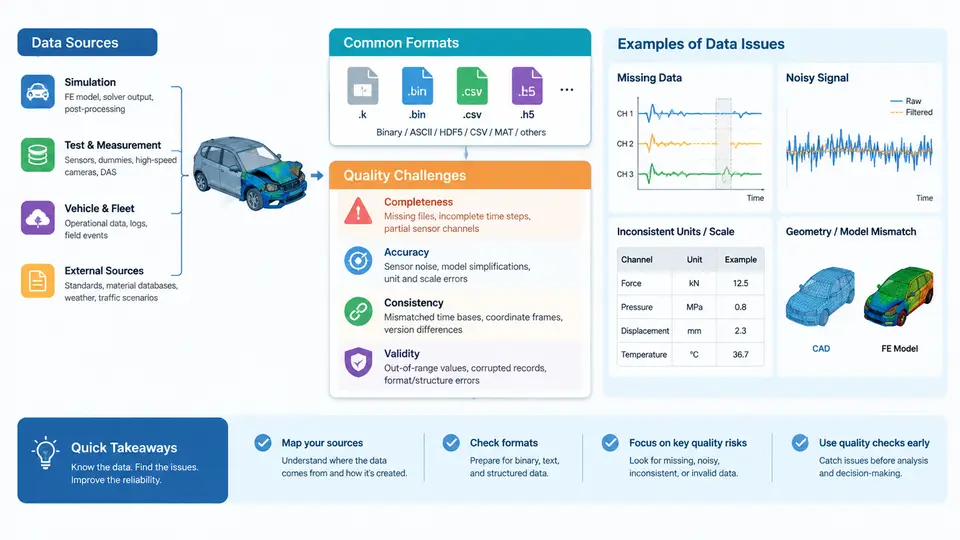
Crash CAE (Computer-Aided Engineering) is the computational backbone of modern vehicle safety development. Before a single physical prototype is built, thousands of simulation runs predict how a body-in-white, restraint system, and occupant will behave under frontal, side, rear, and pedestrian impact. Every one of those runs depends on data: geometry, material definitions, load curves, boundary conditions, solver settings, and result files. When that data is wrong, incomplete, or inconsistent, the simulation does not fail loudly — it produces plausible-looking numbers that quietly mislead engineering decisions. This chapter maps the crash CAE data landscape: where data comes from, how it is stored, and why quality problems are so persistent.
Where Crash CAE Data Comes From
Crash simulation data originates from several distinct pipelines, each with its own conventions and failure modes.
- CAD and geometry sources: Body panels, closures, and structural members are exported from CATIA, NX, or Creo, usually as STEP or JT, then meshed in ANSA, HyperMesh, or Simcenter. Mid-surface extraction, weld and adhesive representation, and thickness assignment all happen here.
- Material and constitutive data: Steel grades (DP590, DP780, hot-stamped 22MnB5), aluminum alloys, plastics, and foams require stress–strain curves, strain-rate sensitivity, and failure criteria. These arrive from material test labs as CSV or Excel, often with inconsistent units and extrapolation beyond tested strain.
- Load and boundary conditions: Sled pulse curves, barrier impact velocities, airbag inflator pressure–time curves, and seatbelt force–displacement data come from physical tests or supplier specifications.
- Solver input decks: LS-DYNA, PAM-CRASH, and Radioss keyword files assemble all of the above into a runnable model.
- Result and post-processing data: d3plot, binout, and time-history files feed injury criteria calculations (HIC, chest deflection, femur force) and animation review.
A single full-vehicle frontal model may contain 8–15 million elements, 200+ material cards, and 50+ load curves. The data volume and heterogeneity alone make manual quality control impractical.
Formats and Their Interoperability Gaps
Crash CAE is a multi-format discipline. Geometry moves through neutral formats, meshes through solver-specific formats, and results through binary post-processors. Table 1 summarizes the common formats and their quality-relevant characteristics.
| Data Category | Typical Formats | Quality Risk |
|---|---|---|
| CAD geometry | STEP, JT, IGES | Surface gaps, lost features, unit ambiguity |
| FE mesh | NASTRAN, LS-DYNA .k, ANSA .ansa | Duplicate nodes, free edges, negative Jacobians |
| Material cards | CSV, XLSX, solver keyword | Unit mismatch, missing strain-rate curves |
| Load curves | CSV, TYDEX, solver *DEFINE_CURVE | Time-axis offset, sign convention errors |
| Results | d3plot, binout, H3D | Corrupted states, missing time steps |
The interoperability gap is a primary quality challenge. A material curve exported in MPa from the lab may be pasted into a solver deck expecting Pa. A CAD model in millimeters may be meshed alongside a component in meters. These are not exotic errors — they are routine, and they are exactly the kind of defect an anomaly detection system must catch before the solver runs.
Why Quality Problems Persist
Crash CAE data quality is difficult because the discipline sits at the intersection of multiple teams, tools, and time scales. Four structural causes stand out.
- Distributed ownership: No single engineer owns the full data chain. The CAD designer, mesher, material specialist, and CAE analyst each validate their own slice, and defects often appear only at integration.
- Late error detection: A unit error in a material card may not surface until the simulation runs for hours and produces an unrealistic deformation pattern. By then, the root cause is buried under solver output.
- Version drift: CAD geometry, mesh, and material data evolve on different schedules. A mesh built from CAD revision C may be paired with material data from revision A, creating silent inconsistencies.
- Lack of ground truth: Unlike software testing, crash CAE has no unit test suite. Correctness is judged by physical correlation, which is expensive and infrequent.
A Concrete Example: Unit and Sign Convention Defects
Consider a side-impact sled model. The seatbelt force–displacement curve is delivered by the supplier in newtons and millimeters, but the solver deck uses a tonne–millimeter–second unit system. The analyst pastes the curve directly into a *DEFINE_CURVE card. The solver interprets the force values as kilonewtons, producing a restraint force roughly 1000× too high. The simulation terminates normally, but chest deflection is near zero and the model appears to "pass" the injury criterion.
The observable symptom is a result that is physically implausible but numerically clean: no negative volumes, no mass scaling warnings, no termination errors. A quality system must therefore check not only solver health but also physical plausibility — force magnitudes, energy balance, and comparison against historical ranges.
*DEFINE_CURVE
$#    lcid      sidr       sfa       sfo      offa      offo    dattyp
         101         0       1.0       1.0       0.0       0.0         0
$#                abscissa                ordinate
                   0.000                   0.000
                  10.000                2500.000
                  25.000                4800.000
                  40.000                5200.000
In this example, the sfa and sfo scale factors are both 1.0, meaning the raw values are used as-is. If the source data were in different units, these factors — or the curve values themselves — would need correction. An anomaly detector can flag curves whose peak force falls outside the expected range for a given restraint type, catching the error before correlation runs.
Data Flow and Quality Checkpoints
The figure below traces the crash CAE data flow from source to result, marking the checkpoints where quality defects most commonly enter and where automated detection is most valuable.
The two checkpoints in the figure are not optional quality gates — they are the minimum viable detection surface. Checkpoint 1 catches deterministic defects (wrong units, missing cards, bad elements) before compute is spent. Checkpoint 2 catches statistical and physical anomalies (implausible forces, energy imbalance) that deterministic rules miss. Together they define the scope of the anomaly detection system developed throughout this course.
What This Means for Detection System Design
Three practical implications follow from the data landscape described above.
- Detection must be format-aware. A validator for LS-DYNA keyword decks cannot be reused directly for CSV material curves. The system needs parsers for each format family and a common internal representation for cross-format checks.
- Detection must be both rule-based and statistical. Unit errors and missing cards are best caught by deterministic rules. Subtle anomalies — a curve that is slightly out of family, a force that is 15% above the historical mean — require statistical baselines built from prior validated models.
- Detection must run early and often. The cost of a defect grows with how late it is found. A unit error caught at Checkpoint 1 costs minutes; the same error caught after a 12-hour solver run and a correlation review costs days.
The remainder of this course builds on this foundation. Subsequent chapters will formalize the defect taxonomy, develop parsing and normalization pipelines, construct statistical baselines from historical model data, and integrate detection into the CAE workflow so that quality checks become a routine, automated part of every simulation run.