3. CAE ontology design
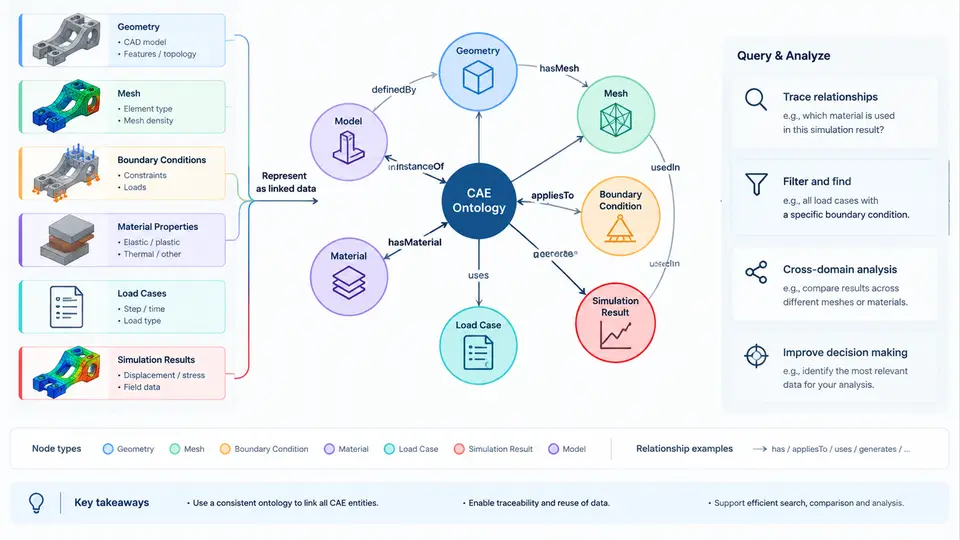
An ontology is the formal contract that turns a pile of CAE files into a queryable knowledge graph. Before any retrieval engine can answer "which load cases used this material at 200 °C," the graph must agree on what a load case is, which properties it owns, and how it connects to a mesh, a solver deck, and a result set. This chapter defines a practical CAE ontology covering six core domains — geometry, mesh, boundary conditions, material properties, load cases, and simulation results — and shows how to instantiate them as linked data with stable IRIs and explicit relations.
Design Principles for a CAE Ontology
Three principles keep the model usable rather than academic. First, separate the artifact from its metadata: a STEP file is a file, while the solid it contains is a geometric entity with a volume and a bounding box. Second, reuse established vocabularies where they exist — PROV-O for provenance, QUDT or OM for units, Dublin Core for file metadata — and mint custom classes only for CAE-specific concepts. Third, model at the granularity of retrieval questions. If analysts routinely ask "which elements exceeded yield," element-level result links are required; if they only ask "did the model pass," a scalar verdict suffices.
A workable namespace convention is https://cae.example.org/ontology# for classes and properties, with instance IRIs built from a deterministic pattern such as .../model/{modelId}/mesh/{meshId}. Deterministic IRIs make re-ingestion idempotent: re-running the loader updates the same node instead of creating duplicates.
Core Classes and Their Relations
The six domains form a dependency chain rather than a flat list. A SimulationModel aggregates one Geometry and one Mesh; the mesh is generated from the geometry and carries a meshQuality record. Material instances are referenced by SectionAssignment nodes that bind a material to a region of the mesh. BoundaryCondition and LoadCase instances attach to node or element sets. A SimulationRun consumes a load case plus a solver configuration and produces ResultSet instances, which in turn link back to the exact mesh and load case through PROV-O prov:used and prov:wasGeneratedBy.
The following table summarizes the principal classes, their key datatype properties, and their object properties. Units are mandatory on every numeric literal; a length without a unit is a defect, not a default.
| Class | Key Datatype Properties | Key Object Properties |
|---|---|---|
Geometry | boundingBox, volume, format | derivedFrom (CAD assembly) |
Mesh | elementType, nodeCount, elementCount, minJacobian | generatedFrom → Geometry |
Material | youngsModulus, poissonRatio, density, yieldStrength | hasTemperatureCurve |
SectionAssignment | thickness | usesMaterial, appliesToRegion |
BoundaryCondition | constraintType, dofMask | appliesToNodeSet |
LoadCase | loadType, magnitude, loadFactor | appliesToNodeSet, combinedWith |
SimulationRun | solver, startedAt, wallClockSeconds | usedLoadCase, usedMesh |
ResultSet | quantity, maxValue, locationOfMax | wasGeneratedBy, usedMesh |
Note the deliberate asymmetry: Mesh points to Geometry via generatedFrom, but geometry does not point back to meshes. This keeps the geometry node stable when meshes are regenerated with different element sizes — a common workflow where one CAD revision spawns five mesh variants.
Modeling Boundary Conditions and Load Cases
Boundary conditions and load cases are the most frequently queried entities because they encode engineering intent. Model them as first-class nodes, never as string annotations on a run. A BoundaryCondition should record the constraint type (fixed, pinned, symmetry, elastic), the degrees of freedom constrained, and the node set it applies to. A LoadCase records the load type (force, pressure, gravity, thermal, displacement), the magnitude with unit, the direction vector in the model coordinate system, and the load factor.
Direction conventions must be declared once and reused. In this course we adopt the model coordinate system with +Z as the vertical axis and gravity acting along −Z. Every direction vector in the graph is expressed in that frame; if a solver deck uses a local frame, the transformation is stored as a coordinateSystem node linked to the load case, not baked into the vector.
Load case combinations are modeled with combinedWith plus a combinationFactor, which allows a linear superposition query: retrieve all runs whose load case is a combination containing the thermal case with a factor above 1.0.
Linking Simulation Results
Results are where the graph earns its keep. A ResultSet should carry the physical quantity (vonMisesStress, displacementMagnitude, temperature), the maximum value with unit, the node or element ID where the maximum occurs, and a pointer to the field file. For element-level queries, store a compact summary — histogram buckets or percentile values — rather than every nodal value, which would bloat the triple store. Full field data stays in the original result file; the graph stores the index.
Provenance is not optional. Each ResultSet links to its SimulationRun, which links to the mesh, load case, material set, and solver version. This chain answers the audit question "why does this stress value differ from last month's" by exposing that the mesh was regenerated with a finer element size.
Instantiating the Ontology: A Worked Example
Consider a bracket model with a single load case. The ingestion pipeline reads the solver deck and emits triples. A representative fragment in Turtle syntax looks like this:
@prefix cae: <https://cae.example.org/ontology#> .
@prefix inst: <https://cae.example.org/model/BRK-001/> .
@prefix qudt: <http://qudt.org/schema/qudt/> .

inst:mesh-01 a cae:Mesh ;
    cae:generatedFrom inst:geom-01 ;
    cae:elementType "C3D10" ;
    cae:nodeCount 48210 ;
    cae:elementCount 27430 ;
    cae:minJacobian 0.42 .

inst:mat-01 a cae:Material ;
    cae:youngsModulus [ qudt:numericValue 210 ; qudt:unit "GPa" ] ;
    cae:poissonRatio 0.30 ;
    cae:density [ qudt:numericValue 7850 ; qudt:unit "kg/m^3" ] ;
    cae:yieldStrength [ qudt:numericValue 355 ; qudt:unit "MPa" ] .

inst:lc-01 a cae:LoadCase ;
    cae:loadType "pressure" ;
    cae:magnitude [ qudt:numericValue 2.5 ; qudt:unit "MPa" ] ;
    cae:direction "0,0,-1" ;
    cae:appliesToNodeSet inst:nset-top .

inst:run-01 a cae:SimulationRun ;
    cae:usedLoadCase inst:lc-01 ;
    cae:usedMesh inst:mesh-01 ;
    cae:solver "Abaqus 2023" ;
    cae:startedAt "2024-11-05T09:14:00Z"^^xsd:dateTime .

inst:res-01 a cae:ResultSet ;
    cae:quantity "vonMisesStress" ;
    cae:maxValue [ qudt:numericValue 287.4 ; qudt:unit "MPa" ] ;
    cae:locationOfMax "E18422" ;
    prov:wasGeneratedBy inst:run-01 ;
    prov:used inst:mesh-01 .
With this graph loaded, a SPARQL query can retrieve every run where the maximum von Mises stress exceeds 90% of yield strength:
SELECT ?run ?stress ?yield WHERE {
  ?run cae:usedLoadCase ?lc .
  ?res prov:wasGeneratedBy ?run ;
       cae:quantity "vonMisesStress" ;
       cae:maxValue ?mv .
  ?mv qudt:numericValue ?stress .
  ?mat cae:yieldStrength ?ys .
  ?ys qudt:numericValue ?yield .
  FILTER (?stress > 0.9 * ?yield)
}
In this example the bracket returns 287.4 MPa against a 355 MPa yield, a utilization of 0.81 — below the 0.9 threshold, so it would not appear. Raising the pressure to 3.0 MPa would push the stress to roughly 345 MPa and trigger the query. This is the practical payoff: safety-margin screening becomes a graph traversal rather than a manual file review.
ResultSet resolves to exactly one SimulationRun; (2) every numeric literal has a unit; (3) every SectionAssignment references a material that exists in the material library. A SHACL shape file can enforce all three automatically during ingestion.
Common Pitfalls
- Duplicating materials per run. If each simulation run mints a new material node, cross-run comparison breaks. Materials belong in a shared library namespace and are referenced, not copied.
- Embedding node sets as strings. A node set should be an entity with an IRI so that boundary conditions, load cases, and result maxima can all point to the same region.
- Omitting units. A magnitude of "2.5" is ambiguous between MPa, ksi, and N/mm². Always attach a unit via QUDT or an equivalent vocabulary.
- Storing full field data in the graph. Keep nodal and elemental arrays in the result file; store only aggregates and the file pointer in the graph.
The ontology described here is deliberately minimal but complete enough to support the retrieval patterns used throughout the rest of this course: material substitution studies, load case comparison, mesh convergence tracking, and margin-of-safety screening. Once these six domains are linked with stable IRIs and explicit provenance, the graph becomes the single source of truth that downstream retrieval and analytics layers can rely on.