1. CAE data landscape and retrieval challen
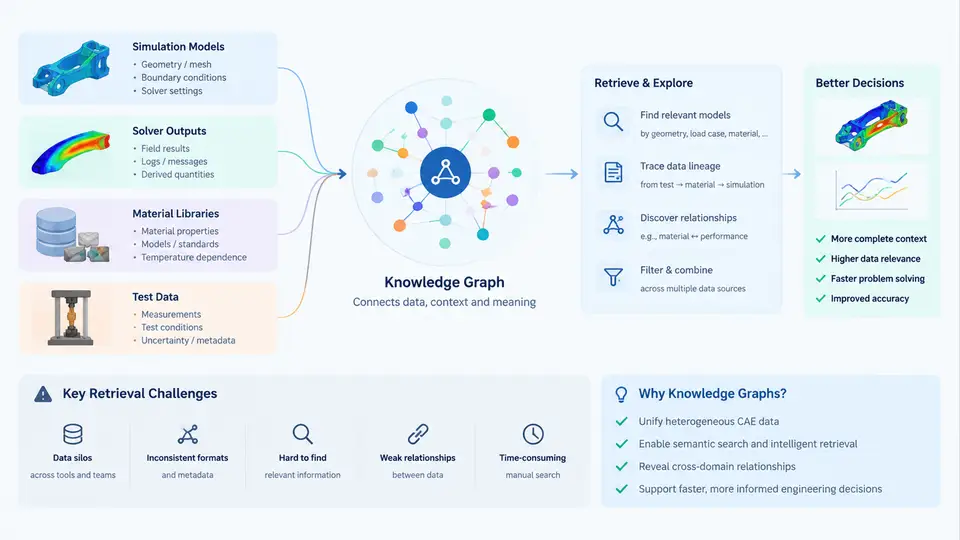
Computer-aided engineering (CAE) is not a single tool but a federation of data-producing activities. A typical product development program generates simulation models, solver outputs, material libraries, and physical test data in parallel, often across different teams, vendors, and time zones. The result is a heterogeneous data landscape in which the same physical component may be described by a dozen files that share no common identifier, no shared units convention, and no traceable lineage. Before any retrieval system can be designed, it is necessary to understand what kinds of data exist, how they are structured, and why conventional search fails on them.
The Four Primary CAE Data Families
Simulation models are the authored artifacts: finite element (FE) meshes, boundary condition sets, load cases, solver decks, and pre-processing scripts. They are typically stored as native solver formats — .cdb, .inp, .bdf, .k — or as neutral exchange formats such as STEP, IGES, or JT for geometry. A single crashworthiness model may contain 8–15 million elements, dozens of part definitions, and hundreds of named selections. The model file itself is large, but its semantic content (what the part represents, which load case it belongs to, which revision of the CAD it references) is usually buried in comments, naming conventions, or a separate metadata spreadsheet.
Solver outputs are the generated results: displacement fields, stress tensors, modal frequencies, temperature histories, and failure indices. These are stored in binary result files (.odb, .rst, .op2, .h3d) whose internal structure is solver-specific. A single transient run can produce tens of gigabytes of time-step data. Retrieving "the maximum von Mises stress in the bracket under the 3g lateral load case" requires not just finding the file but knowing which time step, which element set, and which coordinate system the result was reported in.
Material libraries hold constitutive data: elastic modulus, Poisson's ratio, yield curves, hardening parameters, fatigue S-N curves, and temperature-dependent properties. These are frequently maintained in spreadsheets or proprietary databases (e.g., MatML, MSC Material Center, Ansys Granta). The same aluminum alloy may appear as AL_6061_T6, Al6061-T6, and 6061 T6 across three projects, each with slightly different property values and no indication of which is authoritative.
Test data comes from physical experiments: strain gauge rosettes, accelerometers, digital image correlation (DIC) systems, and fatigue rigs. It is stored in time-series formats (CSV, TDMS, HDF5) with channel names that follow lab-specific conventions. Correlating a test channel to a simulation node or element is a manual, error-prone mapping step that is rarely documented.
Why Conventional Retrieval Breaks Down
File-system search and even full-text search over filenames fail on CAE data for four structural reasons.
- Naming entropy. There is no enforced naming standard. A model may be called
bracket_v3_final_APPROVED.inpin one project andBRK-2041_revC_loadcase2.bdfin another. The same physical part has no stable key. - Format opacity. Binary solver outputs cannot be grepped. Extracting a scalar result requires a solver-specific API or a conversion step, which means retrieval cannot be done with generic tools.
- Lost provenance. The link between a result file and the model, material set, and boundary conditions that produced it is often stored only in the engineer's memory or in an email thread. Without provenance, a retrieved result cannot be trusted or reused.
- Unit and coordinate ambiguity. Results may be reported in mm or m, in global or local coordinate systems, at node or element centroids. A retrieved number without its reference frame is meaningless.
From File Retrieval to Knowledge Retrieval
A knowledge graph addresses these failures by representing CAE entities — models, load cases, materials, results, tests — as typed nodes with explicit relationships, rather than as opaque files. The graph does not replace the file store; it indexes it with meaning. A query such as "find all models that use material AL6061-T6 and have a completed 3g lateral load case with max stress below 250 MPa" becomes a traversal over typed edges: Model → usesMaterial → Material, Model → hasLoadCase → LoadCase, LoadCase → producedResult → Result, Result → hasMetric → StressMetric.
The figure below contrasts the flat file-store view with the graph view for the same set of CAE artifacts. In the flat view, retrieval depends on filename patterns and folder location. In the graph view, retrieval follows semantic relationships that remain valid even when files are renamed or moved.
Practical Implications for Retrieval Design
Three engineering consequences follow from this landscape analysis. First, identity must be assigned, not discovered. A stable part identifier (e.g., a UUID or a controlled part number) must be attached to every model, result, material record, and test channel at creation time. Second, provenance must be captured as structured metadata, not as free-text comments. At minimum, each result should record the model revision, material set revision, solver version, load case definition, and unit system. Third, units and coordinate frames must be explicit in the graph schema, because a stress value without a reference frame cannot be compared across projects.
The remainder of this course builds on this foundation: subsequent chapters cover graph schema design for CAE entities, ingestion pipelines that extract metadata from solver files, query patterns for cross-project retrieval, and validation strategies that keep the graph consistent with the underlying file store. The central premise is that retrieval quality is determined not by search speed but by the richness and correctness of the semantic layer that sits between the engineer and the raw data.