3. CAE data ingestion pipelines
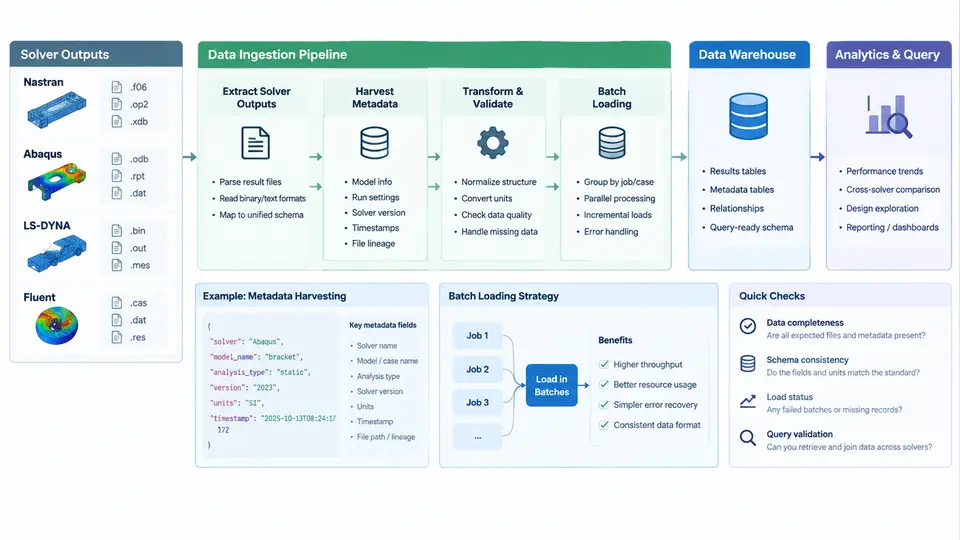
CAE data warehousing begins with ingestion. Before any dashboard, correlation study, or cross-program query can run, the warehouse must reliably absorb heterogeneous solver outputs and attach enough metadata to make those results findable and comparable. This chapter focuses on the extraction layer: how Nastran, Abaqus, LS-DYNA, and Fluent results are parsed, how metadata is harvested alongside the numerical payload, and how batch loading strategies keep the warehouse consistent under heavy nightly workloads.
Why Solver Outputs Resist Naive Loading
Each solver family produces a different result format, and even within one solver the format depends on the analysis type. Nastran writes .f06, .op2, .pch, and .h5 depending on the solution sequence and the PARAM,POST settings. Abaqus produces .odb (binary), .dat, and .fil. LS-DYNA emits d3plot, binout, and glstat/matsum ASCII files. Fluent writes .cas.h5 and .dat.h5 pairs, or legacy .cas/.dat.
A pipeline that treats all of these as "files to copy" will fail at the first query. The ingestion layer must instead normalize each format into a common result model: a run entity, a set of load cases, a set of result quantities (displacement, stress, temperature, pressure), and a mesh reference that ties results back to geometry. The extraction step is therefore a translation problem, not a file-transfer problem.
Extraction Patterns per Solver
For Nastran, the practical choice is to read .op2 or .h5 rather than parse .f06 text. The .f06 file is human-readable but its column layout shifts between solution sequences and it truncates large result sets. A robust extractor uses the OP2 reader API (for example, pyNastran or a vendor SDK) to pull DISPLACEMENT, STRESS, and GRID tables directly into arrays. The .f06 file is retained only for scalar summaries such as mass, center of gravity, and eigenvalue lists.
Abaqus extraction centers on the .odb. Because the ODB is a binary database with its own API, extraction is typically done through abaqus python scripts that open the ODB, iterate over steps and frames, and write out field output to a neutral format such as CSV or Parquet. A minimal extraction script looks like this:
from odbAccess import openOdb
odb = openOdb('job1.odb')
step = odb.steps['Step-1']
frame = step.frames[-1]
stress = frame.fieldOutputs['S']
for v in stress.values:
    print(v.elementLabel, v.data[0], v.data[1], v.data[2])
odb.close()
LS-DYNA is state-based rather than step-based. The d3plot family contains a time series of states, and binout holds scalar channels such as kinetic energy and contact forces. Extraction must therefore record the time dimension explicitly. A common approach is to use lsda or lspp in batch mode to convert selected states to CSV, or to read binout with a library such as lasso-python.
Fluent results are already structured as case-plus-data pairs. The .cas.h5 file holds mesh and boundary conditions; the .dat.h5 file holds field values per zone. Extraction reads both, maps zone IDs to named boundaries, and writes per-zone field arrays. Because Fluent cases often contain multiple cell zones and phase domains, the extractor must preserve the zone hierarchy rather than flattening it.
Metadata Harvesting
Numerical results without metadata are nearly useless in a warehouse. Metadata harvesting runs in parallel with extraction and captures four categories of information:
- Run identity: solver name and version, job name, submission timestamp, host, and user.
- Model context: mesh size (nodes, elements), element types, material count, and unit system.
- Analysis definition: solution sequence or step type, load case name, boundary condition set, and solver settings that affect results (for example,
SOL 101vsSOL 103). - Result inventory: which quantities were written, at which frames or time steps, and in which coordinate system.
The unit system deserves special attention. Nastran and Abaqus do not enforce units; the same numerical value can mean millimetres or inches. The harvester should read the unit declaration from the input deck where possible, and where it cannot, flag the run as unit_ambiguous so downstream queries can exclude it. This single field prevents a large class of silent errors in cross-program comparisons.
run_id, with one row per attribute. This makes it trivial to add new solver-specific attributes without altering the schema, and it keeps the result tables free of sparse columns.Batch Loading Strategies
CAE warehouses typically receive results in nightly batches rather than in real time. Three loading strategies are common, and the right choice depends on volume and latency requirements.
| Strategy | Mechanism | Best for | Main risk |
|---|---|---|---|
| Full reload | Truncate partition, reload all runs | Small datasets, schema changes | Long downtime, lost history |
| Incremental append | Insert only new run_id rows | Steady nightly flow | Duplicate runs if keys are weak |
| Upsert / merge | Match on run_id, update or insert | Re-submitted or corrected runs | Higher write cost, needs clean keys |
In practice, most CAE warehouses use incremental append for result tables and upsert for metadata. The run_id should be a deterministic hash of solver name, job name, submission timestamp, and input deck checksum. This makes re-ingestion idempotent: if the same run is loaded twice, the second load is a no-op rather than a duplicate.
Batch loading should be staged. The pipeline writes extracted data to a staging area first, validates row counts and key uniqueness, and only then promotes to the warehouse tables. A typical validation gate checks that the number of extracted nodes matches the mesh metadata, that no run_id appears twice in the batch, and that all required metadata attributes are present. Runs that fail validation are quarantined with a reason code rather than silently dropped.
Failure Symptoms and Troubleshooting
Three failure modes dominate real ingestion pipelines. First, duplicate result rows appear when the run_id is not stable across re-submissions. The fix is to include the input deck checksum in the hash and to enforce a unique constraint on (run_id, quantity, frame). Second, missing metadata occurs when the harvester cannot parse a solver-specific header. The fix is to log the raw header to a side table and mark the run as metadata_incomplete rather than rejecting it outright. Third, unit mismatches surface as physically implausible values, such as a displacement of 25.4 where 1.0 was expected. The fix is to validate against a reference run of known units and to reject runs whose unit declaration conflicts with the model context.
Putting It Together
A well-designed ingestion pipeline separates concerns: extraction translates solver formats into neutral arrays, metadata harvesting captures the context that makes those arrays meaningful, and batch loading enforces idempotency and validation before promotion. The run_id is the spine that connects all three. When a query later asks "show me all frontal impact runs with peak intrusion above 120 mm," the warehouse can answer because the extraction preserved the quantity, the metadata preserved the load case, and the batch loader guaranteed that each run appears exactly once.