3. Control flow for solver runs
A CAE automation script rarely runs a single solver invocation. A typical overnight study might sweep five mesh densities, run three load cases per mesh, and skip any combination whose result file already exists. Without control flow, a batch file is just a linear list of commands; with control flow, it becomes a small program that decides what to run, how many times, and in what order. This section covers the four constructs that carry almost all of that logic in Windows batch: IF, FOR, GOTO, and CALL.
IF: Branching on Solver Outcomes and File State
Batch IF has three comparison forms, and choosing the wrong one is the most common source of silent failures in solver scripts.
IF EXIST filename— tests for a file or directory. Use it to check for a completed result file before launching a job.IF ERRORLEVEL n— true when the exit code is greater than or equal ton. This is not equality. To test for exactly zero, useIF NOT ERRORLEVEL 1.IF string1==string2— literal string comparison, case-sensitive, and sensitive to stray spaces around==.
Most CAE solvers return 0 on success and a nonzero code on failure. A robust guard around a solver call therefore looks like this:
set SOLVER=C:\Program Files\ANSYS Inc\v241\ansys\bin\winx64\ANSYS241.exe
set JOB=wing_fine

"%SOLVER%" -b -i %JOB%.dat -o %JOB%.out
if errorlevel 1 (
    echo [FAIL] %JOB% exited with code %ERRORLEVEL% >> run.log
    goto :fail
)
echo [ OK ] %JOB% completed >> run.log
Two details matter here. First, %ERRORLEVEL% inside a parenthesized block is expanded when the block is parsed, not when it executes, so it can report a stale value. The if errorlevel 1 form avoids this because it is evaluated at runtime. Second, if you must read the variable inside a block, enable delayed expansion with setlocal enabledelayedexpansion and write !ERRORLEVEL!.
if %ERRORLEVEL%==1 fails when the solver returns 2 or -1. Always prefer if errorlevel 1 for "any failure" tests, and reserve exact comparisons for cases where the solver documents specific codes.
FOR: Sweeping Parameters and Enumerating Cases
FOR is the loop engine. For solver automation, three variants cover nearly everything:
| Variant | Use case | Example |
|---|---|---|
FOR %%v IN (list) | Iterate a literal set of values | Mesh densities, load cases |
FOR /L %%i IN (start,step,end) | Numeric counter loop | Restart attempts 1..3 |
FOR /F "tokens=*" %%f IN (file) | Read lines from a file | Job queue from jobs.txt |
A parameter sweep over three mesh levels and two load cases, with a skip-if-done guard, illustrates the pattern:
setlocal enabledelayedexpansion
for %%M in (coarse medium fine) do (
    for %%L in (LC1 LC2) do (
        set JOB=wing_%%M_%%L
        if exist results\!JOB!.rst (
            echo [SKIP] !JOB! already solved >> run.log
        ) else (
            echo [RUN ] !JOB! >> run.log
            "%SOLVER%" -b -i !JOB!.dat -o !JOB!.out
            if errorlevel 1 echo [FAIL] !JOB! >> run.log
        )
    )
)
endlocal
Note the use of ! instead of % for variables set and read inside the same block. This is the single most important habit when nesting FOR loops that build job names.
GOTO: Explicit Jumps and Error Exits
GOTO :label transfers control to a labeled line. In solver scripts it serves two purposes: skipping work that is already complete, and routing failures to a cleanup path. Labels are written with a leading colon and are case-insensitive.
if exist %JOB%.rst goto :postprocess
"%SOLVER%" -b -i %JOB%.dat -o %JOB%.out
if errorlevel 1 goto :fail

:postprocess
echo Extracting results for %JOB% >> run.log
goto :eof

:fail
echo Aborting run at %DATE% %TIME% >> run.log
exit /b 1
goto :eof is a built-in that ends the current script or subroutine without needing a label. exit /b 1 returns a nonzero code to the caller, which matters when the script is invoked from a scheduler or another batch file.
CALL: Subroutines and Sequential Job Chaining
CALL does two distinct jobs. CALL :label args invokes a subroutine within the same file and returns when the subroutine hits goto :eof. CALL other.bat runs another batch file and returns control afterward — unlike invoking it directly, which would transfer control permanently.
call :solve_case wing_coarse LC1
call :solve_case wing_coarse LC2
call :solve_case wing_medium LC1
goto :eof

:solve_case
set JOB=%1_%2
if exist results\%JOB%.rst (
    echo [SKIP] %JOB% >> run.log
    goto :eof
)
"%SOLVER%" -b -i %JOB%.dat -o %JOB%.out
if errorlevel 1 (
    echo [FAIL] %JOB% >> run.log
    exit /b 1
)
echo [ OK ] %JOB% >> run.log
goto :eof
Subroutines receive positional parameters as %1, %2, and so on. Inside a subroutine, %0 is the label name. This structure keeps the main body readable as a list of jobs while the solve logic lives in one place.
CALL chain above runs jobs one at a time. If your license allows concurrent solves, replace the sequential calls with start "" /b "%SOLVER%" ... and collect exit codes separately. Keep the sequential form when jobs share scratch directories or license tokens.
Putting the Constructs Together
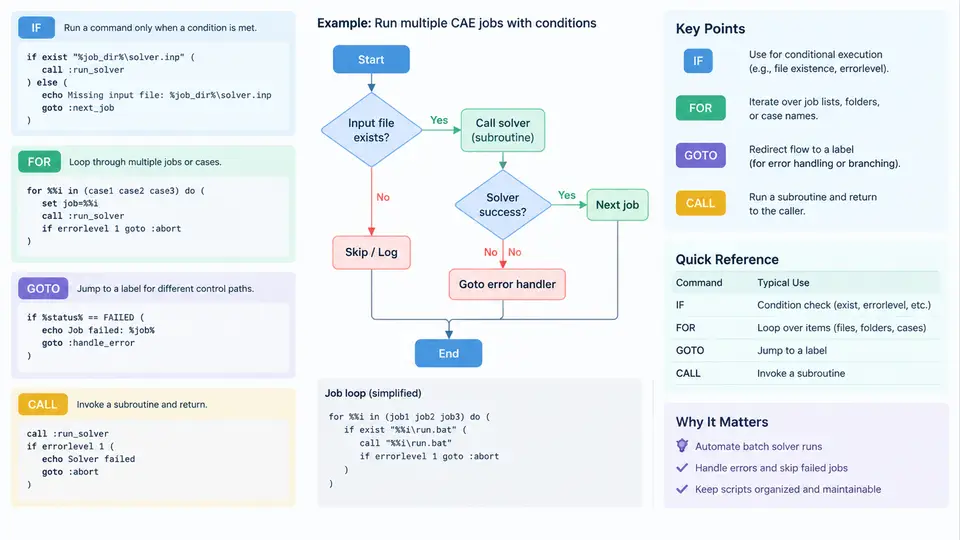
The diagram below shows how a single job flows through the four constructs: the FOR loop enumerates cases, IF EXIST decides whether to skip, CALL dispatches to the solve subroutine, and IF ERRORLEVEL plus GOTO route the outcome to either the postprocess path or the failure exit.
Practical Notes on Robustness
Three habits prevent most control-flow bugs in solver scripts. First, always setlocal enabledelayedexpansion at the top of any script that sets variables inside FOR or IF blocks, and use ! for those variables. Second, quote every path that may contain spaces — "%SOLVER%", "%JOB%.dat" — because CAE install directories almost always contain spaces. Third, log every branch decision to a file with a timestamp so that a failed overnight run can be diagnosed without re-executing it.
A minimal but complete job-queue pattern combines all four constructs: read job names from jobs.txt with FOR /F, skip completed ones with IF EXIST, dispatch each remaining job through CALL :solve_case, and on any nonzero exit code jump to a :fail label that writes a summary and returns exit /b 1. This structure scales from three cases to three hundred without changing its shape, and it is the foundation on which the later chapters on parallel execution and result harvesting are built.