3. Core Python data structures for CAE
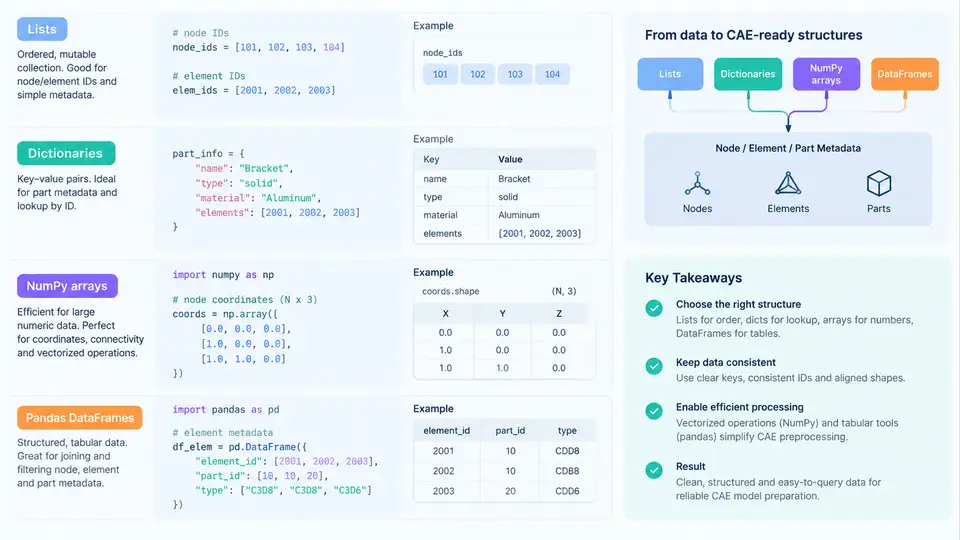
Crash CAE preprocessing is fundamentally a data transformation problem. A typical full-vehicle model contains hundreds of thousands of nodes, tens of thousands of shell and solid elements, dozens of parts, and multiple material and property definitions. Before any Python script can rename a part, remap a material ID, or export a solver deck, the underlying data must live in a structure that supports fast lookup, vectorized arithmetic, and column-wise filtering. Choosing the wrong container is the most common reason a preprocessing script that works on a 5,000-element coupon model becomes unusable on a 2-million-element body-in-white.
This section examines the four containers you will use constantly — list, dict, numpy.ndarray, and pandas.DataFrame — and maps each to the CAE entities it naturally represents.
Lists: ordered, positional, and cheap to append
A Python list is an ordered, mutable sequence. In CAE preprocessing it is the right container for things that are inherently sequential and small: a list of include file paths, a list of part IDs to delete, a list of load case names, or the ordered set of keyword blocks read from a deck. Lists preserve insertion order and support indexing, slicing, and iteration.
include_files = [
    "00_master.key",
    "10_body_in_white.key",
    "20_powertrain.key",
    "30_closure.key",
]
parts_to_remove = [100201, 100202, 100315]

for path in include_files:
    print(f"queued: {path}")
The limitation is equally important: a list has no notion of columns, and membership testing (x in my_list) is O(n). If you find yourself writing a loop over a list of 400,000 node IDs to check whether an element references a node, you have chosen the wrong structure.
Dictionaries: ID-keyed lookup for metadata
A dict maps keys to values with average O(1) lookup. This makes it the natural home for CAE metadata that is addressed by an integer ID: part ID → part name, material ID → material card, node ID → coordinate tuple, property ID → thickness. When you parse a keyword deck, the first pass almost always produces dictionaries keyed by entity ID.
part_meta = {
    100201: {"name": "BIW_FRONT_RAIL_L", "material": 2001, "property": 3001},
    100202: {"name": "BIW_FRONT_RAIL_R", "material": 2001, "property": 3001},
    100315: {"name": "SHOTGUN_L",         "material": 2002, "property": 3002},
}

mat_id = part_meta[100201]["material"]      # 2001
name  = part_meta.get(999999, {}).get("name", "UNKNOWN")
Two practical notes. First, use dict.get() with a default rather than bare indexing when the key may be absent — missing IDs are normal in partially assembled decks. Second, dictionaries are insertion-ordered in Python 3.7+, so iteration order is deterministic, but you should never rely on that order for numerical results.
NumPy arrays: vectorized geometry and connectivity
Node coordinates and element connectivity are numeric, large, and almost always processed as whole arrays. A numpy.ndarray stores homogeneous numeric data in contiguous memory and applies operations element-wise without Python-level loops. A node table of 1.2 million nodes is a (1200000, 3) float64 array — about 28.8 MB — and translating every node by 50 mm in X is a single expression.
import numpy as np

# node_ids: (N,) int64 ; coords: (N, 3) float64
node_ids = np.array([101, 102, 103, 104], dtype=np.int64)
coords = np.array([
    [  0.0,   0.0,   0.0],
    [100.0,   0.0,   0.0],
    [100.0,  50.0,   0.0],
    [  0.0,  50.0,   0.0],
], dtype=np.float64)

coords[:, 0] += 50.0                      # shift all nodes +50 mm in X

# connectivity: (M, 4) int64 for quad shells (1-based solver IDs)
quads = np.array([[101, 102, 103, 104]], dtype=np.int64)

# bounding box of the node set
xmin = coords[:, 0].min()
xmax = coords[:, 0].max()
Vectorization is not a stylistic preference. Replacing a Python loop over 1.2 million nodes with array slicing typically reduces runtime from tens of seconds to tens of milliseconds. The trade-off is that NumPy arrays are homogeneous and fixed-size: you cannot mix a string part name into a coordinate array, and appending requires np.append or list accumulation followed by a single conversion.
pandas DataFrames: the working table for mixed metadata
Real CAE metadata is heterogeneous — an element table carries an integer element ID, a string element type, an integer property ID, and often a part ID and a thickness. That is exactly a pandas.DataFrame: a labeled, column-oriented table with per-column dtypes, boolean masking, grouping, and joins.
import pandas as pd

elements = pd.DataFrame({
    "elem_id":  [9001, 9002, 9003, 9004],
    "type":     ["QUAD4", "QUAD4", "TETRA4", "QUAD4"],
    "part_id":  [100201, 100201, 100315, 100202],
    "pid":      [3001, 3001, 3002, 3001],
    "thickness":[1.2, 1.2, 2.0, 1.2],
})

shells = elements[elements["type"] == "QUAD4"]
thin   = elements[(elements["type"] == "QUAD4") & (elements["thickness"] < 1.5)]
by_part = elements.groupby("part_id")["elem_id"].count()
The groupby result above immediately answers a routine preprocessing question — how many elements belong to each part — without writing a single explicit loop. Merging a part metadata table onto an element table with pd.merge(elements, parts, on="part_id", how="left") is the standard way to attach part names and material IDs to elements before export.
Choosing the right container
| CAE entity / task | Recommended container | Reason |
|---|---|---|
| Include file list, load case names | list | Small, ordered, positional |
| Part ID → name / material / property | dict | O(1) lookup by integer ID |
| Node coordinates, element connectivity | numpy.ndarray | Large, homogeneous, vectorized math |
| Element table with type, PID, thickness | pandas.DataFrame | Mixed dtypes, filtering, grouping, joins |
| Node ID → coordinate (sparse lookup) | dict or indexed DataFrame | Random access by ID |
pd.DataFrame(coords, columns=["x","y","z"]) wraps a NumPy array without copying the underlying buffer in most cases, while df[["x","y","z"]].to_numpy() gives you back a contiguous array for solver export. Keeping the node table as a DataFrame during filtering and as an array during arithmetic avoids repeated conversions.
[x, y, z] lists. A 1.2-million-node model then occupies roughly 1.2 million separate Python objects, consuming hundreds of megabytes and making any coordinate operation orders of magnitude slower than the equivalent NumPy slice.
Practical workflow: attaching part names to elements
A common preprocessing task is to produce a report of element counts and total shell area per part, using the part name rather than the numeric ID. The reproducible sequence is:
- Parse the part keyword blocks into a dictionary keyed by part ID, then convert it to a DataFrame with columns
part_id,part_name,material_id,property_id. - Parse the element blocks into a NumPy connectivity array and a parallel DataFrame of element IDs, types, and part IDs.
- Merge the part table onto the element table with
how="left"onpart_id. - Group by
part_nameand aggregate element count; for shell area, compute per-element area from the node coordinate array using the quad area formula and store it as a new column before grouping.
parts_df = pd.DataFrame([
    {"part_id": 100201, "part_name": "BIW_FRONT_RAIL_L", "material_id": 2001},
    {"part_id": 100202, "part_name": "BIW_FRONT_RAIL_R", "material_id": 2001},
    {"part_id": 100315, "part_name": "SHOTGUN_L",         "material_id": 2002},
])

merged = elements.merge(parts_df, on="part_id", how="left")
summary = merged.groupby("part_name").agg(
    n_elements=("elem_id", "count"),
    avg_thickness=("thickness", "mean"),
).reset_index()

print(summary)
Expected output for the sample data above is a three-row table listing BIW_FRONT_RAIL_L, BIW_FRONT_RAIL_R, and SHOTGUN_L with their element counts and mean thickness. If a part name appears as NaN in the merged result, the corresponding part_id is missing from the part table — a reliable symptom of an incomplete or mismatched include file, and the first thing to check before exporting.