1. Crash CAE model preprocessing landscape
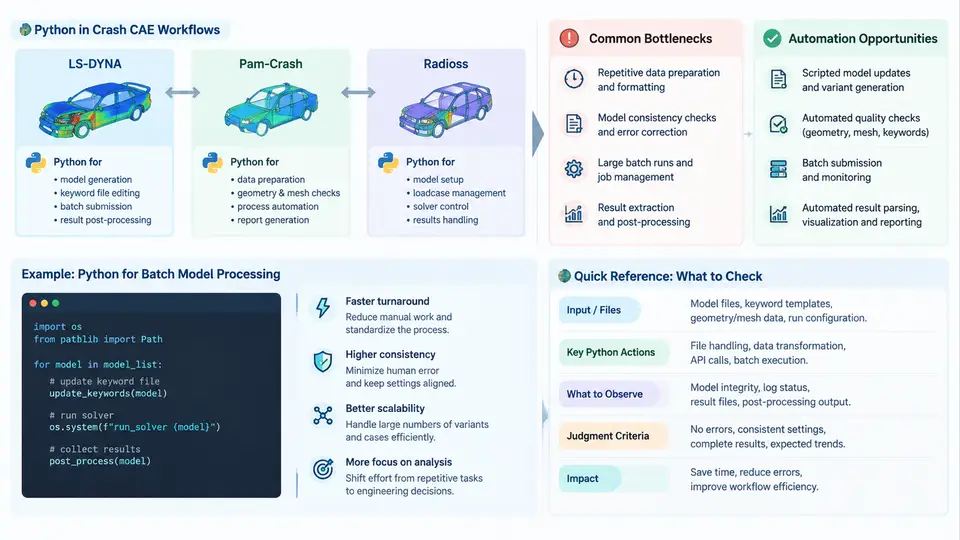
Crash CAE preprocessing is the stage where a vehicle geometry, its material definitions, connections, boundary conditions, and solver control data are transformed into a runnable input deck. In LS-DYNA, Pam-Crash, and Radioss workflows, this stage consumes a disproportionate share of the total simulation cycle. A typical full-vehicle frontal impact model contains 8–15 million elements, tens of thousands of spot welds, hundreds of material cards, and dozens of load cases. Before the solver ever starts, engineers must clean geometry, mesh it, assign properties, define contacts, set initial velocities, and assemble the deck. Python has become the de facto automation layer across all three solvers because it can orchestrate GUI tools, parse and rewrite keyword files, and enforce consistency at scale.
Why Preprocessing Dominates the Crash CAE Cycle
Industry surveys consistently place preprocessing at 40–60% of the total CAE effort for crash models. The reasons are structural, not accidental. Crash models are assembled from many subsystems supplied by different teams, each with its own naming conventions, element formulations, and material databases. A door trim supplier may deliver a model in Pam-Crash format, the body-in-white team may work in LS-DYNA keyword format, and the restraint group may use Radioss. Merging these into one coherent deck requires format translation, ID renumbering, unit reconciliation, and contact definition. Each of these steps is repetitive, error-prone, and therefore a prime target for automation.
The three solvers share a common conceptual model but differ in file syntax and tooling:
| Solver | Native input format | Common preprocessors | Python integration path |
|---|---|---|---|
| LS-DYNA | Keyword (.k, .key) | LS-PrePost, ANSA, HyperMesh | Keyword parsing, LS-PrePost command scripts, PyDYNA |
| Pam-Crash | Pam-Crash input (.pc, .dat) | Visual-Environment, ANSA | Text parsing, Visual-Environment Python API |
| Radioss | Radioss Block / Bulk (.rad, .0000) | HyperMesh, ANSA, HyperCrash | Block/Bulk parsing, HyperMesh Tcl/Python, OpenRadioss tooling |
Despite the syntax differences, the automation patterns are remarkably similar: read a deck, locate entities by ID or keyword, modify attributes, renumber, and write back. Python excels here because it handles text robustly, has mature libraries for tabular data, and can drive the preprocessor APIs that already exist.
Common Bottlenecks in Crash Preprocessing
Understanding where time is lost is the first step toward automating it. The most frequent bottlenecks are:
- ID collisions and renumbering. When two subsystems both use node ID 100001, the merged deck is invalid. Manual renumbering across millions of entities is impractical.
- Unit inconsistency. A supplier model in mm-ton-s must be converted to m-kg-s or vice versa. A single missed conversion factor produces a model that runs but gives wrong energies.
- Duplicate and missing welds. Spot welds defined by coincident nodes may be duplicated after merging, or lost if the connecting nodes were renumbered.
- Contact definition drift. Each subsystem may define its own *CONTACT or /INTER interfaces, leading to overlapping or missing contact pairs.
- Material card mismatch. The same material may appear under different IDs with slightly different parameters across subsystems.
- Deck assembly and include management. LS-DYNA uses *INCLUDE, Radioss uses /BEGIN and include chains, Pam-Crash uses its own include mechanism. Tracking file dependencies manually is fragile.
Each bottleneck has a characteristic failure signature. Unit errors typically show up as absurd kinetic energy or zero deformation. ID collisions cause the solver to abort with duplicate-ID messages. Missing welds produce localized separation that looks like a modeling error but is actually a data management error. Recognizing these signatures is essential before writing automation, because the script must detect and report the condition, not silently produce a bad deck.
Where Python Fits: Automation Opportunities
Python can intervene at every stage of preprocessing. The highest-value opportunities, ranked by typical time savings, are:
- Deck parsing and entity indexing. Read a keyword or block file into an in-memory structure keyed by entity type and ID. This enables all downstream operations.
- ID renumbering and offsetting. Apply deterministic offsets per subsystem so that merged IDs never collide, while preserving references in sets, contacts, and constraints.
- Unit conversion. Apply scale factors to node coordinates, mass, time, and material parameters in a single pass, with a validation report.
- Duplicate detection and weld consolidation. Find coincident nodes within a tolerance, merge them, and rebuild weld definitions.
- Contact generation. Automatically create *CONTACT_AUTOMATIC_SINGLE_SURFACE or /INTER/TYPE7 pairs based on part sets and proximity.
- Include tree management. Generate the top-level deck with correct include paths and ordering.
- Quality checks. Run pre-solver checks for free nodes, negative volumes, duplicate elements, and missing properties, and emit a report.
A concrete example illustrates the pattern. Suppose a body-in-white model uses node IDs 1–500,000 and a door model uses node IDs 1–80,000. A Python script can offset all door node and element IDs by 1,000,000, then update every reference in the door's *SET_NODE, *CONSTRAINED_NODAL_RIGID_BODY, and *CONTACT definitions. The script reads the door deck, builds a mapping {old_id: new_id}, applies it to all entity blocks, and writes a new deck. The same logic applies to Pam-Crash and Radioss with different keyword names but identical structure.
Practical checkpoint: Before merging, always run a duplicate-ID scan and a unit-consistency check. A 30-line Python script that reports the maximum node ID per subsystem and the bounding box dimensions in meters will catch most unit and collision errors before they reach the solver.
Visualizing the Preprocessing Data Flow
The diagram below shows how Python sits between the source models and the solver-ready deck. It is not a linear checklist; it is a data-flow view showing where each automation step reads and writes, and where validation gates prevent bad data from propagating.
What This Course Will Build
Across the following chapters, we will construct a reusable Python preprocessing toolkit. The first block covers parsing and indexing for each of the three solver formats, because every later operation depends on a reliable in-memory representation. The second block covers the core transformations: renumbering, unit conversion, weld consolidation, and contact generation. The third block covers validation and reporting, including the checks that catch the failure signatures described above. The final block covers integration with preprocessor APIs and batch execution, so that the toolkit can run unattended on a model exchange server.
The emphasis throughout is on reproducible, inspectable operations. Every script should log what it changed, every transformation should be reversible or at least auditable, and every validation check should produce a machine-readable report. This is what separates a useful automation layer from a fragile collection of one-off scripts. The goal is not to replace the preprocessor GUI, but to handle the repetitive, high-volume, consistency-critical work that the GUI cannot scale to.
Getting started: Before writing any automation, inventory your current preprocessing steps and measure how long each takes. The steps that consume the most time and involve the most manual repetition are your first automation targets. In most crash CAE teams, that means ID renumbering and unit conversion — both of which are straightforward to implement in Python and immediately reduce solver aborts.