1. CAE postprocessing and reporting workflo
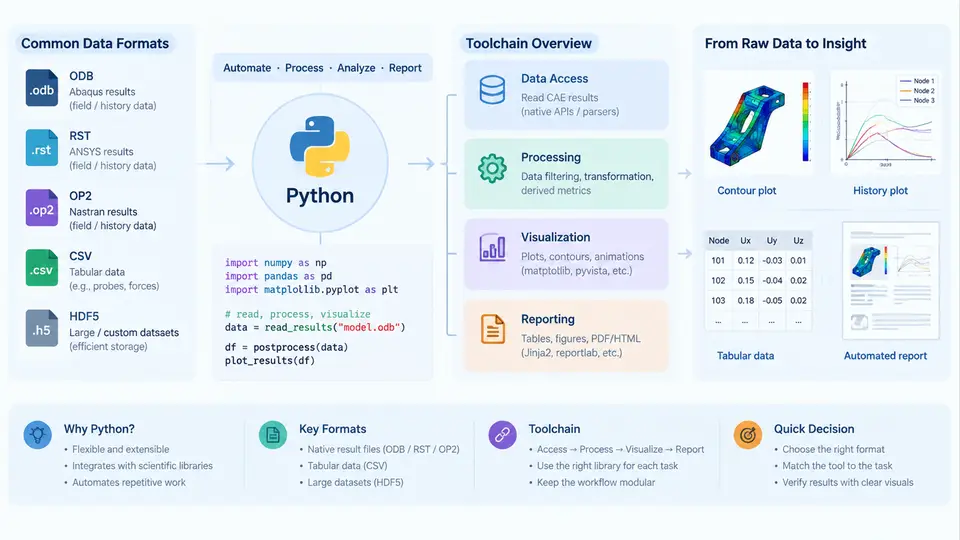
In a typical CAE project, the solver is only half the story. Once the analysis completes, engineers must extract meaningful quantities from large result files, compare them against design targets, and communicate findings to teams that may never open the solver GUI. This is the postprocessing and reporting stage, and it is where Python has become the de facto automation language. This chapter establishes the conceptual map for the rest of the course: what postprocessing actually involves, why Python fits it so well, which data formats you will encounter, and how the pieces of a typical toolchain connect.
What Postprocessing Really Means
Postprocessing is not a single action but a chain of transformations. A raw result database contains field variables (displacement, stress, temperature, pressure) defined over a mesh, plus scalar history outputs at specific nodes or elements. Turning that into a decision requires several distinct operations:
- Extraction — pulling specific result quantities (e.g., von Mises stress, nodal displacement magnitude) from the solver output.
- Reduction — computing maxima, minima, averages, or time histories over regions, load steps, or frequency modes.
- Derivation — calculating quantities the solver did not output directly, such as safety factor, fatigue damage, or margin of safety.
- Comparison — checking results against allowable values, test data, or previous design iterations.
- Presentation — producing contour plots, XY charts, tables, and summary reports in a consistent, repeatable format.
Each of these steps is repetitive across load cases, design variants, and project phases. That repetition is precisely what makes Python valuable: a script that extracts and reduces results for one load case can be looped over dozens of cases with minimal modification.
Why Python Fits CAE Postprocessing
Python occupies a practical middle ground in the CAE ecosystem. It is embedded in most major solvers and pre/postprocessors — Abaqus/CAE, ANSYS (through PyMAPDL and PyAnsys), MSC Nastran (via pyNastran), and open-source tools like ParaView and Salome all expose Python APIs. At the same time, it is a general-purpose language with mature libraries for numerical work (NumPy, SciPy), data manipulation (pandas), plotting (Matplotlib, Plotly), and document generation (python-docx, openpyxl, ReportLab).
This dual role matters. A postprocessing script can read a result file, compute a derived quantity with NumPy, write a summary row into an Excel workbook with openpyxl, and embed a contour image into a Word report — all in one process, without manual copy-paste between tools. The alternative, GUI-driven postprocessing, is fine for one-off inspections but becomes error-prone and slow when the same operation must be repeated for every design iteration.
Common Data Formats in CAE Postprocessing
Before writing any script, you need to know what you are reading. CAE result data appears in several families of formats, each with different access patterns.
| Format family | Typical examples | Access method | Best suited for |
|---|---|---|---|
| Native solver binary | .odb (Abaqus), .rst (ANSYS), .op2 (Nastran) | Solver-specific Python API | Full field and history results with metadata |
| Neutral / exchange | CGNS, VTK/VTU, EnSight | vtk, pyvista, meshio | Cross-tool visualization and archiving |
| Tabular / text | CSV, DAT, XY text blocks | pandas, NumPy loadtxt | History curves, scalar summaries, quick checks |
| Report / document | DOCX, XLSX, PDF, HTML | python-docx, openpyxl, ReportLab, Jinja2 | Deliverables and stakeholder communication |
The practical rule is: read from the native format when you need full fidelity, convert to a neutral format when you need portability, and reduce to tabular form as early as possible. Most reporting logic operates on small tables of extracted scalars, not on the full mesh.
The Toolchain at a Glance
A working CAE postprocessing pipeline typically has four layers. The diagram below shows how they connect and where Python sits in each layer.
A Minimal Working Example
The following script illustrates the pattern without depending on a specific solver. It reads a CSV of extracted nodal results, computes a safety factor, and writes a summary row. This is the reduction-and-derivation step in isolation.
import pandas as pd

# Example input: nodal stress results exported from a solver
df = pd.read_csv("nodal_stress.csv")  # columns: node_id, mises_mpa

allowable = 350.0  # MPa, example allowable

peak = df["mises_mpa"].max()
peak_node = df.loc[df["mises_mpa"].idxmax(), "node_id"]
margin = (allowable - peak) / allowable

summary = pd.DataFrame([{
    "case": "LC1",
    "peak_mises_mpa": round(peak, 1),
    "critical_node": int(peak_node),
    "allowable_mpa": allowable,
    "margin_pct": round(margin * 100, 1),
    "pass": margin > 0
}])

summary.to_csv("summary_LC1.csv", index=False)
print(summary.to_string(index=False))
With example input values, this produces a single-row summary that can be appended to a project-level results table. The key point is not the specific numbers but the structure: read, reduce, derive, decide, write. Every layer of the toolchain follows this pattern.
Where Failures Typically Appear
Postprocessing scripts fail in predictable ways. Recognizing the symptoms early saves hours of debugging.
- Unit mismatches. Solver output in mm and MPa, but the allowable table in inches and ksi. The script runs without error and produces a wrong margin. Always record units alongside values.
- Wrong frame or step selected. Reading frame 0 instead of the last frame gives the initial state, not the peak. Verify by printing the frame count and time value before extracting.
- Node or element set mismatch. Extracting from the full model when the check applies only to a specific region. Confirm the set name and membership count.
- Silent empty results. A field output that does not exist in the requested step returns an empty collection. Check for zero-length results before computing statistics.
- Coordinate system confusion. Stress components are direction-dependent. If the solver reports in global coordinates but the check is in a local system, transform before comparing.
What This Course Will Build
Across the following chapters, we will move from this conceptual overview into concrete implementations. You will learn how to open and query native result databases, convert between formats, build reusable extraction functions, generate plots and tables programmatically, and assemble complete report documents. The goal is a toolchain you can adapt to your own solver and project conventions — not a single rigid script, but a set of patterns that scale from a single load case to a full design study.
The essential takeaway from this chapter is that Python's value in CAE postprocessing comes from its position at the intersection of solver APIs and general-purpose data tooling. Understanding the data formats and the four-layer toolchain gives you the vocabulary to design scripts that are reproducible, auditable, and maintainable.