3. PAM-CRASH input deck structure
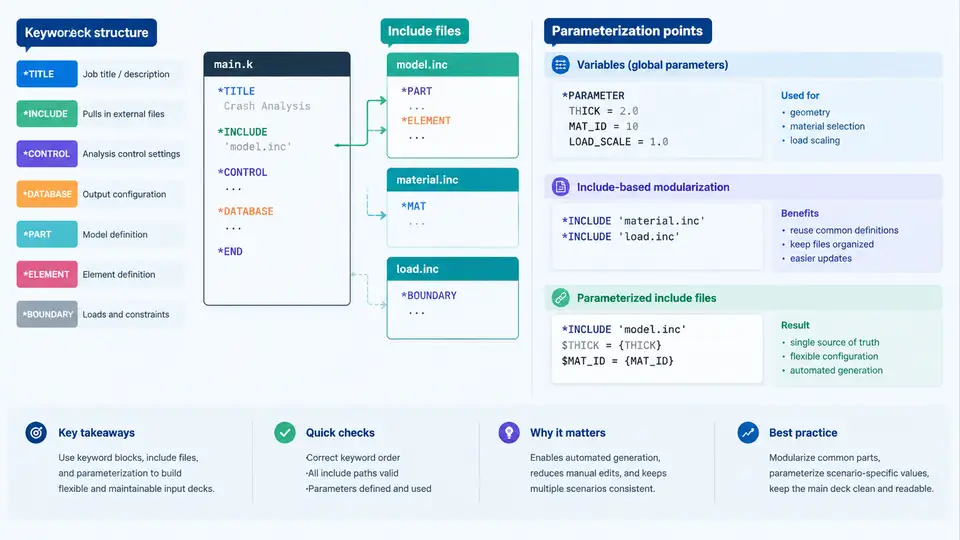
PAM-CRASH reads a single flat input deck at solve time, but that deck is rarely authored as one file. In practice it is assembled from a root file plus any number of *INCLUDE references, and the solver resolves them into one continuous keyword stream before the first time step. Understanding this structure is the prerequisite for automation: if you cannot predict the exact byte sequence the solver will parse, you cannot safely generate or patch it programmatically.
The keyword block as the atomic unit
Every PAM-CRASH input file is a sequence of keyword blocks. A block begins with a keyword line whose first field is a slash-prefixed name, for example /MAT/1, /PART/1, /SHELL/1, or /NODE/1. The keyword line is followed by a fixed number of data lines whose column layout is defined by the keyword's card format. PAM-CRASH is column-sensitive: a value placed one column too far left or right is silently misread or triggers a format error. This is the single most important constraint for automated generation — you must emit fixed-width fields, not whitespace-delimited ones.
A minimal, self-consistent fragment looks like this:
/NODE/1
  1001  0.000000  0.000000  0.000000
  1002 50.000000  0.000000  0.000000
  1003 50.000000 50.000000  0.000000
  1004  0.000000 50.000000  0.000000
/SHELL/1
  2001       1       1       2       3       4
/PART/1
  3001       1       1
/MAT/1
  4001  7.850E-09  2.100E+05  3.000E-01
Here /NODE/1 declares four nodes with IDs 1001–1004; /SHELL/1 declares one quadrilateral element 2001 connecting those four nodes; /PART/1 binds element 2001 to material 4001; and /MAT/1 defines that material as steel-like with density 7.85e-9 t/mm³, Young's modulus 210 GPa, and Poisson ratio 0.30. The IDs are arbitrary but must be unique within their namespace and must cross-reference correctly. Automation failures almost always surface as dangling references — an element pointing at a node ID that was never emitted.
Include files and resolution order
Large models are split for maintainability: mesh in one file, materials in another, boundary conditions in a third. The root deck pulls them together with *INCLUDE:
*INCLUDE
mesh_plate.k
*INCLUDE
materials.k
*INCLUDE
loadcase_impact.k
The solver substitutes each included file at the point of the *INCLUDE line, producing one logical stream. Two consequences matter for automation. First, order is semantic: a /PART block that references material ID 4001 must appear after the /MAT/1 block that defines 4001, or the reference will not resolve. Second, paths are relative to the working directory, not to the including file, unless your solver build supports a search-path variable. A generator that writes includes into a subdirectory must either emit correct relative paths or set the search path explicitly.
Nested includes are permitted, but deep nesting makes debugging painful. A practical rule: keep the include tree two levels deep — one root, one level of functional includes — and let the generator own the root file entirely.
Where parameterization actually lives
Not every field is worth templating. The productive approach is to identify the small set of values that change between runs and isolate them, while keeping the bulk of the deck as static, version-controlled text. The diagram above groups these into four families: geometry, material, load/boundary conditions, and control. In a typical parametric study — say, varying impact velocity across five runs — only the load block changes. In a mesh-convergence study, only geometry changes. Keeping these families in separate include files means the generator rewrites one file per run and leaves the rest untouched.
A workable pattern is a template with placeholder tokens and a small substitution table:
# template: loadcase_impact.k.tmpl
/INIVEL/1
  {{NODE_SET}}   {{VELOCITY}}   0.0   0.0
/TIME/1
  {{T_END}}     {{DT_INIT}}
For a run with NODE_SET=5001, VELOCITY=-5000.0, T_END=0.020, and DT_INIT=1.0E-07, the generator emits:
/INIVEL/1
  5001  -5000.0   0.0   0.0
/TIME/1
  0.020     1.0E-07
Note the sign convention: a negative X velocity drives the impactor toward the plate along −X. Whatever convention you adopt, apply it consistently in the template, the generator, and any post-processing that reads displacement output.
Validation before submission
Generated decks fail in predictable ways. Before handing a deck to the solver, run three checks programmatically:
- Reference integrity. Collect every node ID emitted, then verify every element references an existing node. Same for element-to-part and part-to-material links.
- ID uniqueness. Duplicate IDs cause the solver to overwrite or abort depending on the keyword. A set-based check catches this in milliseconds.
- Column alignment. If your generator uses fixed-width formatting, assert that each field's character span matches the card definition. A single misaligned exponent turns
2.100E+05into a parse error or, worse, a plausible but wrong value.
Practical takeaway
Treat the input deck as a build artifact, not a hand-edited document. Own the root file in the generator, keep functional includes stable, and confine variability to a small, well-named set of placeholders. Validate references, uniqueness, and column alignment on every generated deck. This structure is what makes the rest of the automation pipeline — batch submission, parametric sweeps, and result harvesting — reliable rather than fragile.