1. PAM-CRASH simulation workflow overview
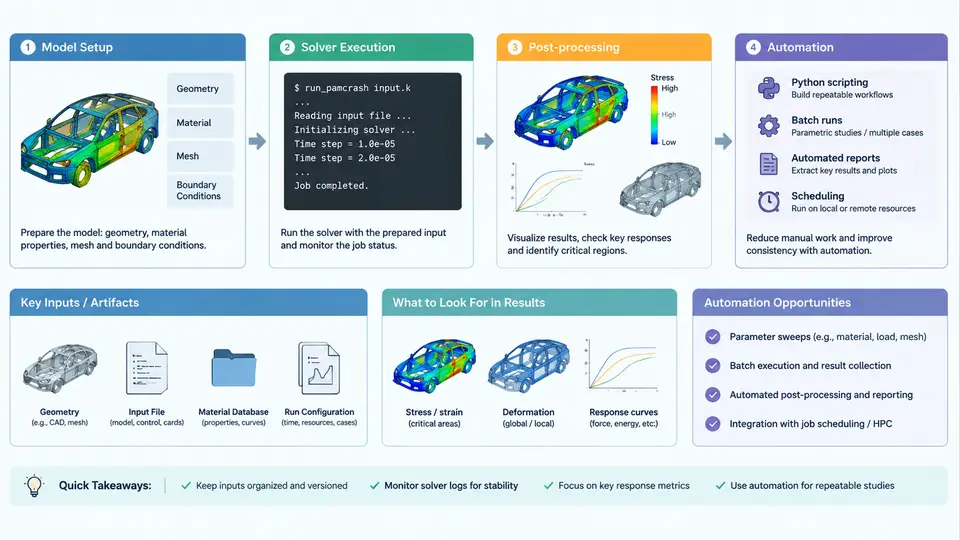
PAM-CRASH is an explicit finite element solver widely used in the automotive industry for crashworthiness, occupant safety, and impact analysis. A typical PAM-CRASH study is not a single action but a pipeline of four distinct stages: model setup, solver execution, post-processing, and reporting. Each stage consumes files produced by the previous one, and each has its own failure modes. Understanding this pipeline — and knowing exactly where automation can be inserted — is the foundation for everything that follows in this course.
The Four Stages and Their Data Contracts
The workflow is best understood as a chain of file transformations. The model setup stage produces a complete input deck: the main input file (conventionally *.pc or *.inp), plus any included files referenced via INCLUDE statements. This deck contains the mesh, material definitions, contact interfaces, boundary conditions, initial velocities, and control cards such as CONTROL_TIMESTEP and CONTROL_TERMINATION. The deck is the contract between pre-processing and the solver: if it is malformed, the solver will either abort immediately or, worse, run to completion and produce physically meaningless results.
Solver execution takes that deck and produces a time-history of results. PAM-CRASH writes a *.out file for the run log, a *.erf error file, and binary result files (typically *.dsy or *.bin depending on the output configuration) containing nodal displacements, element stresses, contact forces, and energies at each output interval. The solver is controlled by a launch command and a set of runtime options — number of CPUs, memory allocation, and the solver executable version.
Post-processing reads the binary results and extracts engineering quantities: peak acceleration at a sensor location, intrusion into the occupant compartment, energy balance over time, and deformation animations. This is where the simulation answers the actual engineering question. Finally, reporting packages those quantities into a form a crash engineer or program manager can act on.
Where Automation Pays Off
Manual execution of this pipeline is viable for a single run. It becomes untenable when a project requires a design of experiments (DOE) with dozens of variants, or when the same model must be re-run with updated material data every week. Automation targets four specific pain points:
- Deck generation: Instead of hand-editing a
*.pcfile for each variant, a Python script reads a parameter table (e.g., CSV with thickness, material grade, and impact velocity) and writes a complete deck per row. This eliminates transcription errors and makes the parameter set auditable. - Batch submission and monitoring: A script submits each deck to the solver, polls the
*.outfile for completion or error keywords, and retries or flags failed runs. This replaces manual queue watching. - Result extraction: Rather than opening each result file in a GUI, a Python script reads the binary output, computes peak values and time histories, and writes a consolidated CSV. This is the highest-value automation because it scales linearly with the number of runs.
- Report generation: A template-driven script assembles plots, tables, and pass/fail judgments into a PDF or HTML report, ensuring every run is documented consistently.
A Concrete Example: Parametric Deck Generation
Consider a frontal impact study where the front rail thickness t varies from 1.2 mm to 2.0 mm in 0.2 mm increments, and the impact velocity v is fixed at 15 m/s. The base deck contains a placeholder token for thickness. A Python script using string replacement can generate five decks:
import csv, pathlib

base = pathlib.Path("base_model.pc").read_text()
out_dir = pathlib.Path("runs"); out_dir.mkdir(exist_ok=True)

with open("params.csv") as f:
    for row in csv.DictReader(f):
        deck = base.replace("__THICKNESS__", row["thickness"])
        deck = deck.replace("__VELOCITY__", row["velocity"])
        name = f"run_t{row['thickness']}_v{row['velocity']}"
        (out_dir / f"{name}.pc").write_text(deck)
        print(f"generated {name}.pc")
With params.csv containing five rows, this produces five decks in runs/. The key engineering detail is that the placeholder tokens must be unique and must not collide with any legitimate PAM-CRASH keyword. A common failure is using a token like T that also appears in material names; the script then corrupts unrelated parts of the deck. Always use a distinctive delimiter such as __THICKNESS__.
Execution and Verification
After generation, each deck is submitted with a command such as pamcrash -np 4 -i run_t1.4_v15.pc -o run_t1.4_v15.out. The -np 4 flag requests four CPUs. The script should then poll the *.out file for the string NORMAL TERMINATION (success) or ERROR (failure). A run that terminates with ERROR typically indicates a negative volume, an unstable time step, or a missing include file — all of which are diagnosable from the *.erf file.
For verification, the engineer should confirm that the number of generated decks equals the number of parameter rows, that each deck contains the correct thickness value, and that the solver log shows the expected termination status. A quick sanity check is to compare the total mass reported in the *.out file against the expected mass from the parameter table; a mismatch indicates a unit or material density error.
What This Course Covers
The remaining chapters build on this overview. You will learn how to parse and modify PAM-CRASH input decks programmatically, how to launch and monitor solver runs from Python, how to read binary result files and extract engineering quantities, and how to assemble automated reports. Each chapter includes runnable examples and a discussion of failure modes. The goal is not to replace the crash engineer's judgment but to remove the repetitive file handling that consumes time better spent on interpretation.
By the end of this course, you should be able to take a manual PAM-CRASH workflow and convert it into a reproducible, auditable Python pipeline — one that a colleague can run with a single command and trust the results.