3. Reading and parsing CAE result files
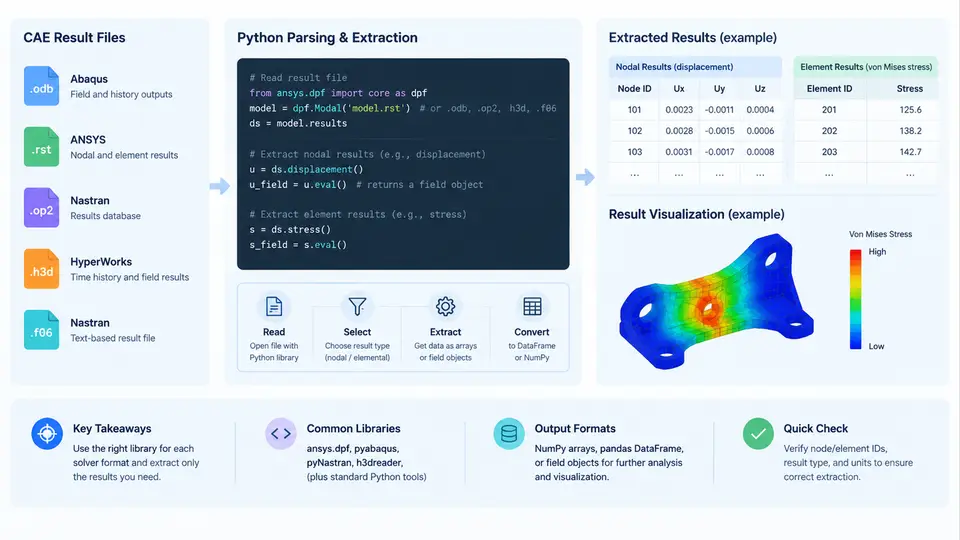
Once a solver has finished, the physics lives in a binary or text result file rather than in the model. Extracting nodal and elemental results from those files is the first real data-engineering step of any automation pipeline, because every downstream chart, table, and dashboard depends on getting clean arrays out of a format that was designed for a solver, not for Python. This section covers the five formats named in the course outline — .odb, .rst, .op2, .h3d, and .f06 — and shows how to read each one with a Python library, how to align the extracted values with node and element IDs, and how to verify that what you read is what the solver wrote.
What each format actually is
Before writing code it helps to know what kind of container you are opening. The formats differ in origin, in whether they are binary or text, and in whether a Python library can read them directly or only through a vendor API.
| Format | Solver / origin | Encoding | Typical Python access |
|---|---|---|---|
.odb | Abaqus/Standard, Abaqus/Explicit | Binary, HDF5-based | odbAccess (ships with Abaqus), or h5py for the HDF5 variant |
.rst | ANSYS Mechanical APDL | Binary | pyansys / ansys-mapdl-reader |
.op2 | Nastran (MSC, NX) | Binary, Fortran-record based | pyNastran |
.h3d | Altair HyperWorks / OptiStruct | Binary | pyH3D or HyperWorks scripting APIs |
.f06 | Nastran printed output | Fixed-width ASCII | Plain Python text parsing, pandas.read_fwf |
The practical consequence is that .f06 is the easiest to read and the least structured, while .odb and .op2 are highly structured but require a library that understands their internal tables. A robust pipeline usually reads the binary format for bulk data and uses the .f06 only for spot-checking scalar values such as total strain energy or a single grid-point stress.
Reading an Abaqus .odb
The odbAccess module is only importable from the Abaqus Python interpreter (abaqus python or abaqus cae -noGUI), so the extraction script is normally launched by the solver installation rather than by a system Python. The pattern is: open the database, select the step and frame, then request a field output by variable name.
from odbAccess import openOdb

odb = openOdb('bracket_static.odb', readOnly=True)
step = odb.steps['Step-1']
frame = step.frames[-1]                 # last converged increment

disp = frame.fieldOutputs['U']          # nodal displacement
stress = frame.fieldOutputs['S']        # element stress (tensor)

node_ids = [v.nodeLabel for v in disp.values]
u_mag = [v.magnitude for v in disp.values]

# Elemental data: average to element centroid
elem_ids = [v.elementLabel for v in stress.values]
mises = [v.mises for v in stress.values]

odb.close()
Two details matter here. First, fieldOutputs['S'] is stored at integration points by default; calling stress.getSubset(position=ELEMENT_NODAL) or position=CENTROID changes the sampling location, and the numbers will differ. Second, v.mises is a convenience accessor for the von Mises invariant of the tensor — if you need the raw six components, read v.data and map it to the solver's component order (11, 22, 33, 12, 13, 23).
Reading ANSYS .rst and Nastran .op2
For ANSYS, ansys-mapdl-reader exposes the result file as an object with named arrays. A typical extraction of nodal displacement and elemental stress looks like this:
from ansys.mapdl import reader as pymapdl_reader

rst = pymapdl_reader.read_binary('plate.rst')
disp = rst.nodal_displacement(0)        # result index 0
stress = rst.element_stress(0)          # list of (elem_id, array)

node_ids = rst.mesh.nodes_num
For Nastran, pyNastran reads the .op2 and gives you a results object keyed by subcase:
from pyNastran.op2.op2 import OP2

op2 = OP2()
op2.read_op2('wing.op2')
case = op2.case_control_deck
disp = op2.displacements[1]             # subcase 1
stress = op2.cbar_stress[1]             # CBAR elemental stress
Both libraries return objects whose attribute names encode the result type and whose data arrays are indexed by the solver's internal ordering. The node and element IDs are stored alongside the values, so always carry the ID array through the pipeline rather than assuming the array index equals the ID.
Reading .h3d and .f06
HyperWorks .h3d files are read through pyH3D or through the HyperWorks Python API. The access pattern is similar to the others: open the file, list the result pools, and pull a pool by name.
import pyH3D

h3d = pyH3D.H3DReader('crash.h3d')
pools = h3d.get_result_pools()
disp = h3d.get_nodal_result('Displacement', step=0)
The .f06 is a different animal: it is a printed report with fixed column widths. The reliable approach is to locate the block by its header string, then parse with pandas.read_fwf using explicit column spans taken from the Nastran documentation.
import pandas as pd

with open('model.f06') as f:
    lines = f.readlines()

start = next(i for i, l in enumerate(lines)
             if 'ELEMENT STRESSES' in l)
block = lines[start + 3:start + 40]

df = pd.read_fwf(block, colspecs=[(0,8),(8,16),(16,24),(24,32)],
                 names=['elem_id','axial','bending','shear'])
Because .f06 formatting varies between Nastran versions and between result types, the column spans must be verified against a real file before the parser is trusted. A quick sanity check is to confirm that the number of parsed rows equals the number of elements reported in the header.
Aligning results with the model
Extraction is only half the job. The values must be joined back to the mesh so that a node ID in the result file maps to the same node in the geometry. The safest pattern is to build a dictionary keyed by ID and then iterate the mesh in its own order:
disp_by_node = dict(zip(node_ids, u_mag))
mesh_nodes = mesh.node_ids
aligned = [disp_by_node.get(nid, float('nan')) for nid in mesh_nodes]
Using .get() with a NaN default makes missing nodes visible instead of silently shifting the array. If the count of NaN entries is non-zero, the result file and the mesh are out of sync — usually because the result was written for a different set, or because a node was renumbered during export.
.f06 and compare it with max(u_mag) from the .odb. A mismatch larger than rounding error means the wrong frame, subcase, or position was selected.
Common failure modes
- Wrong frame or subcase: the last frame is not always the one of interest; check
step.framescount and the frame'sframeValue. - Integration-point vs. nodal values: reading
Swithout specifying position returns integration-point data, which will not match a nodal contour plot. - Unit inconsistency:
.f06values follow the model's unit system, while some libraries return SI; document the unit system once and apply it consistently. - Truncated files: a solver killed mid-run leaves a partial result file; check the file size and the presence of the final frame before parsing.
The diagram above summarizes the flow from each solver-specific file through its reader into a common extraction step, then into ID-based alignment and finally into a clean tabular structure. The key engineering decision is not which library to import but which frame, subcase, and position to request — those three choices determine whether the numbers you extract correspond to the result you intend to report.