1. CAE design space exploration overview
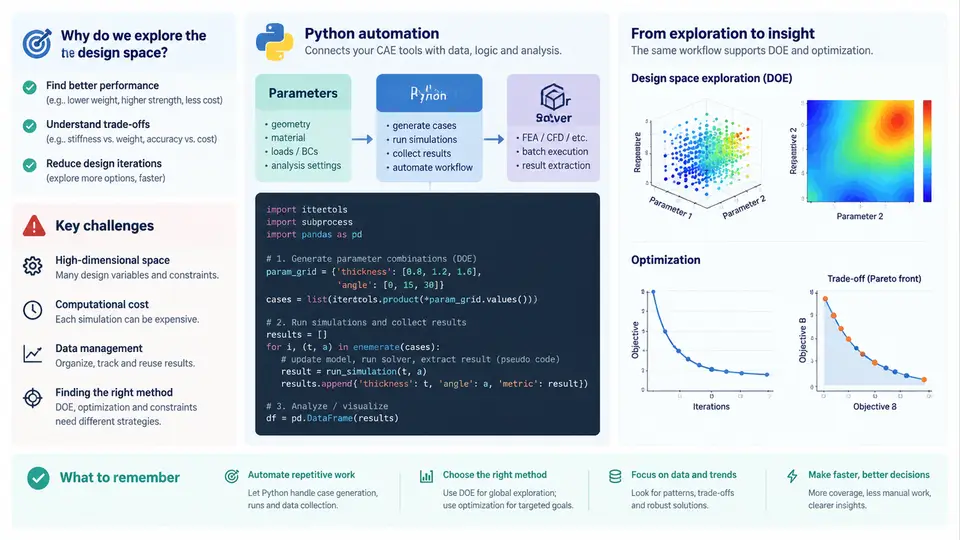
Design space exploration (DSE) is the systematic investigation of how a product's performance responds to changes in its design variables. In a CAE-driven development process, DSE sits between geometry definition and final design commitment: instead of analyzing a single nominal configuration, engineers sweep parameters, sample the space, and use the resulting response data to make defensible decisions. Python has become the de facto automation layer for this work because it can orchestrate solvers, manipulate geometry and meshes, manage parameter sets, and post-process large result sets within one reproducible script.
Why Manual Parametric Studies Break Down
A single structural or thermal run may take minutes to hours. A meaningful study, however, rarely involves one variable. Consider a bracket with four design variables — thickness t, fillet radius r, rib height h, and hole diameter d — each at three levels. A full factorial sweep requires 3⁴ = 81 runs. If each run costs 20 minutes of solver time plus 10 minutes of manual model editing, the study consumes roughly 40 hours of wall-clock time, most of it human attention. Add a fifth variable and the count jumps to 243. This combinatorial growth is the first motivation for automation: the number of runs scales multiplicatively, while manual effort scales linearly with runs and introduces transcription errors at every step.
The second motivation is consistency. When an engineer edits a CAD model by hand, re-meshes, applies boundary conditions, and launches the solver, small inconsistencies creep in — a forgotten load case, a changed mesh density, a renamed output file. These inconsistencies are invisible in a single run but corrupt trend analysis across dozens of runs. Automation enforces identical setup logic for every design point.
From Parametric Studies to DOE and Optimization
DSE workflows fall into three overlapping categories, distinguished by how design points are chosen and what is done with the results.
- Parametric studies vary one or a few variables at a time to establish sensitivity and trends. They answer "what happens if
tincreases by 2 mm?" and are cheap to interpret but blind to interactions. - Design of Experiments (DOE) selects a structured set of design points to fit a response surface or quantify variable effects. Methods include full factorial, Latin hypercube sampling (LHS), central composite designs, and Box-Behnken designs. DOE answers "which variables matter, and how do they interact?"
- Optimization searches the space for a design that minimizes or maximizes an objective subject to constraints. It may use gradient-based methods, genetic algorithms, or surrogate-assisted search. Optimization answers "what is the best design I can commit to?"
These categories form a natural progression. A parametric study reveals which variables are worth including. A DOE builds a surrogate model — often a polynomial response surface, Kriging model, or radial basis function — that approximates the solver at negligible cost. Optimization then searches the surrogate and verifies promising candidates with full-fidelity CAE runs. Python automation is what makes this pipeline continuous rather than a series of disconnected manual campaigns.
The Automation Architecture
A typical Python-driven DSE pipeline has five stages, each with distinct failure modes. The diagram below shows the data and control flow, including the feedback loop where surrogate predictions are verified against full-fidelity runs.
Core Challenges in CAE DSE
Automation does not eliminate the hard problems; it relocates them. Four challenges dominate real projects.
Computational cost. High-fidelity CFD or nonlinear FEA runs can take hours. A 200-point LHS study is infeasible without either parallel execution or surrogate modeling. Python addresses this with joblib.Parallel, dask.distributed, or HPC job submission wrappers, but the engineer must still decide how many concurrent solver licenses are available and how to handle failed runs without aborting the entire batch.
Geometry and mesh robustness. Not every parameter combination produces a valid model. A fillet radius larger than the adjacent edge length will fail in CAD; a thin rib may generate degenerate mesh elements. A robust pipeline must detect these failures, log them, and either repair the geometry or mark the design point as infeasible. Silent failures — where the solver returns a result for a corrupted model — are the most dangerous.
Data management. A 200-run study generates 200 input decks, 200 result files, and a KPI table. Without a structured data store, the study becomes unreproducible within weeks. Python's pandas and sqlite3 modules make it straightforward to maintain a single table where each row is a design point with its inputs, outputs, solver status, and timestamp.
Surrogate accuracy. A response surface fitted to 50 points may predict a minimum that does not exist. Cross-validation, adaptive sampling, and verification runs are essential. Python's scikit-learn provides the regression and validation tools, but the engineer must choose the model form and sampling strategy appropriate to the response's nonlinearity.
A Minimal Working Example
The following script sketches a complete parametric study loop for a cantilever beam. It defines three design variables, generates an LHS sample, writes a parameter file for each point, launches a solver (represented here by a placeholder function), and collects results into a CSV. The example is illustrative; actual solver invocation depends on the CAE tool's scripting interface.
import numpy as np
import pandas as pd
from pyDOE import lhs
import subprocess, os, json

# Design variables: [min, max]
bounds = {
    "thickness": [4.0, 12.0],   # mm
    "width":     [20.0, 60.0],  # mm
    "load":      [500.0, 2000.0] # N
}

n_samples = 30
np.random.seed(42)
sample = lhs(len(bounds), samples=n_samples, criterion="maximin")

# Scale unit hypercube samples to physical bounds
keys = list(bounds.keys())
scaled = np.zeros_like(sample)
for i, k in enumerate(keys):
    lo, hi = bounds[k]
    scaled[:, i] = lo + sample[:, i] * (hi - lo)

records = []
for idx, row in enumerate(scaled):
    params = dict(zip(keys, row))
    run_dir = f"run_{idx:03d}"
    os.makedirs(run_dir, exist_ok=True)

    with open(os.path.join(run_dir, "params.json"), "w") as f:
        json.dump(params, f)

    # Placeholder for actual solver call
    # subprocess.run(["solver", "-i", "model.inp", "-p", "params.json"], cwd=run_dir)
    max_stress = 3 * params["load"] * 100 / (params["width"] * params["thickness"]**2)
    mass = params["width"] * params["thickness"] * 200 * 7.85e-6

    records.append({**params, "max_stress_MPa": max_stress, "mass_g": mass})

df = pd.DataFrame(records)
df.to_csv("doe_results.csv", index=False)
print(df.describe())
Running this produces a 30-row CSV with columns for each input variable plus the two KPIs. The describe() output gives immediate insight into the KPI ranges. From here, the engineer can fit a response surface, identify the variable with the strongest effect on stress, or set up a constrained optimization that minimizes mass subject to a stress limit.
What Python Automation Actually Changes
The value of Python in CAE DSE is not that it replaces engineering judgment. It is that it makes the exploration loop fast enough and consistent enough that judgment can be applied to the right questions. Instead of spending days editing models and copying results, the engineer spends that time deciding which variables to include, which sampling method suits the response, whether the surrogate is trustworthy, and what the optimal design means for manufacturing and safety margins. The automation handles the repetition; the engineer handles the reasoning.
This chapter has established the motivation, the three workflow categories, the five-stage pipeline architecture, and the four dominant challenges. The chapters that follow will build each stage in detail, starting with parameterization and geometry control, then moving through sampling strategies, solver orchestration, KPI extraction, surrogate modeling, and optimization. The goal throughout is a reproducible, auditable pipeline that turns CAE from a verification tool into a design exploration engine.