1. Production CAE automation landscape
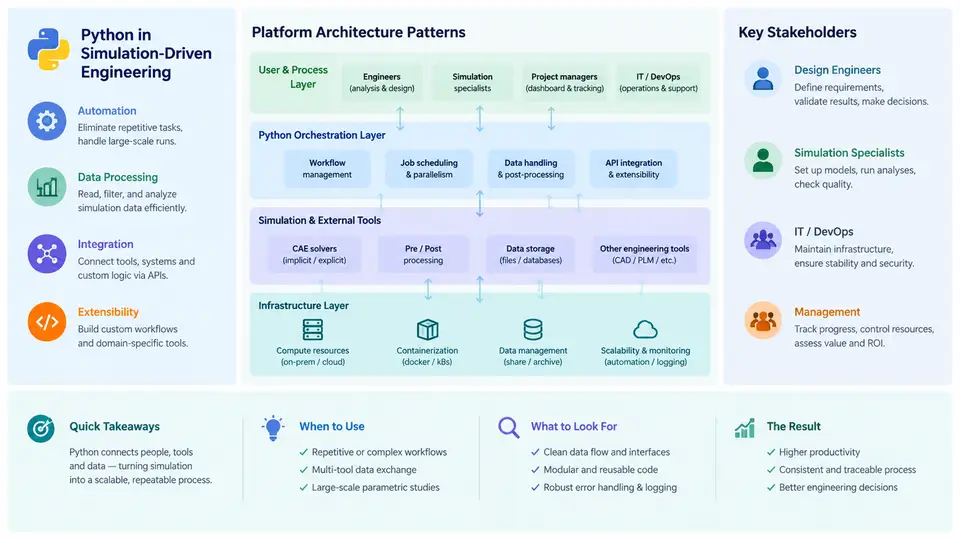
Production CAE automation is not a single script that runs a solver. It is an engineering capability that turns a repeatable simulation workflow into a governed, versioned, and observable service. In a production setting, the question is rarely "can Python drive this solver?" — it is "can Python drive this solver reliably, for hundreds of load cases, across multiple teams, with traceable inputs and auditable outputs?" This chapter establishes the landscape: where Python fits in simulation-driven engineering, which architecture patterns survive contact with real programs, and who the stakeholders are that shape requirements.
Why Python Became the Glue Language of CAE
CAE toolchains are inherently heterogeneous. A typical crash or durability program might combine a pre-processor (ANSA, HyperMesh), a solver (Abaqus, LS-DYNA, Nastran, OptiStruct), a post-processor (META, HyperView), a job scheduler (LSF, Slurm, PBS), and a PLM system (Teamcenter, 3DEXPERIENCE). Each vendor exposes a different automation surface: Tcl, Python, COM, REST, or a proprietary command language.
Python wins here for three structural reasons. First, binding coverage: nearly every major CAE vendor ships a Python API, and where it does not, Python can still drive the tool through file I/O, subprocess invocation, or COM. Second, ecosystem leverage: numpy, pandas, h5py, pyvista, and matplotlib cover the data-handling and reporting layer that CAE vendors historically left to Excel macros. Third, low ceremony for engineers: a simulation engineer can read and modify a 200-line Python script without a software engineering background, which matters because the people who understand the physics are usually not the people who write production code.
The practical consequence is that Python occupies the orchestration and data plane, not the compute plane. The solver still does the numerics in Fortran or C++. Python decides what to run, with which parameters, in what order, on which machine, and what to do with the results.
Architecture Patterns That Survive Production
Three patterns recur across mature CAE automation platforms. They are not mutually exclusive; most platforms combine them.
1. The parameterized job runner. A single entry point accepts a parameter set (material card, thickness, load case ID), renders a solver deck from a template, submits the job, and collects results. This is the workhorse pattern for DOE and optimization loops. Its critical design decision is template versus programmatic deck generation: templating (Jinja2 over an .inp or .key file) is faster to build and easier to review; programmatic generation via a vendor API is more robust to format changes but couples you to that API version.
2. The workflow DAG. When a simulation involves mesh generation, multiple solver stages, and post-processing, a directed acyclic graph expresses dependencies explicitly. Tools like Prefect, Airflow, or a lightweight custom DAG runner handle retries, partial failure, and caching. The key benefit in CAE is incremental re-execution: if only the material card changed, the mesh stage should not re-run.
3. The service wrapper. A REST or gRPC service exposes simulation capability to non-CAE consumers — a design engineer in a web tool, or an optimization algorithm that needs a black-box function evaluation. This pattern demands strict input validation, resource quotas, and asynchronous job handles, because the caller cannot be trusted to know that a full vehicle crash takes six hours.
Reference Architecture
The diagram below shows the layered structure of a production CAE automation platform, with the data and control flows that connect the layers. Note that the solver and HPC layer is deliberately isolated behind a submission adapter — this is what allows the same platform to target an on-premise LS-DYNA cluster and a cloud burst capacity without rewriting the workflow layer.
Stakeholders and What They Actually Need
Automation platforms fail when they optimize for one stakeholder. The table below maps each stakeholder to their primary concern and the platform feature that addresses it.
| Stakeholder | Primary concern | Platform feature that addresses it |
|---|---|---|
| Simulation analyst | Does the automation reproduce my manual workflow exactly? | Deck templates validated against a golden reference run; diff tooling on solver input |
| Design engineer | Can I get a quick answer without learning the solver? | Simplified parameter schema, defaulted load cases, fast-turnaround queue |
| Optimization engineer | Can I call this as a function thousands of times? | Stateless job API, deterministic outputs, machine-readable result schema |
| CAE IT / HPC admin | Will this saturate the cluster or leak licenses? | Quota enforcement, license checkout tracking, job priority classes |
| Program manager | Which design variant passed, and can I prove it later? | Run manifest with input hash, solver version, and pass/fail criteria |
| Quality / certification | Is this result traceable and reproducible? | Immutable audit log, PLM linkage, archived solver decks |
A Minimal Reproducible Example
To make the landscape concrete, consider a parameterized job runner for a modal analysis. The input is a JSON parameter set; the output is a solver deck and a parsed natural frequency table.
# params.json — example input (illustrative values, not measured data)
{
  "job_id": "modal_beam_001",
  "template": "templates/modal_beam.inp.j2",
  "material": {"E": 210000.0, "nu": 0.30, "rho": 7.85e-9},
  "mesh": {"element_size": 5.0},
  "solver": {"code": "abaqus", "cpus": 4, "memory_gb": 16},
  "extract": ["freq_1", "freq_2", "freq_3"]
}
The runner renders the template, writes the deck to a run-specific directory, submits via the scheduler adapter, and on completion parses the .dat file for the requested frequencies. The verification criterion is straightforward: the first three natural frequencies must match a golden reference run within 0.5%. If they do not, the most common causes are a stale template (the mesh block was edited but the material block was not re-rendered) or a unit mismatch in the material card — both are detectable by diffing the rendered deck against the golden deck.
What Distinguishes Production from Prototype
A prototype automation script answers "does this work?" A production platform answers four additional questions: Who ran it? (identity and authorization), What exactly was run? (input hash, solver version, template version), What happened? (exit codes, solver warnings, convergence status), and Can we reproduce it? (archived inputs and environment). These four questions define the minimum viable traceability layer, and they are the reason the architecture above separates the workflow layer from the solver layer — the workflow layer is where traceability is enforced, and it must not depend on solver-specific behavior.
The remainder of this course builds each layer in turn: parameter schemas and deck templating, scheduler integration, result parsing, workflow orchestration, and finally the service and traceability concerns that make the whole system production-grade.