3. Solver APIs and interfaces
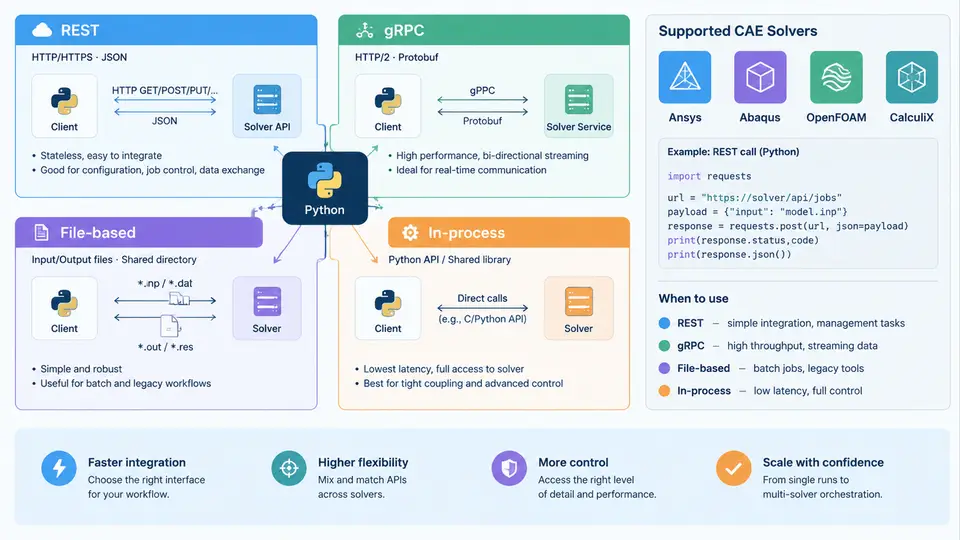
When you integrate multiple CAE solvers into a single Python workflow, the first architectural decision is not which library to import but how your Python process will talk to each solver. Ansys, Abaqus, OpenFOAM, and CalculiX expose fundamentally different integration surfaces, and choosing the wrong one for a given solver leads to fragile scripts, silent data corruption, or unmanageable runtime. This chapter classifies the four dominant interface patterns, shows how each maps onto real CAE tools, and gives you the criteria to select among them.
The four interface families
Every solver integration you will write falls into one of four families, distinguished by where the solver executes and how data crosses the boundary:
- In-process API — the solver runs inside your Python interpreter as a library. Data crosses the boundary as native Python objects; there is no serialization and no separate process.
- File-based interface — you write an input deck, launch the solver as a subprocess, and parse the output files it produces. The filesystem is the API.
- REST API — the solver (or a wrapper service) exposes HTTP endpoints; you send JSON or multipart requests and receive JSON responses.
- gRPC API — the solver exposes a typed, contract-defined service over HTTP/2 with Protocol Buffers; calls are strongly typed and support streaming.
The distinction matters because it determines your error handling, your data-fidelity guarantees, and your deployment topology. A file-based integration can survive a solver crash by inspecting the log; an in-process integration cannot, because the crash takes your Python process with it.
In-process APIs: the tightest coupling
CalculiX is the clearest example of a solver you drive almost entirely through files, but several CAE tools do offer genuine in-process Python APIs. The canonical case is pycalculix or the Abaqus Scripting Interface (ASI), where abaqus cae noGUI=script.py runs your Python inside the Abaqus kernel. More directly, tools like pyansys (PyMAPDL) connect to a running MAPDL instance and issue commands through a Python object:
from ansys.mapdl.core import launch_mapdl

mapdl = launch_mapdl()
mapdl.prep7()
mapdl.et(1, "SOLID186")
mapdl.mp("EX", 1, 210e9)      # steel, Pa
mapdl.mp("NUXY", 1, 0.3)
mapdl.blc4(0, 0, 0.1, 0.1, 0.01)
mapdl.esize(0.01)
mapdl.vmesh("ALL")
mapdl.slashsolu()
mapdl.solve()
print(mapdl.post_processing.nodal_displacement("NODE", 1))
Here the solver is a separate process, but the API is stateful and session-oriented: commands mutate solver state in order, and the Python object holds a live connection. This is the highest-fidelity option — you get structured results back as NumPy arrays, not text to parse. The cost is that the solver must be installed, licensed, and reachable, and that a solver crash can leave the session in an undefined state.
File-based interfaces: the universal fallback
OpenFOAM and CalculiX are driven primarily through files. For OpenFOAM you generate a case directory (system/, constant/, 0/), run blockMesh, simpleFoam, or pimpleFoam as subprocesses, and read the resulting fields from time directories. For CalculiX you write a .inp deck and run ccx -i model, then parse model.dat and model.frd.
import subprocess, pathlib

case = pathlib.Path("cylinder")
subprocess.run(["blockMesh", "-case", str(case)], check=True)
subprocess.run(["simpleFoam", "-case", str(case)], check=True)

# Read the last time directory's pressure field
times = sorted(int(p.name) for p in (case / "0").parent.iterdir()
               if p.name.isdigit())
latest = case / str(times[-1]) / "p"
print(latest.read_text()[:200])
The file-based pattern is the most portable and the most debuggable: every intermediate artifact is on disk, so you can inspect the mesh, the log, and the partial results after a failure. Its weakness is parsing. OpenFOAM's dictionary format and CalculiX's fixed-width .frd blocks are not self-describing; you need a parser (for example foamFile readers or ccx2paraview) and you must handle the solver's exit codes and FOAM FATAL ERROR lines explicitly.
REST and gRPC: service-oriented solver access
When the solver runs on a remote cluster or is wrapped by a platform (Ansys Minerva, SimScale, or a custom FastAPI service around OpenFOAM), you interact over the network. REST is the pragmatic default: submit a job, poll a status endpoint, download results.
import requests, time

job = requests.post("https://solver.example.com/v1/jobs",
                    json={"solver": "openfoam",
                          "case": "cylinder",
                          "endTime": 500}).json()

while job["state"] not in ("finished", "failed"):
    time.sleep(5)
    job = requests.get(f"https://solver.example.com/v1/jobs/{job['id']}").json()

if job["state"] == "failed":
    raise RuntimeError(job["log_tail"])
results = requests.get(job["results_url"]).content
gRPC is the better choice when you need typed contracts, low latency, or streaming — for example, a co-simulation where a structural solver and a fluid solver exchange interface loads every time step. The .proto file defines the message schema, so both sides agree on field names and types at compile time, and bidirectional streaming lets you push boundary conditions while pulling displacements without a request/response round trip per step.
Mapping interfaces to the four solvers
| Solver | Primary interface | Typical Python entry point | Data boundary |
|---|---|---|---|
| Ansys MAPDL | In-process / gRPC | ansys.mapdl.core.launch_mapdl() | Python objects, NumPy arrays |
| Abaqus | In-process (kernel) / file | abaqus cae noGUI=, .inp + .odb | Python objects, ODB |
| OpenFOAM | File-based | subprocess.run(["simpleFoam", ...]) | Case directories, dictionaries |
| CalculiX | File-based | subprocess.run(["ccx", "-i", "model"]) | .inp, .dat, .frd |
Note that the same solver can appear in more than one row. Abaqus is in-process when you script the CAE kernel but file-based when you submit a deck to a batch queue. Your integration layer should therefore abstract the interface, not the solver: define a common solve(case) -> Result contract and let each adapter implement it with whichever mechanism the tool supports.
Failure modes and how to detect them
Each interface fails differently, and the detection strategy follows from the boundary:
- In-process: a solver exception propagates as a Python exception, but a hard crash (segfault) kills the interpreter. Wrap calls in a subprocess if you need isolation, and always check the returned status object rather than assuming success.
- File-based: the subprocess may exit 0 while the solver wrote
FOAM FATAL ERRORor*ERRORto the log. Parse the log, not just the exit code. Missing output files are the reliable signal. - REST: HTTP 200 does not mean the job succeeded. Inspect the job state field and the log tail. Handle timeouts and retries explicitly; a dropped connection mid-poll is normal.
- gRPC: typed errors surface as status codes (
DEADLINE_EXCEEDED,UNAVAILABLE), which is an advantage — but streaming calls can fail mid-stream, so your consumer must handle partial results.
log.simpleFoam and confirm the final time directory exists. For CalculiX, confirm Job finished appears in the .sta file. Convergence is a physical claim, not a process claim.
Choosing an interface for a multi-solver workflow
In a coupled workflow — say, a thermal load from CalculiX feeding an OpenFOAM conjugate heat transfer case — you will mix interfaces. The practical rule is to keep the orchestration in Python and push each solver to its most native interface. Drive CalculiX through files because that is what it is built for; drive MAPDL through its Python API because that gives you structured arrays; expose the whole pipeline through a thin REST or gRPC layer only if other teams or services need to call it. This keeps each adapter simple and confines parsing and error handling to the boundary where it belongs.
The diagram above summarizes the decision space: one orchestrator, four interface families, four representative solvers, and a single normalized result contract. The key engineering insight is that the interface family — not the solver brand — determines your serialization cost, your failure-detection strategy, and your deployment constraints. Pick the interface per solver, normalize the result, and keep the orchestration logic independent of both.