1. Multi-solver CAE integration landscape
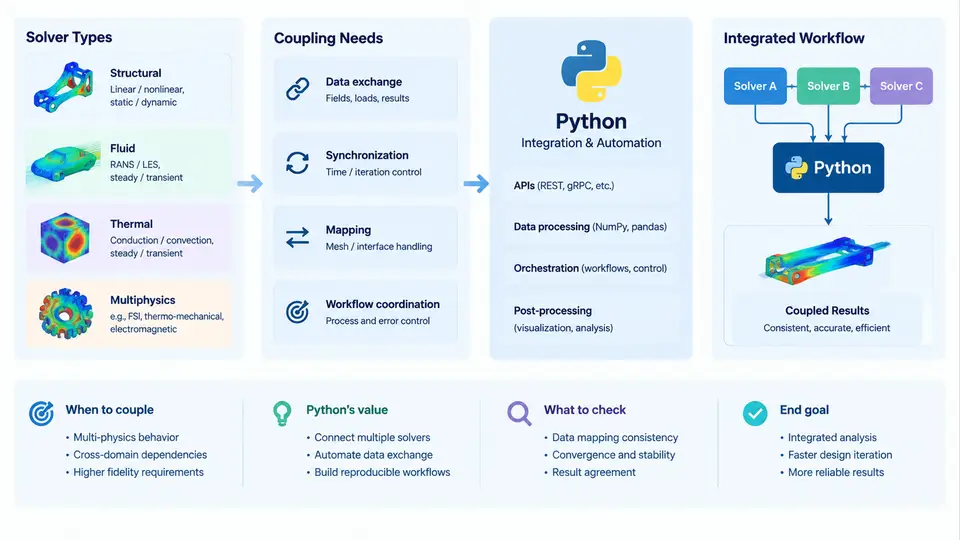
Modern engineering simulation rarely relies on a single physics solver. A typical product development cycle may require structural analysis in Abaqus or ANSYS Mechanical, thermal management in Fluent or STAR-CCM+, electromagnetic behavior in Maxwell or CST, and multibody dynamics in Adams or Simpack. Each tool carries its own input format, execution model, licensing scheme, and result structure. The discipline of multi-solver CAE integration addresses the engineering and software problem of orchestrating these heterogeneous tools into a coherent, automated workflow — and Python has become the de facto glue language for that orchestration.
Why Multi-Solver Workflows Emerge
Single-solver analyses assume that one physics domain dominates and that boundary conditions from other domains can be approximated as fixed inputs. This assumption breaks down in coupled systems. Consider a power electronics module: the IGBT junction temperature depends on electrical losses, which depend on temperature-dependent material properties, which in turn depend on the thermal solution. Solving this with a single tool is either impossible or requires intrusive custom code inside the solver. A multi-solver approach decomposes the problem: an electromagnetic solver computes losses, a thermal solver computes the temperature field, and a structural solver evaluates thermo-mechanical stress. The integration layer manages data exchange, convergence checks, and iteration control.
Three coupling patterns dominate practice:
- One-way (sequential) coupling: Solver A produces a field (e.g., pressure loads) that is mapped onto Solver B's mesh. No feedback loop exists. This is the simplest and most common pattern — for example, mapping CFD pressure results onto a structural model for stress analysis.
- Two-way (iterative) coupling: Solvers exchange data at each iteration until a convergence criterion is met. Fluid-structure interaction (FSI) is the canonical example: the fluid solver computes pressure on a deformed surface, the structural solver computes the deformation under that pressure, and the loop repeats until displacement and pressure residuals fall below tolerance.
- Co-simulation: Both solvers run simultaneously in separate processes and exchange data at synchronized time steps through a coupling interface such as the Functional Mock-up Interface (FMI) or a custom socket protocol. This is common in system-level simulation where a 1D system model (e.g., GT-SUITE, Amesim) interacts with a 3D CFD or structural model.
Solver Types and Their Integration Characteristics
Not all solvers integrate with equal ease. The table below summarizes the practical integration surface of common solver categories.
| Solver Category | Typical Tools | Input Format | Execution Model | Integration Approach |
|---|---|---|---|---|
| Structural FEA | Abaqus, ANSYS Mechanical, Nastran | INP, CDB, BDF | Batch or GUI | Python scripting API (e.g., Abaqus/CAE Python, PyMAPDL) |
| CFD | Fluent, STAR-CCM+, OpenFOAM | CAS, MSH, dict files | Batch, journal, or server | Journal files, PyFluent, OpenFOAM Python bindings |
| Multibody Dynamics | Adams, Simpack, RecurDyn | CMD, XML, proprietary | Batch or co-simulation | Adams/View command language, Python via pyAdams |
| Electromagnetics | Maxwell, CST, FEKO | Proprietary project files | Batch or GUI | IronPython (Maxwell), CST Python library |
| 1D System Simulation | GT-SUITE, Amesim, Dymola | Model files, FMU | Co-simulation via FMI | FMI standard, Python fmpy library |
The key insight is that integration difficulty correlates with the solver's automation maturity. Tools with first-class Python APIs (Abaqus, PyMAPDL, PyFluent) allow direct in-process control. Tools that only expose batch execution require file-based orchestration: generate input decks, launch the solver as a subprocess, parse output files. Co-simulation tools require a runtime coupling interface, which adds synchronization and data-mapping complexity.
Python's Role in the Integration Layer
Python occupies a unique position in CAE workflows because it serves three distinct roles simultaneously:
- Orchestrator: Python scripts launch solvers, manage file I/O, monitor convergence, and handle error recovery. Libraries such as
subprocess,pathlib, andshutilprovide the primitives; frameworks likeluigiorprefectadd dependency tracking and scheduling. - Data transformer: Results from one solver must be mapped onto another solver's mesh or coordinate system. Python's ecosystem —
numpyfor array operations,scipyfor interpolation,meshiofor mesh format conversion, andvtkfor visualization — handles the numerical heavy lifting. - API client: Modern solvers expose REST or gRPC APIs for remote execution and result retrieval. Python's
requests,grpcio, andansys-tools-pathlibraries allow scripts to interact with solver services running on HPC clusters or cloud instances.
Practical example — sequential thermal-structural coupling: A Python script reads a steady-state thermal solution from ANSYS Fluent (exported as a CSV of node temperatures), interpolates those temperatures onto an Abaqus mesh using scipy.interpolate.griddata, writes the interpolated temperatures into an Abaqus INP file as a predefined field, submits the Abaqus job via subprocess.run, and extracts the maximum von Mises stress from the resulting ODB file using abaqus python scripting. The entire chain runs from a single python run_coupling.py command.
Coupling Needs and Data Mapping Challenges
The most common failure point in multi-solver integration is not solver execution — it is data mapping. When Solver A's mesh does not match Solver B's mesh, field data must be interpolated. Three mapping scenarios exist:
- Conservative mapping: The total force or flux is preserved. This is required for load transfer in structural analysis. If the source mesh is finer than the target mesh, conservative mapping integrates the source field over each target element.
- Consistent mapping: The field values are interpolated at target nodes without preserving integrals. This is acceptable for temperature or displacement fields where pointwise accuracy matters more than total energy.
- Non-matching interface mapping: When the coupling surface geometry differs (e.g., a 3D CFD surface to a 1D beam model), projection algorithms such as nearest-neighbor, inverse distance weighting, or radial basis functions are used. Python's
scipy.interpolate.RBFInterpolatoris a practical tool for this.
Common pitfall: Mapping a pressure field from a CFD mesh to a structural mesh without checking the total force can introduce a 5–15% load imbalance. Always verify that the integral of the mapped field matches the integral of the source field within an acceptable tolerance (typically <1% for conservative mapping).
Visualizing the Integration Landscape
The SVG below illustrates the typical architecture of a multi-solver CAE integration workflow, showing how Python sits between the user, the solvers, and the data transformation layer.
What This Means for Your Integration Strategy
Before writing a single line of Python, answer three questions: (1) Which solvers are involved, and what automation interfaces do they expose? (2) What data must cross solver boundaries, and what mapping fidelity is required? (3) Is the coupling one-way, iterative, or co-simulation? The answers determine whether you need a simple file-based script or a full co-simulation framework with runtime synchronization.
A practical starting point is to build a solver capability matrix for your project. For each solver, document: the executable path, the input file format, the batch execution command, the result file format, and the available Python API. This matrix becomes the specification for your integration layer. In the chapters that follow, you will implement each row of that matrix — starting with direct solver scripting, then moving to data mapping, convergence control, and finally co-simulation orchestration.
Rule of thumb: If your coupling is one-way and the mesh mismatch is small (<5% node deviation), a file-based Python script with scipy.interpolate is sufficient. If the coupling is two-way and requires more than 3–5 iterations, invest in a proper co-simulation interface (FMI or socket-based) to avoid fragile file-polling loops.