3. Python environment setup for MADYMO auto
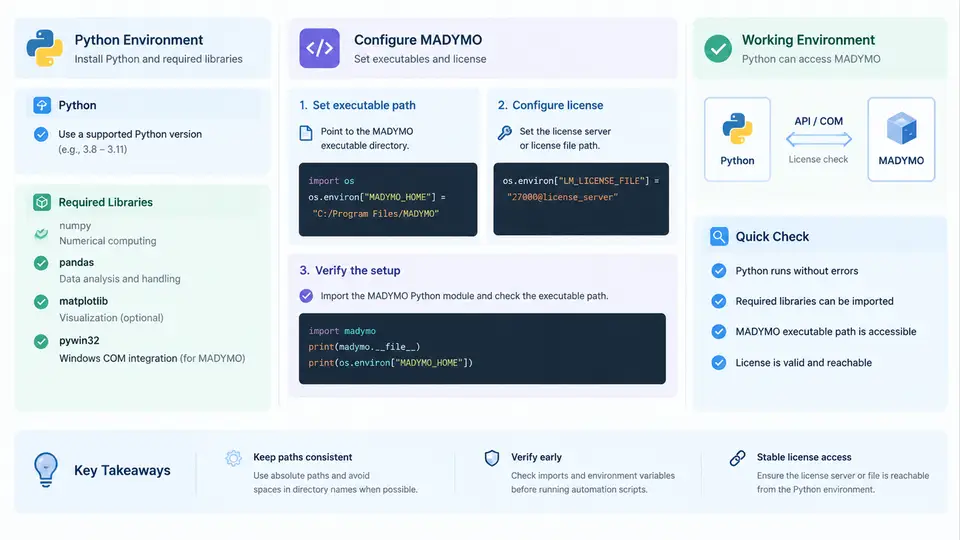
Before a single parametric sweep can be launched, the automation host must be able to do three things reliably: run a modern Python interpreter, import the scientific and XML-handling libraries your scripts depend on, and invoke the MADYMO solver with a valid license. This chapter builds that foundation. The goal is a reproducible environment in which a script can generate a model, call madymo, read the results, and repeat — without manual intervention and without license surprises.
Choosing and Installing the Interpreter
MADYMO automation is I/O-heavy and numerically light: scripts mostly manipulate XML input decks, template parameters, and result files. Any maintained CPython release from 3.9 onward is suitable. Avoid the system Python on Linux workstations, because package upgrades can break OS tooling; install a dedicated interpreter instead. Two practical options dominate:
- Standalone CPython + venv — download from python.org, then create an isolated environment per project. This is the most portable choice and the easiest to document for colleagues.
- Conda / Miniconda — convenient when you also need compiled scientific stacks, and it handles non-Python dependencies (BLAS, HDF5) cleanly.
Create the environment with an explicit name so that multiple MADYMO versions can coexist:
# Option A: venv on a standalone CPython
python -m venv C:\madymo-automation\.venv
C:\madymo-automation\.venv\Scripts\activate

# Option B: conda
conda create -n madymo-auto python=3.11 -y
conda activate madymo-auto

# Verify
python --version
python -c "import sys; print(sys.executable)"
The second command matters more than the first: it confirms that pip install will land in the environment you think it will. A frequent failure mode is installing libraries into a global interpreter while running scripts from a virtual one, producing ModuleNotFoundError despite a successful install.
Required Libraries
The dependency set is small and stable. Install it once and pin the versions in a requirements.txt so that a sweep run in six months reproduces today's behaviour.
| Package | Role in MADYMO automation | Typical use |
|---|---|---|
lxml | Fast, namespace-aware XML parsing and writing | Editing <PARAMETER> values in input decks |
numpy | Array maths for parameter grids and result vectors | Building DOE matrices, computing peak values |
pandas | Tabular aggregation and CSV/Excel export | Collecting one row per run into a summary table |
matplotlib | Trend and sensitivity plots | Peak acceleration vs. belt stiffness |
jinja2 | Template rendering for input decks | Generating decks from a parameter dictionary |
pyyaml | Human-editable configuration files | Storing solver paths and sweep definitions |
pip install lxml numpy pandas matplotlib jinja2 pyyaml
pip freeze > requirements.txtconda install lxml numpy pandas matplotlib jinja2 pyyaml. Mixing conda and pip in one environment works but complicates reproducibility; pick one channel per environment.Locating the MADYMO Executables
MADYMO installations differ by platform and by release. On Windows the solver typically lives under C:\Program Files\TASS\MADYMO<version>\bin; on Linux under /opt/TASS/madymo<version>/bin. The two executables you will call most often are madymo (or madymo.exe) for the solver and madymo3d for post-processing. Confirm them before writing any automation code:
# Linux
/opt/TASS/madymo2024/bin/madymo -h

# Windows (PowerShell)
& "C:\Program Files\TASS\MADYMO2024\bin\madymo.exe" -h
Do not rely on the executable being on PATH. Automation scripts should resolve it from configuration, because a sweep may need to compare two solver versions. A minimal config.yaml keeps this explicit:
madymo:
  executable: "C:/Program Files/TASS/MADYMO2024/bin/madymo.exe"
  license_file: "C:/TASS/license/madymo.lic"
  license_server: "27000@lic-srv-01"
  scratch_dir: "D:/sweeps/scratch"
  timeout_s: 3600
License Configuration
MADYMO licensing is the most common cause of a sweep that dies at run 1 of 200. Two mechanisms exist: a node-locked license file, and a floating license served by a license daemon. The environment variables that control them are LM_LICENSE_FILE and MADYMO_LICENSE_FILE; the exact precedence depends on the release, so set both consistently and verify.
# Linux
export MADYMO_LICENSE_FILE=/opt/TASS/license/madymo.lic
export LM_LICENSE_FILE=27000@lic-srv-01

# Windows (PowerShell, current session)
$env:MADYMO_LICENSE_FILE = "C:\TASS\license\madymo.lic"
$env:LM_LICENSE_FILE = "27000@lic-srv-01"
For floating licenses, check availability before launching a large sweep. A short probe run is cheaper than discovering the pool is exhausted at run 150:
madymo -licstat
# or, for FlexLM-style daemons
lmutil lmstat -a -c 27000@lic-srv-01Verifying the Environment End to End
Installation is only complete when a script can drive the solver. The following probe renders a trivial deck, runs it, and checks the exit status — the same pattern every later chapter builds on.
import subprocess, yaml, pathlib

cfg = yaml.safe_load(pathlib.Path("config.yaml").read_text())
exe = cfg["madymo"]["executable"]

result = subprocess.run(
    [exe, "-f", "probe.xml", "-n", "probe_run"],
    capture_output=True, text=True, timeout=cfg["madymo"]["timeout_s"]
)
print("returncode:", result.returncode)
print(result.stdout[-500:])
Interpret the outcome as follows. A return code of 0 with a normal termination message in the log means the environment is ready. A non-zero code accompanied by a license message points to the license configuration. A non-zero code with a missing-file or parse error points to the deck or the working directory. A FileNotFoundError from Python itself means the executable path in config.yaml is wrong — check for forward slashes on Windows and for spaces that need quoting.
Environment Checklist
Run through the following before starting any parametric study. Each item maps to a failure mode observed in practice.
| Check | Command or action | Pass criterion |
|---|---|---|
| Interpreter active | python -c "import sys; print(sys.executable)" | Path inside the project environment |
| Libraries importable | python -c "import lxml, numpy, pandas, jinja2, yaml" | No traceback |
| Solver reachable | madymo -h using the configured path | Usage text printed |
| License valid | madymo -licstat | Seats listed as available |
| Probe run | Execute the subprocess.run snippet above | returncode == 0 |
| Scratch writable | Write and delete a file in scratch_dir | No permission error |
Two habits pay off across the remaining chapters. First, keep the environment definition under version control — requirements.txt plus config.yaml is enough to rebuild the host on another machine. Second, never hard-code the solver path or license server inside a script; read them from configuration so that a version comparison or a site migration is a one-line change rather than a code edit. With the interpreter, libraries, executables, and license all verified, the next step is generating input decks programmatically and driving them through a controlled sweep.