1. MADYMO parametric study automation
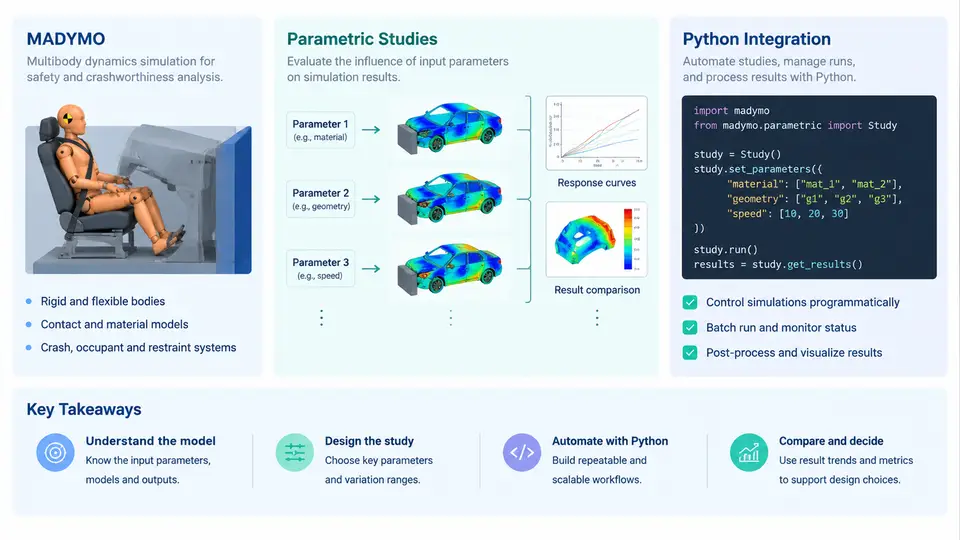
MADYMO (Mathematical Dynamic Model) is a multi-body and finite element solver developed by TASS International (now part of Siemens) for occupant safety simulation. It is widely used in the automotive industry to model crash dummies, airbags, seat belts, steering systems, and vehicle interiors under impact loading. A typical MADYMO model is defined through a structured input deck (the *.xml input file) that declares bodies, joints, contacts, FE meshes, and control cards. The solver then integrates the equations of motion and produces time-history outputs such as accelerations, forces, and injury criteria (HIC, Nij, chest deflection, etc.).
In real CAE workflows, engineers rarely run a single MADYMO simulation. Instead, they need to evaluate how occupant responses change when design parameters vary — airbag vent size, belt pretensioner force, seat friction, restraint timing, or dummy seating position. This is the essence of a parametric study: systematically varying one or more input parameters, running the solver for each combination, and analyzing the resulting response surface or sensitivity ranking.
Why Automate Parametric Studies?
Manual parametric studies are error-prone and slow. Consider a study with 5 parameters at 3 levels each — a full factorial design requires 35 = 243 runs. Editing the XML deck by hand for each run, launching MADYMO, and collecting outputs is impractical. Automation with Python addresses three pain points:
- Input generation: Programmatically modify parameter values in the MADYMO input deck while preserving the rest of the model.
- Execution orchestration: Launch MADYMO runs (locally or via a job scheduler), monitor completion, and handle failures.
- Output extraction and analysis: Parse result files, compute injury criteria, and produce plots or sensitivity tables.
How Python Integrates with MADYMO
MADYMO does not expose a native Python API in the same way some solvers do. Integration is therefore achieved through a combination of file manipulation, subprocess execution, and result parsing. The typical architecture is shown below.
The diagram shows the closed loop: parameters are defined, input decks are generated from a template, MADYMO runs are executed, results are parsed, and analysis feeds back into the next iteration. Python sits at the center of this loop, acting as the glue between the solver and the engineer's decision-making process.
A Minimal Working Example
Suppose we want to study the effect of airbag vent diameter on HIC for a driver-side frontal impact. The MADYMO input deck contains a line like:
<AIRBAG_VENT DIAMETER="30.0" />We define a parameter sweep from 20 mm to 40 mm in 5 mm increments. A Python script using lxml can modify this attribute and write a new deck for each run:
from lxml import etree
import subprocess, os

vent_diameters = [20, 25, 30, 35, 40]

for d in vent_diameters:
    tree = etree.parse("template.xml")
    vent = tree.xpath("//AIRBAG_VENT")[0]
    vent.set("DIAMETER", str(d))
    run_dir = f"run_d{d}"
    os.makedirs(run_dir, exist_ok=True)
    tree.write(f"{run_dir}/model.xml")
    subprocess.run(["madymo", "-i", f"{run_dir}/model.xml"],
                   cwd=run_dir, check=True)
After execution, each run directory contains a .kn3 file (kinematics) and a .out file (time-history output). The HIC value can be extracted from the .out file using a simple parser:
def extract_hic(out_file):
    with open(out_file) as f:
        for line in f:
            if "HIC" in line:
                return float(line.split()[-1])
    return None

results = {d: extract_hic(f"run_d{d}/model.out") for d in vent_diameters}
print(results)
This produces a dictionary mapping vent diameter to HIC, which can be plotted or tabulated. In a real study, you would also extract Nij, chest deflection, and belt forces, and you would likely use a proper DOE library such as pyDOE2 or scipy.stats to generate the parameter matrix.
Key Considerations for Production Workflows
Moving from a toy example to a production parametric study requires attention to several engineering details:
- Template integrity: The template deck must be valid and runnable before parameterization. Always run a baseline case first to confirm the model converges.
- Parameter mapping: Clearly document which XML attributes or include files correspond to which physical parameters. A mapping table prevents silent errors.
- Run isolation: Each run should have its own directory to avoid file collisions. MADYMO writes multiple output files with fixed names.
- Error handling: Solver runs can fail due to numerical instability, missing files, or license issues. The automation script should detect non-zero exit codes and log failures without stopping the entire study.
- Parallelization: MADYMO runs are independent, so they can be parallelized using
concurrent.futures,multiprocessing, or a cluster scheduler (PBS, SLURM). - Provenance: Record the exact parameter set, solver version, and input deck hash for each run. This is essential for reproducibility and for regulatory documentation.
What This Course Covers
Over the next chapters, we will build a complete Python automation framework for MADYMO parametric studies. You will learn how to parse and modify MADYMO input decks programmatically, generate DOE matrices, orchestrate parallel solver runs, extract injury criteria from output files, and produce sensitivity plots and response surfaces. The goal is not just to automate individual runs, but to create a reusable workflow that can be applied to different occupant safety problems — from airbag optimization to restraint system tuning — with minimal modification.
By the end of this course, you will have a working toolkit that turns a time-consuming manual process into a repeatable, auditable, and scalable engineering workflow.