3. Batch script fundamentals
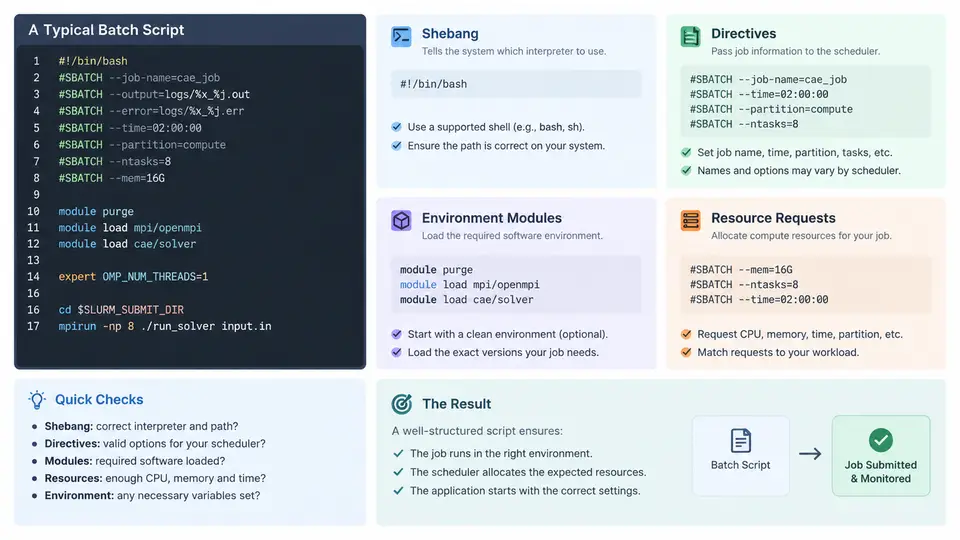
A batch script is the contract between a user and the scheduler. It declares what to run, how much of the cluster to reserve, and which software environment the job expects. On a Slurm-managed Linux CAE cluster, that contract is expressed through four distinct layers: the interpreter line (shebang), scheduler directives, environment module commands, and resource request flags. Getting any one of these wrong typically produces a job that either fails immediately, runs on the wrong hardware, or silently consumes far more resources than intended. This section walks through each layer using a representative OpenFOAM solver job, then consolidates them into a reusable template.
The Shebang Line
The first line of every batch script must be a shebang that tells the operating system which interpreter executes the file. For Slurm jobs the conventional choice is Bash:
#!/bin/bash
#SBATCH --job-name=channel_flow
#SBATCH --partition=compute
#SBATCH --nodes=1
#SBATCH --ntasks=32
#SBATCH --cpus-per-task=1
#SBATCH --mem=64G
#SBATCH --time=04:00:00
#SBATCH --output=slurm-%j.out
#SBATCH --error=slurm-%j.err
Two practical points matter here. First, the shebang must be the very first line — a leading blank line or comment before it causes sbatch to reject the script or fall back to an unintended shell. Second, avoid #!/bin/sh on most HPC systems, because sh is often a minimal POSIX shell that lacks arrays, [[ ]], and other Bash constructs commonly used in job scripts. If your site provides a specific Bash build (for example, a module-managed version), you may point the shebang at it, but the portable default is #!/bin/bash.
Scheduler Directives
Lines beginning with #SBATCH are directives parsed by Slurm before the script runs. They look like comments to Bash, which is exactly the design intent: the same file is both a valid shell script and a valid job specification. Directives must appear before the first non-comment, non-blank command; anything after the first executable line is treated as ordinary shell content.
Directives can also be supplied on the sbatch command line, and command-line values override in-file values. This is useful for parameter sweeps, but it also means a script's declared resources are not always the resources actually requested. For reproducible CAE runs, keep the authoritative resource declaration inside the script and use the command line only for deliberate overrides.
Resource Requests
Resource flags determine both scheduling eligibility and runtime behavior. The most consequential ones for CAE workloads are:
| Directive | Meaning | CAE consideration |
|---|---|---|
--nodes | Number of physical nodes | Multi-node MPI solvers need this to match the decomposition |
--ntasks | Total MPI ranks | Should equal the solver's MPI process count |
--cpus-per-task | Threads per rank | Set to 1 for pure MPI; raise for hybrid OpenMP |
--mem | Memory per node | Under-requesting causes OOM kills mid-solve |
--time | Wall-clock limit | Too short truncates the run; too long delays scheduling |
--gres | Generic resources (GPUs, etc.) | Required for GPU-accelerated solvers |
A common mistake is requesting --ntasks=32 while the solver is launched with mpirun -np 16. Slurm allocates 32 ranks, the solver uses 16, and half the allocation is wasted. The reverse — launching more ranks than allocated — causes oversubscription and severe performance loss. The rule is simple: the MPI launch count must equal --ntasks.
Memory deserves special attention. CAE solvers frequently grow their memory footprint as the mesh is partitioned and the linear system is assembled. A job that fits in 40 GB during initialization may need 70 GB at peak. Requesting --mem=64G when the peak is 70 GB produces an out-of-memory kill that appears in the error file as a signal 9 termination, often with no solver-level diagnostic. When in doubt, run a short benchmark and observe peak RSS with /usr/bin/time -v before committing to a production request.
Environment Modules
HPC clusters rarely expose a single global software stack. Instead, module (or modulecmd) manipulates environment variables such as PATH, LD_LIBRARY_PATH, and MANPATH to activate a specific compiler, MPI library, or application build. A batch script must load the same modules that were active when the job was prepared, otherwise the solver may link against an incompatible MPI or miss a required library.
module purge
module load gcc/12.3.0
module load openmpi/4.1.5
module load openfoam/2306
module purge first is deliberate: it removes any inherited modules from the submitting shell, ensuring the job environment is defined entirely by the script. This makes the job reproducible regardless of who submits it or from which login session. After loading, verify the active stack with module list and confirm the solver binary resolves correctly with which simpleFoam.
module avail on your target cluster and pin exact versions rather than relying on defaults, which can change without notice.
Putting It Together
The following template combines all four layers for a steady-state OpenFOAM run. It is a working structure, not a guaranteed-successful job — the mesh, case path, and decomposition must be adapted to the actual study.
#!/bin/bash
#SBATCH --job-name=channel_flow
#SBATCH --partition=compute
#SBATCH --nodes=1
#SBATCH --ntasks=32
#SBATCH --cpus-per-task=1
#SBATCH --mem=64G
#SBATCH --time=04:00:00
#SBATCH --output=slurm-%j.out
#SBATCH --error=slurm-%j.err

module purge
module load gcc/12.3.0
module load openmpi/4.1.5
module load openfoam/2306

source $FOAM_ETC/bashrc

cd $SLURM_SUBMIT_DIR
decomposePar -force
srun simpleFoam -parallel > solver.log 2>&1
reconstructPar
Note the use of srun rather than mpirun. Under Slurm, srun is the native launcher and inherits the allocation directly, avoiding the rank-mapping mismatches that occur when mpirun is used without explicit host files. The $SLURM_SUBMIT_DIR variable ensures the job runs in the directory from which it was submitted, not the compute node's default working directory.
Verification and Troubleshooting
After submission, confirm the allocation matches intent before trusting the run. squeue -j <jobid> -o "%.10i %.9P %.8T %.10M %.6D %R %C %m" shows state, node count, allocated CPUs, and memory. If the job fails within seconds, check the error file first — module load failures and missing binaries appear there. If it fails after minutes with signal 9, suspect memory. If it runs but produces no output, verify that cd $SLURM_SUBMIT_DIR succeeded and that the solver's working directory contains the case files.
module list output in the job log makes post-mortem diagnosis far easier.
The four layers described here — shebang, directives, modules, and resource requests — form the minimum viable batch script. Once they are correct, the remaining work of monitoring, array jobs, and dependency chains builds on a stable foundation.