3. Cross-platform fundamentals
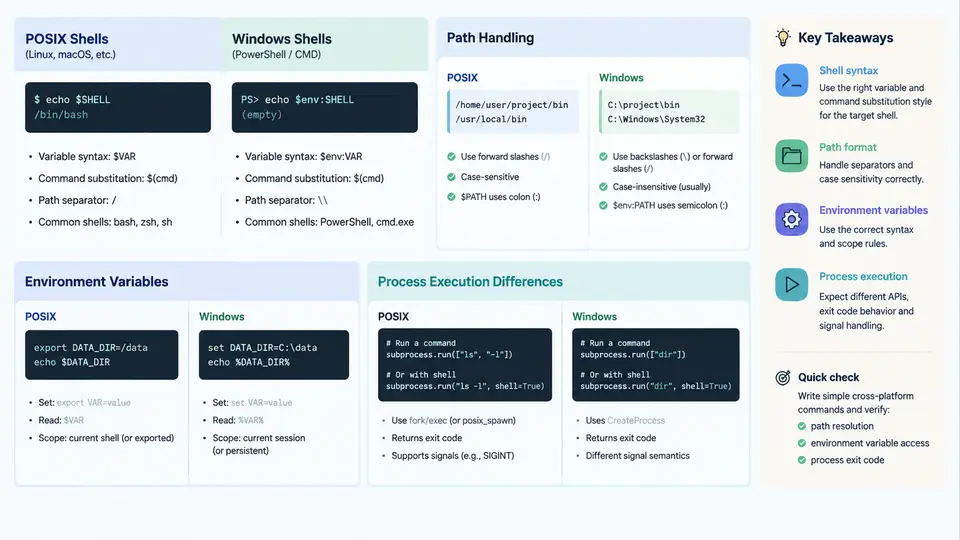
CAE automation scripts rarely stay on the machine where they were written. A Python driver that launches abaqus or ccx on a Linux cluster may need to run unchanged on a Windows workstation, and a batch file that works in cmd.exe will fail immediately in bash. The friction is not in the solver — it is in the operating-system layer beneath it. This chapter isolates the four areas where that friction concentrates: shell semantics, path handling, environment variables, and process execution. Understanding these differences is what separates a script that works on one machine from a tool that works everywhere.
Shells: Two Different Programming Models
POSIX shells (sh, bash, dash, zsh) and Windows shells (cmd.exe, PowerShell) are not dialects of the same language. They differ in quoting, variable expansion, exit-code propagation, and control flow.
In POSIX shells, single quotes suppress all expansion and double quotes allow variable and command substitution. Windows cmd.exe has no equivalent distinction: %VAR% expands inside double quotes, and there is no single-quote syntax at all. PowerShell is a third model — it passes objects rather than strings, and its quoting rules follow .NET conventions. A command that is correct in one shell is frequently a syntax error in another.
# POSIX: single quotes are literal, double quotes expand
echo '$HOME'      # prints: $HOME
echo "$HOME"      # prints: /home/user

:: cmd.exe: no literal-quoting equivalent
echo %USERPROFILE%   :: always expands

# PowerShell: backtick is the escape character
Write-Output "Path: $env:USERPROFILE"
Exit codes are another divergence. POSIX uses $? and treats 0 as success. cmd.exe uses %ERRORLEVEL%, and PowerShell exposes $LASTEXITCODE for native executables but $? for cmdlets. A wrapper that checks the wrong variable will silently treat a failed solver run as successful.
Path Handling: Separators, Roots, and Case
Windows uses backslash (\) as the separator and drive letters (C:\) as roots. POSIX uses forward slash (/) with a single root. Windows paths are case-insensitive; POSIX paths are case-sensitive. Windows also reserves characters that are legal on POSIX (< > : " | ? *), and enforces a legacy 260-character limit unless long paths are enabled.
The practical rule for cross-platform scripts is to never hard-code a separator. Use the language's path library instead of string concatenation:
# Python — correct
from pathlib import Path
inp = Path("cases") / "bracket" / "mesh.inp"

# Python — fragile
inp = "cases/bracket/mesh.inp"   # breaks if later joined with a Windows root
When a path must cross a shell boundary, quote it. Spaces in C:\Program Files\... or /opt/CAE Tools/... will otherwise be split into separate arguments. On Windows, a trailing backslash inside a quoted argument can escape the closing quote — a classic source of "unterminated string" errors when passing directories to solvers.
&, |, and ^ as control operators.Environment Variables: Naming and Scope
Environment variables carry license servers, solver roots, and MPI configuration into child processes. The naming convention differs: POSIX uses UPPER_CASE with $VAR or ${VAR} expansion; Windows uses %VAR% in cmd.exe and $env:VAR in PowerShell. Windows variable names are case-insensitive; POSIX names are case-sensitive, so $Path and $PATH are different variables.
Scope also differs. POSIX exports propagate to children only when export is used. Windows distinguishes process, user, and machine scope, and changes made with setx do not affect the current session. A script that sets a license variable and immediately launches a solver may find the variable missing if it was set at the wrong scope.
# POSIX
export LM_LICENSE_FILE=27000@licsrv
abaqus job=bracket cpus=4 interactive

:: cmd.exe
set LM_LICENSE_FILE=27000@licsrv
abaqus job=bracket cpus=4 interactive

# PowerShell
$env:LM_LICENSE_FILE = "27000@licsrv"
abaqus job=bracket cpus=4 interactive
Process Execution: Spawning, Waiting, and Signals
Launching a solver is where the differences become operational. POSIX uses fork/exec and signals; Windows uses CreateProcess and has no POSIX signals. Termination, therefore, is not portable: kill -TERM has no direct Windows equivalent, and taskkill /F has no POSIX equivalent.
Argument passing is another trap. POSIX passes an argument vector directly; Windows passes a single command-line string that the child parses. This means quoting rules differ, and an argument containing spaces may arrive intact on Linux but split on Windows. Python's subprocess with a list of arguments handles this correctly on both platforms; passing a single string with shell=True does not.
import subprocess, sys

cmd = [solver, "job=bracket", "cpus=4", "interactive"]
proc = subprocess.run(cmd, capture_output=True, text=True)

if proc.returncode != 0:
    print("Solver failed:", proc.stderr, file=sys.stderr)
    sys.exit(proc.returncode)
Note the use of a list, the explicit returncode check, and the propagation of that code to the parent. This pattern behaves identically on Linux, macOS, and Windows, which is precisely the goal.
A Portable Wrapper Pattern
The following pattern is the minimum viable cross-platform launcher. It resolves the solver from an environment variable, builds the argument list, runs the process, and reports the exit code. It is deliberately short so the four concerns above remain visible.
import os, subprocess, sys
from pathlib import Path

solver = os.environ.get("CAE_SOLVER", "abaqus")
case = Path(os.environ.get("CAE_CASE_DIR", ".")) / "bracket"

cmd = [solver, f"job={case.name}", "cpus=4", "interactive"]
proc = subprocess.run(cmd, cwd=case.parent, capture_output=True, text=True)

print(proc.stdout)
if proc.returncode != 0:
    print(proc.stderr, file=sys.stderr)
    sys.exit(proc.returncode)
Three details make this portable. First, os.environ.get supplies a default so the script runs even when the variable is unset. Second, Path handles separators and roots. Third, subprocess.run with a list avoids shell quoting entirely. The same file runs under bash, cmd.exe, and PowerShell without modification.
Verification Checklist
| Concern | Check | Failure symptom |
|---|---|---|
| Shell quoting | Run under bash and cmd.exe | Syntax error or literal $VAR in output |
| Path separator | Test with a path containing spaces | Argument split, "file not found" |
| Env scope | Echo variable in child process | Empty value, license checkout fails |
| Exit code | Force a solver error | Script reports success on failure |
| Termination | Interrupt a running job | Orphaned solver process |
Run each check on both target platforms before trusting a script in production. The cost is minutes; the alternative is a failed overnight solve discovered the next morning.
The four areas covered here — shell semantics, paths, environment variables, and process execution — account for the majority of cross-platform failures in CAE automation. Treating them as a single design concern, rather than patching them after a failure, is what makes a script genuinely portable.