1. Course overview
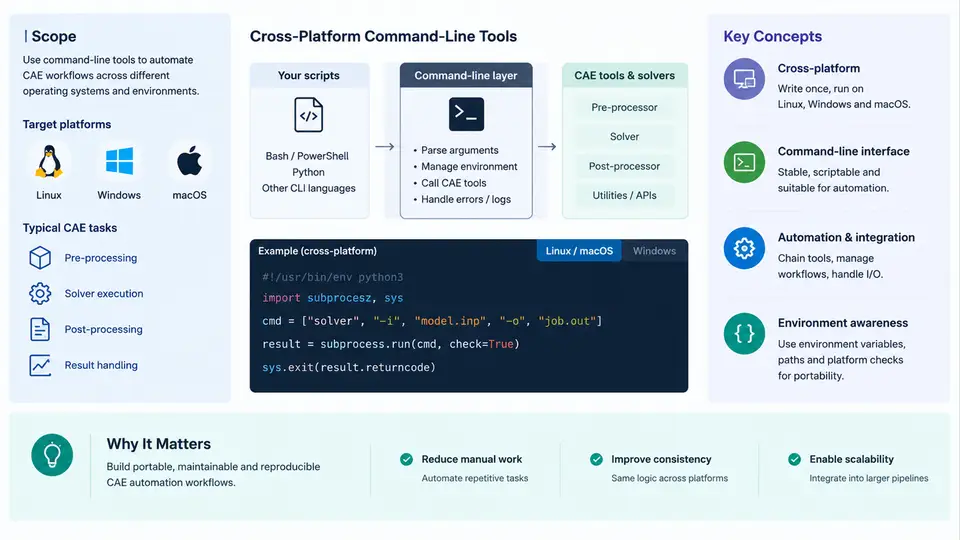
Computer-aided engineering (CAE) workflows have historically been bound to the interactive graphical user interface (GUI) of a single solver vendor. An engineer opens a pre-processor, meshes a part, assigns boundary conditions, submits a job, and reads contour plots by hand. That model breaks down the moment a team needs to run the same study across hundreds of design variants, on a Linux cluster, inside a CI pipeline, or across Windows workstations and HPC nodes simultaneously. Cross-platform command-line tools exist to remove the GUI from the critical path and to make CAE execution scriptable, reproducible, and portable.
This chapter establishes the vocabulary and technical context for the rest of the course. It defines what "cross-platform" and "command-line" mean in a CAE context, explains why automation is worth the engineering effort, and maps the layers of a typical automated CAE stack. It does not yet teach a specific solver's syntax; instead it gives you the mental model you will apply in every later chapter.
What "Cross-Platform Command-Line" Actually Means
A command-line tool is any executable that accepts arguments, reads input files or stdin, writes output files or stdout, and returns an exit code. In CAE, the canonical examples are solver binaries such as ccx (CalculiX), mapdl (Ansys batch mode), abaqus, openfoam utilities like simpleFoam, and meshers such as gmsh and snappyHexMesh. These tools are driven by text, not by mouse clicks.
Cross-platform means the same automation logic runs on Windows, Linux, and macOS without rewriting the orchestration layer. This is harder than it sounds because the three platforms differ in:
- Path conventions — Windows uses backslashes and drive letters (
C:\work\case), POSIX systems use forward slashes (/home/user/case). - Process invocation —
subprocesssemantics, shell quoting, and environment variable expansion differ. - Executable discovery —
PATHlookup,.exesuffixes, and case sensitivity of filenames. - Line endings and encoding — CRLF vs LF, and locale-dependent text handling.
- Parallel launch — MPI launchers (
mpiexec,mpirun) have platform-specific flags and process-binding behavior.
The practical consequence is that portable CAE automation is usually written in a scripting language with strong cross-platform libraries — Python is the dominant choice — and treats the solver as an external process rather than as an embedded library.
Why Automate CAE at All
Manual GUI operation is acceptable for a single analysis. It fails for the workloads that dominate modern engineering: parametric sweeps, design-of-experiments (DoE) studies, optimization loops, regression testing of solver decks, and batch post-processing. Automation delivers four concrete benefits:
- Reproducibility — every run is defined by a versioned input deck and a recorded command line, so results can be regenerated exactly.
- Scalability — the same script launches 1 job or 500 jobs; only the parameter list changes.
- Traceability — logs, exit codes, and output files form an auditable record of what was run and what happened.
- Integration — CAE becomes a step in a larger pipeline (CAD export → mesh → solve → post-process → report) rather than an isolated activity.
The Layered Architecture of an Automated CAE Stack
It helps to think of CAE automation as five cooperating layers. Each layer has a clear responsibility, and cross-platform concerns appear at every boundary.
Data flows downward: the orchestrator generates inputs, the solver consumes them, post-processing reads solver output, and reporting aggregates the extracted metrics. Control and error information flow upward through exit codes and log files. A well-designed stack keeps each layer independently testable — you can validate input generation without running the solver, and validate post-processing against a stored result file.
Core Concepts You Will Reuse Throughout the Course
| Concept | Meaning in CAE Automation | Typical Artifact |
|---|---|---|
| Batch mode | Solver runs without GUI, driven by an input deck and command-line flags. | abaqus job=beam input=beam.inp |
| Input deck | Text file describing geometry, mesh, materials, loads, and solver controls. | *.inp, *.jou, *.dict |
| Exit code | Integer returned by the process; 0 usually means success, non-zero indicates failure. | echo $? / echo %ERRORLEVEL% |
| Parameter sweep | Systematic variation of one or more inputs across a defined set of values. | CSV or JSON parameter table |
| Headless execution | Running on a machine with no display, common on HPC clusters. | SSH session, Slurm job script |
| Artifact | Any file produced by a run that must be retained for traceability. | Logs, result files, plots, checksums |
A Minimal Reproducible Example
To make the abstraction concrete, consider a cantilever beam study. The goal is to compute tip deflection for three applied loads. The input is a parameterized CalculiX deck; the output is a deflection value extracted from the .dat file. The orchestration script below is intentionally small but demonstrates the full loop: generate input, run solver, parse output, record result.
import subprocess, pathlib, re, csv

template = pathlib.Path("beam_template.inp").read_text()
loads = [100.0, 200.0, 300.0]   # Newtons, example values
results = []

for load in loads:
    case = pathlib.Path(f"case_{int(load)}")
    case.mkdir(exist_ok=True)
    deck = template.replace("{{LOAD}}", f"{load:.1f}")
    (case / "beam.inp").write_text(deck)

    proc = subprocess.run(
        ["ccx", "-i", "beam"],
        cwd=case, capture_output=True, text=True
    )
    if proc.returncode != 0:
        print(f"Load {load} N failed: {proc.stderr.strip()}")
        continue

    dat = (case / "beam.dat").read_text()
    match = re.search(r"UY\s+([-\d.E+]+)", dat)
    deflection = float(match.group(1)) if match else None
    results.append({"load_N": load, "tip_deflection_mm": deflection})

with open("sweep_results.csv", "w", newline="") as f:
    writer = csv.DictWriter(f, fieldnames=["load_N", "tip_deflection_mm"])
    writer.writeheader()
    writer.writerows(results)
This example is illustrative, not a validated run. The key points are: the solver is invoked as an external process with cwd set to the case directory, the exit code is checked before parsing, and results are written to a structured file. On Windows the same script works if ccx is on PATH; on Linux it works unchanged. That is the essence of cross-platform automation.
What This Course Covers
The remaining chapters build on this foundation in four movements. First, environment and tooling: installing and locating solver binaries, managing PATH, and writing portable Python. Second, input generation: templating decks, handling units and coordinate conventions, and validating inputs before submission. Third, execution: subprocess management, MPI launch, resource limits, and failure diagnosis. Fourth, post-processing and integration: parsing result files, extracting metrics, and wiring the whole stack into CI or a job scheduler.
By the end, you should be able to take a GUI-driven CAE workflow, decompose it into the five layers above, and reimplement it as a portable command-line pipeline that runs identically on a laptop and a cluster node.