1. Course overview
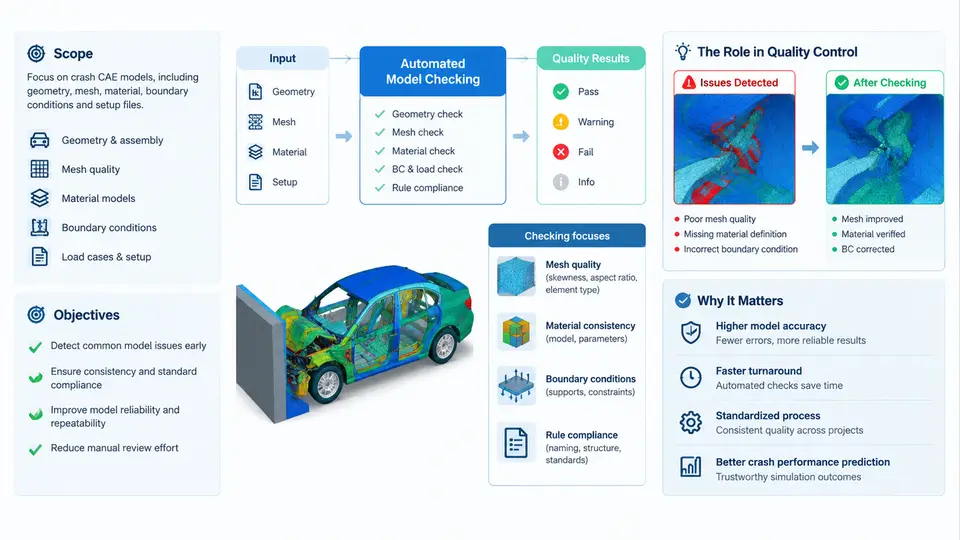
Crash CAE (Computer-Aided Engineering) simulation is the virtual backbone of modern vehicle safety development. A full frontal, offset deformable barrier, side pole, or rear impact load case can consume tens of thousands of CPU core-hours, and the resulting occupant injury values — HIC, chest deflection, femur load, neck Nij — feed directly into design release decisions. When a model contains a duplicated node, an inverted shell normal, an unmerged rigid body, or a missing contact definition, the solver may still converge and produce plausible-looking numbers. That is the dangerous case: a wrong answer that looks right. Automated model checking exists to eliminate this class of silent failure before the solver is ever launched.
What "Model Checking" Means in a Crash CAE Context
Model checking is the systematic, rule-based verification of an LS-DYNA (or equivalent explicit solver) input deck against a defined set of modeling standards. It is not the same as result validation, and it is not the same as solver debugging. The distinction matters:
- Model checking — Is the deck built correctly? Are units consistent, are materials defined, are contacts present, are rigid bodies constrained, are initial velocities applied to the right set?
- Solver debugging — Why did the run terminate? Negative volume, time-step collapse, mass scaling explosion, contact penetration.
- Result validation — Is the predicted response physically credible? Correlation against sled or full-vehicle test data.
Automated model checking targets the first category. It converts a senior CAE engineer's tribal knowledge — "always check that the seat belt slipring has a defined friction coefficient" — into executable, repeatable rules that run in seconds on every deck revision.
Scope of This Course
The course covers the full lifecycle of an automated checking capability, from rule authoring to CI integration:
- Deck parsing and data extraction — reading
*NODE,*ELEMENT_SHELL,*PART,*MAT_*,*CONTACT_*,*CONSTRAINED_*,*INITIAL_VELOCITY, and*DATABASE_*keywords into an analyzable data model. - Rule categories — unit consistency, connectivity, material completeness, contact integrity, boundary and initial conditions, output requests, and solver control parameters.
- Severity classification — blocking errors, warnings, and informational findings, with a policy for each.
- Automation infrastructure — batch execution, report generation, and gating in a version-control or PLM workflow.
- Metrics and governance — model quality score, escape rate, and continuous improvement of the rule set.
Out of scope: mesh quality optimization itself (aspect ratio, Jacobian, warpage thresholds are referenced but not taught as a meshing course), correlation methodology, and solver license management.
Learning Objectives
By the end of this course, a learner should be able to:
- Explain why automated checking is a prerequisite for credible crash CAE results, using concrete failure modes.
- Write a checking rule that parses a specific LS-DYNA keyword block and evaluates a condition against it.
- Classify findings by severity and justify the classification with an engineering consequence.
- Build a checking pipeline that runs on a deck revision and produces a machine-readable and human-readable report.
- Integrate the pipeline as a gate in a CI/CD or PLM release process.
- Measure and improve the effectiveness of the rule set over time.
The Position of Automated Checking in the Quality Chain
Crash CAE quality control is a chain of gates. Automated model checking is the earliest gate that can be fully mechanized, and it is the cheapest place to catch a defect. The cost of a defect grows by roughly an order of magnitude at each stage: a missing contact caught by a checker costs minutes; caught by a solver crash costs hours; caught by a wrong injury number that reaches a design review costs days; caught by a physical test failure costs weeks and real money.
The diagram below shows the position of the automated checker in the crash CAE workflow, the data it consumes, and the decision it drives.
A Concrete Failure Mode: Why Manual Review Is Not Enough
Consider a full-vehicle frontal impact deck with roughly 2.4 million shell elements, 180 material definitions, and 95 contact definitions. A senior engineer reviewing this deck manually will typically focus on the parts they know are risky — the seat belt routing, the steering column, the battery pack mounts. They will not systematically verify that every *MAT_024 has a nonzero FAIL value, or that every *CONTACT_AUTOMATIC_SINGLE_SURFACE has a sensible SOFT and DEPTH setting, or that the *INITIAL_VELOCITY_GENERATION card references the correct node set and not a stale set ID left over from a previous build.
An automated checker evaluates all 180 materials and all 95 contacts in the same pass, in under ten seconds. It does not get tired, it does not skip the boring parts, and it produces the same verdict on every revision. That consistency is the core value proposition.
Severity Classification: The Decision Policy
Not every finding should stop a run. A checker that blocks on cosmetic issues will be disabled by the first engineer who is under schedule pressure. A workable policy uses three levels:
| Severity | Definition | Action | Example |
|---|---|---|---|
| Blocking | Will produce a wrong result or a solver crash | Deck cannot be submitted | Missing *MAT for a referenced part; zero initial velocity on the barrier |
| Warning | May degrade accuracy or indicate a modeling inconsistency | Requires engineer sign-off | Contact SOFT=0 on a foam-to-steel interface; time-step below 0.5 µs |
| Info | Deviates from preferred practice but is not incorrect | Logged, no gate | Non-standard DT2MS value; unused material card |
The classification must be justified by an engineering consequence, not by convention. "Missing material" is blocking because the solver will either error out or assign a default density of zero, producing infinite acceleration. "Unused material card" is informational because it has no effect on the solution.
What a Checker Actually Consumes and Produces
A checker reads the assembled .k or .key deck, including all *INCLUDE files resolved to their final paths. It builds an in-memory representation of the model: node coordinates, element connectivity, part-to-material mapping, contact pair definitions, set memberships, and control card values. Rules are then evaluated against this representation.
The output is a structured report. A minimal machine-readable form is JSON:
{
  "deck": "full_vehicle_frontal_v47.k",
  "timestamp": "2025-01-15T09:42:11Z",
  "findings": [
    {
      "rule_id": "MAT-001",
      "severity": "blocking",
      "message": "Part 1042 references material 88 which is not defined",
      "location": "*PART 1042"
    },
    {
      "rule_id": "CNT-014",
      "severity": "warning",
      "message": "Contact 27 (AUTOMATIC_SINGLE_SURFACE) has SOFT=0 on foam-steel interface",
      "location": "*CONTACT 27"
    }
  ],
  "summary": { "blocking": 1, "warning": 1, "info": 0 }
}
The human-readable report is typically an HTML page with the same findings grouped by severity, each linked to the offending keyword block and line number. The gate decision is a single boolean: blocking_count == 0.
How This Course Is Organized
The chapters that follow move from the conceptual foundation into implementation. Early chapters establish the failure modes and the rule taxonomy. Middle chapters build the parser, the rule engine, and the reporting layer, using LS-DYNA keyword blocks as the working data format. Later chapters address CI integration, metrics, and the governance process that keeps the rule set alive as the vehicle program evolves. Each chapter includes a reproducible example — a deck fragment, a rule definition, and the expected finding — so that the learner can build and test the capability incrementally rather than reading about it abstractly.
The first practical skill to acquire is the ability to look at a deck and predict which defects a checker should catch. That prediction skill is what separates a rule author from someone who merely runs a tool.